• Home
  • News
  • Software
  • Knowledge
  • MMO
  • Tips
  • Security
  • Network
  • Office
AnonyViet - English Version
  • Home
  • News
  • Software
  • Knowledge
  • MMO
  • Tips
  • Security
  • Network
  • Office
No Result
View All Result
  • Home
  • News
  • Software
  • Knowledge
  • MMO
  • Tips
  • Security
  • Network
  • Office
No Result
View All Result
AnonyViet - English Version
No Result
View All Result

Instructions to look up cold penalties on Telegram

AnonyViet by AnonyViet
March 14, 2025
in Software
0

Cold punishment search has now become simpler and faster than ever thanks to the Telegram application. Not only is a popular messaging platform, Telegram also integrates many useful BOT to help users easily look up cold penalties without having to access complex websites. This article will guide you in detail how Look up cold penalties on Telegram Effective and time -saving.


Join the channel Telegram belong to Anonyviet 👉 Link 👈

Instructions to look up cold penalties on Telegram

The Telegram is not only a mere messaging app but also a versatile tool to support users in many different fields. With the appearance of smart bots, the lookup look up becomes easier than ever. You only need a few simple steps to check your traffic violation information.

Instructions to look up cold penalties on Telegram

Step 1: Install and log in Telegram

First, you need to download and install the telegram application on your phone Google Play (for Android) or App Store (for iOS). After installation, register or log in with your phone number.

Step 2: Search for bot to look up cold penalties

Open the Telegram app, click on the search icon and enter the keyword “Cold punishment look up“Or the name BOT is as specific as @topidphatnguoi_bot. When the results appear, select the appropriate BOT and click Start to start using.
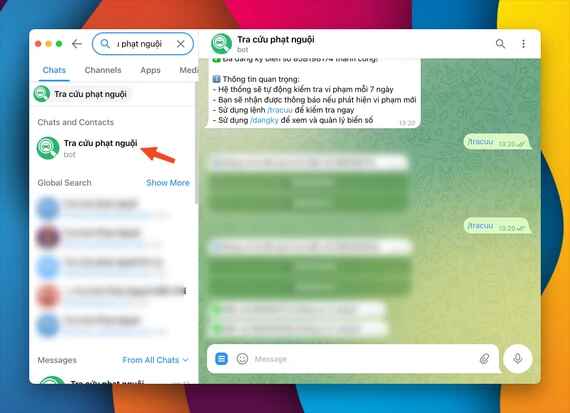
Find botopidphatnguoi_bot

Step 3: Register the license plate

Before searching, you need to register your license plate. Click the menu icon in the chat frame and select the command /dangky. After that, add a license plate of motorbikes or cars in accordance with the prescribed format. Currently, BOT supports up to 4 license plates for each user.

Register the license plate

Step 4: Conduct information search

To look up, you just need to click on the menu and select the command /Tracuu. If there are many license plates, select the license plate to be checked. BOT will display detailed information about violations, including time, location, handling agency and fines guidance.
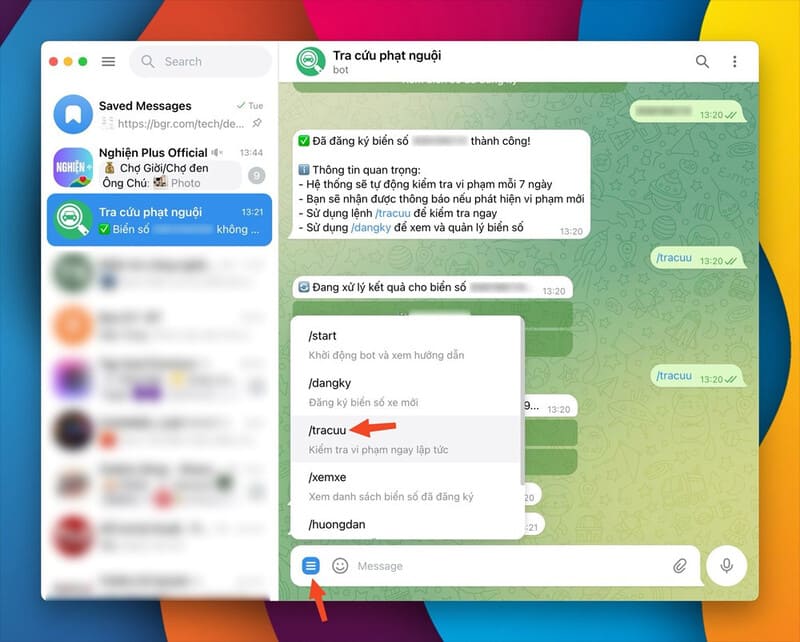
Select command /tracuu

See also: How to get a cold punishment passing the red light through Vnetraffic

Benefits of cold sanctions on Telegram

  • Save time: Instead of having to access complex websites or go directly to the authorities, you can look up cold penalties right on the telegram in just a few minutes.
  • Get automatic notifications: BOT on Telegram will automatically check and notify you as soon as a new violation. This will help you not miss any important information.
  • Easy to manage multiple number plates: With the ability to register up to 4 license plates, you can manage the violation information of the whole family or fleet conveniently.

Quick instructions on how to use cold punishment bot

1. Register number plate:

  • Use command /dangky.
  • Choose the type of car (machine or car).
  • Enter the license plate in the format.

2. Look up violations:

  • Use commands /tracuu.
  • Select the license plate to be checked.

3. See the registered number plate:

  • Use command /viewxe.
  • Check and can delete unused license plates.

Note when using BOT to look up cold penalties

  • Each user can only register maximum 4 number plates.
  • BOT will automatically check the violation every day and send notice if there is a new error.
  • Make sure to enter the number of license plates to avoid errors in the lookup process.
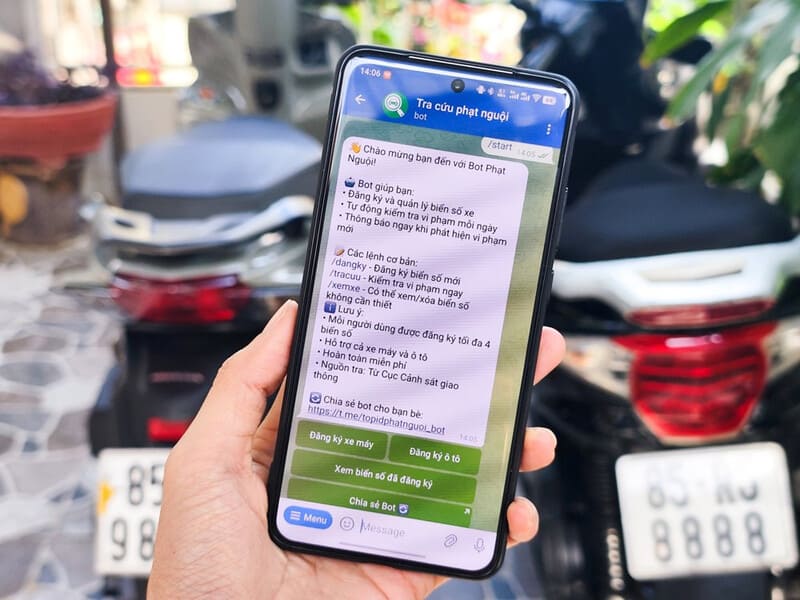
Note when using BOT to look up cold penalties

See also: How to check for cooling cars, motorbikes online extremely useful

Conclusion

Job Look up cold penalties on Telegram is a smart and convenient solution for road users. With superior features, Telegram not only saves you time but also ensures you always update violation information in a timely manner. Wish you apply successfully!


Tags: coldInstructionspenaltiesTelegram
Previous Post

Instructions for adding COPilot to the right mouse menu on Windows 11

Next Post

Guide to free programming with Vue School

AnonyViet

AnonyViet

Related Posts

How to authenticate the owner’s SIM on VNeID from April 15
Software

How to authenticate the owner’s SIM on VNeID from April 15

April 15, 2026
Review of Galaxy A57 and A37: Some are eight ounces, some are half a pound
Software

Review of Galaxy A57 and A37: Some are eight ounces, some are half a pound

April 14, 2026
JOPDF: Versatile PDF editing software for Windows and Mac
Software

JOPDF: Versatile PDF editing software for Windows and Mac

April 10, 2026
MyVehicle: Convenient and secure motorcycle maintenance reminder app
Software

MyVehicle: Convenient and secure motorcycle maintenance reminder app

April 10, 2026
How to turn off AI on Gmail to absolutely protect personal data
Software

How to turn off AI on Gmail to absolutely protect personal data

April 8, 2026
How to add Settings to Control Center using Shortcuts
Software

How to add Settings to Control Center using Shortcuts

April 7, 2026
Next Post
Guide to free programming with Vue School

Guide to free programming with Vue School

0 0 votes
Article Rating
Subscribe
Login
Notify of
guest

guest

0 Comments
Oldest
Newest Most Voted
Inline Feedbacks
View all comments

Recent News

How to intercept traffic using Burp Suite to analyze HTTP/HTTPS

How to intercept traffic using Burp Suite to analyze HTTP/HTTPS

April 18, 2026
How to avoid Adblock detection on Youtube with 4 good tips

How to avoid Adblock detection on Youtube with 4 good tips

April 17, 2026
How to transfer ChatGPT data to Claude is extremely simple

How to transfer ChatGPT data to Claude is extremely simple

April 16, 2026
How to authenticate the owner’s SIM on VNeID from April 15

How to authenticate the owner’s SIM on VNeID from April 15

April 15, 2026
How to intercept traffic using Burp Suite to analyze HTTP/HTTPS

How to intercept traffic using Burp Suite to analyze HTTP/HTTPS

April 18, 2026
How to avoid Adblock detection on Youtube with 4 good tips

How to avoid Adblock detection on Youtube with 4 good tips

April 17, 2026
How to transfer ChatGPT data to Claude is extremely simple

How to transfer ChatGPT data to Claude is extremely simple

April 16, 2026
AnonyViet - English Version

AnonyViet

AnonyViet is a website share knowledge that you have never learned in school!

We are ready to welcome your comments, as well as your articles sent to AnonyViet.

Follow Us

Contact:

Email: anonyviet.com[@]gmail.com

Main Website: https://anonyviet.com

Recent News

How to intercept traffic using Burp Suite to analyze HTTP/HTTPS

How to intercept traffic using Burp Suite to analyze HTTP/HTTPS

April 18, 2026
How to avoid Adblock detection on Youtube with 4 good tips

How to avoid Adblock detection on Youtube with 4 good tips

April 17, 2026
No Result
View All Result
  • Home
  • News
  • Software
  • Knowledge
  • MMO
  • Tips
  • Security
  • Network
  • Office

wpDiscuz
0
0
Would love your thoughts, please comment.x
()
x
| Reply