• Home
  • News
  • Software
  • Knowledge
  • MMO
  • Tips
  • Security
  • Network
  • Office
AnonyViet - English Version
  • Home
  • News
  • Software
  • Knowledge
  • MMO
  • Tips
  • Security
  • Network
  • Office
No Result
View All Result
  • Home
  • News
  • Software
  • Knowledge
  • MMO
  • Tips
  • Security
  • Network
  • Office
No Result
View All Result
AnonyViet - English Version
No Result
View All Result

Instructions to create Fake Link and Facebook post photos to Troll friends

AnonyViet by AnonyViet
March 9, 2023
in Tips
0

April Fool’s Day is coming, do you have any plans to tease your friends? Today Anonyviet will guide you to create Fake Link to post on Facebook, to troll people. The purpose is to create an article with “fake” information to lure gullible people. Follow along with the instructions below!

How to create Fake Link to troll friends

First, go to the page Ulink
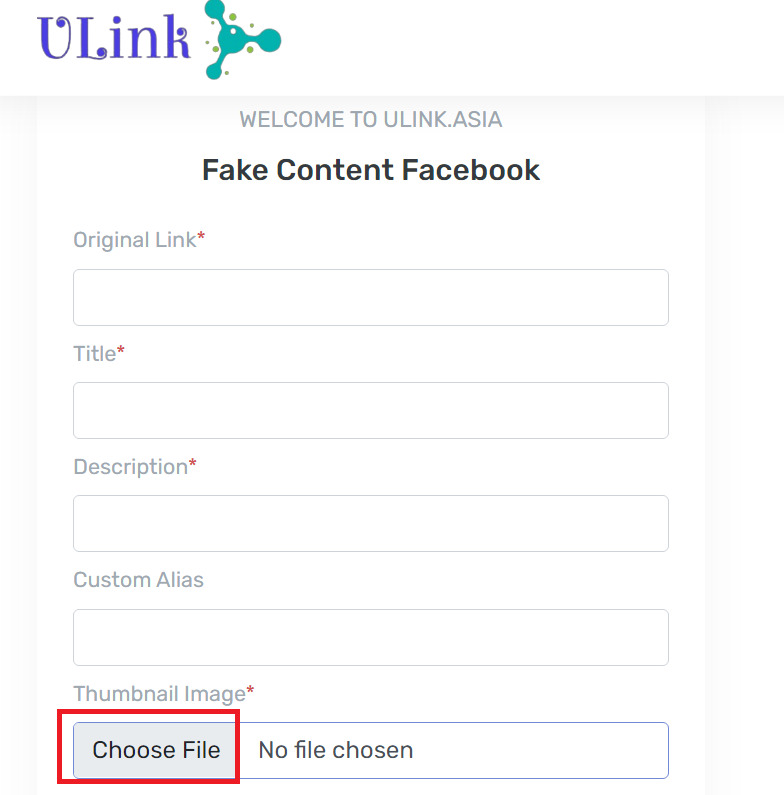
Create Fake Link to troll your friends

The interface is very simple, you just need to enter the information that the website gives, namely:

Original Link: This is the destination link that after your friends click on the link on facebook will be redirected to this “original link”. Therefore, in this section you should leave the link of a funny troll image, signaling that the viewer has been cheated.

The troll image you can find on google, right-click on the image and select “Copy Image Link” and then paste it in the “Original Link” box.
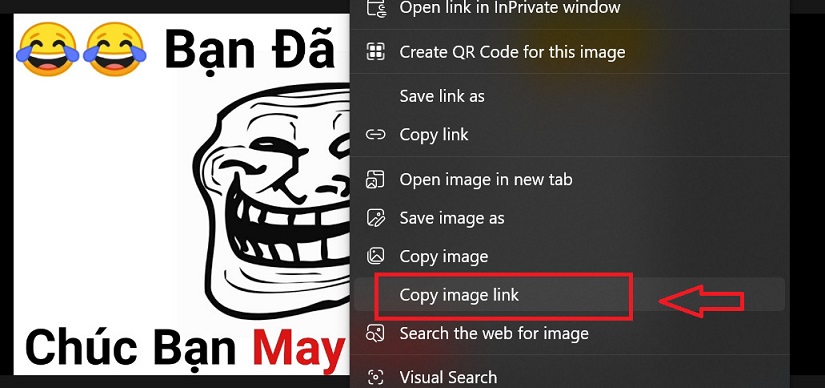
Create Fake Link and Facebook post photo to Troll your friends 4
Ulink In addition to creating fake new, it also has the effect of shortening the link, so in this part you can paste the link of the original article to shorten it for you.

Title: Post title

Description: A short description under the title (note it’s limited to 50 characters)

Thumbnail Image: Article cover image
You click “Choose File” to select an image on your computer to make the cover image for the “fake” article.

Type Display: Display format, for the purpose of creating fake links, you choose the format “Article”. If you want to shorten the link, then choose “Website”.
Finally, click “Create”. Wait a few minutes for the system to display the link
After that, you just need to click “Copy” that link, then paste it on Facebook and you’re done.
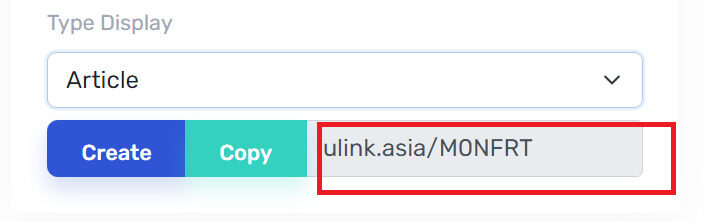
Create Fake Link to troll your friends
Copy that link, then paste it on facebook

Thanks to Ulinkyou can create any article about your friends as well as yourself and share it on Facebook, helping to increase the interaction between you and your friends on social networks.

Note

You should note that “fake” content should only be encapsulated for the purpose of entertainment between friends, should not post false information related to politics or insult, libel, or affect others. Honor others!
For example, I create an article like this:
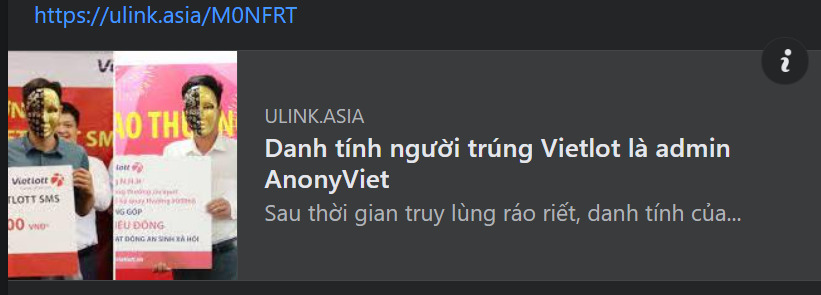
Create Fake Link to troll your friends

After clicking on the link, there will be a very strong “hometown” image:

Create Fake Link to troll your friends
Picture after clicking the link

Epilogue

Through the above article, Anonyviet taught you how to create Fake link troll friends on facebook. April Fool’s Day is coming, everyone has a way to tease their friends. I wish you success in applying and fishing a lot of “fish”!


Rate this post

Tags: createFacebookfakefriendsInstructionslinkphotosposttroll
Previous Post

AOMEI gives away 6 Backup software worth $648 on World Backup Day

Next Post

FULL HOW TO REPORT / RIP FACEBOOK 2015

AnonyViet

AnonyViet

Related Posts

Windows can now run Linux applications
Tips

Windows can now run Linux applications

March 17, 2026
New features of Windows 10 21H1 are coming soon
Tips

New features of Windows 10 21H1 are coming soon

March 16, 2026
How to convert normal music into 8D music with Audioalter
Tips

How to convert normal music into 8D music with Audioalter

March 14, 2026
How to prevent your family’s Security Camera from being hacked
Tips

How to prevent your family’s Security Camera from being hacked

March 13, 2026
Pixel Agents: Turn VS Code into a Pixel Art Office for AI
Tips

Pixel Agents: Turn VS Code into a Pixel Art Office for AI

March 12, 2026
English learning app Memrise is offering a lifetime discount of only 21,000 VND
Tips

English learning app Memrise is offering a lifetime discount of only 21,000 VND

March 11, 2026
Next Post
FULL HOW TO REPORT / RIP FACEBOOK 2015

FULL HOW TO REPORT / RIP FACEBOOK 2015

0 0 votes
Article Rating
Subscribe
Login
Notify of
guest

guest

0 Comments
Oldest
Newest Most Voted
Inline Feedbacks
View all comments

Recent News

Windows can now run Linux applications

Windows can now run Linux applications

March 17, 2026
How to install extension to remind office workers to drink water

How to install extension to remind office workers to drink water

March 17, 2026
Why are iPhones and MacBooks still the number 1 “weapons” of the technology world?

Why are iPhones and MacBooks still the number 1 “weapons” of the technology world?

March 16, 2026
New features of Windows 10 21H1 are coming soon

New features of Windows 10 21H1 are coming soon

March 16, 2026
Windows can now run Linux applications

Windows can now run Linux applications

March 17, 2026
How to install extension to remind office workers to drink water

How to install extension to remind office workers to drink water

March 17, 2026
Why are iPhones and MacBooks still the number 1 “weapons” of the technology world?

Why are iPhones and MacBooks still the number 1 “weapons” of the technology world?

March 16, 2026
AnonyViet - English Version

AnonyViet

AnonyViet is a website share knowledge that you have never learned in school!

We are ready to welcome your comments, as well as your articles sent to AnonyViet.

Follow Us

Contact:

Email: anonyviet.com[@]gmail.com

Main Website: https://anonyviet.com

Recent News

Windows can now run Linux applications

Windows can now run Linux applications

March 17, 2026
How to install extension to remind office workers to drink water

How to install extension to remind office workers to drink water

March 17, 2026
No Result
View All Result
  • Home
  • News
  • Software
  • Knowledge
  • MMO
  • Tips
  • Security
  • Network
  • Office

wpDiscuz
0
0
Would love your thoughts, please comment.x
()
x
| Reply