• Home
  • News
  • Software
  • Knowledge
  • MMO
  • Tips
  • Security
  • Network
  • Office
AnonyViet - English Version
  • Home
  • News
  • Software
  • Knowledge
  • MMO
  • Tips
  • Security
  • Network
  • Office
No Result
View All Result
  • Home
  • News
  • Software
  • Knowledge
  • MMO
  • Tips
  • Security
  • Network
  • Office
No Result
View All Result
AnonyViet - English Version
No Result
View All Result

Instructions for setting up fake location on Zalo

AnonyViet by AnonyViet
February 8, 2026
in Software
0

Set up fake location on Zalo is a smart trick that helps you completely control the location you want to share, instead of being limited by your actual location. Imagine being able to “be” anywhere on the map with just a few simple steps. Whether it’s to protect your privacy, work, or simply surprise your friends, it’s completely within your reach.

Join the channel Telegram belong to AnonyViet 👉 Link 👈

Why should you know how to set up fake location on Zalo?

The above position change Zalo It’s not just a technology tip, but it also brings many practical values ​​in everyday life.

  • You can protect your privacy absolutely, keep your actual location private and avoid unwanted tracking from others.
  • This feature is extremely useful for work, allowing you to remotely check-in or test applications that require geolocation without having to move.
  • Dating and meeting friends has become more convenient than ever. You can send a specific location in advance for everyone to head to, even if you’re not there yet.
Why should you know how to set up fake location on Zalo?

Instructions on how to set up fake location on Zalo

First, you need to access Google Play Store/ App Store, search for the keyword “Fake GPS Location” and download the application to your device.
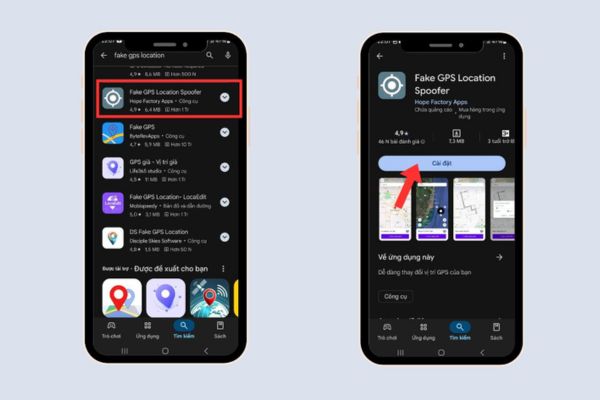
Download the Fake GPS Location application

List for Android

With the Android operating system, this is quite simple and can be done quickly through the following steps:

Step 1: Next, you need to go to Settings on your phone, find the item Developer options. In this section, find the line Select simulated location app and select the Fake GPS app you just installed to give it permission.
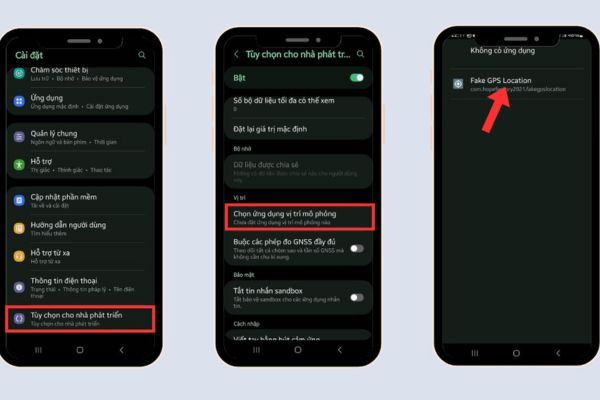
Select Fake GPS application

Step 2: Now, open the Fake GPS app, use the map to select the desired location and press the activate button to start creating the fake location.
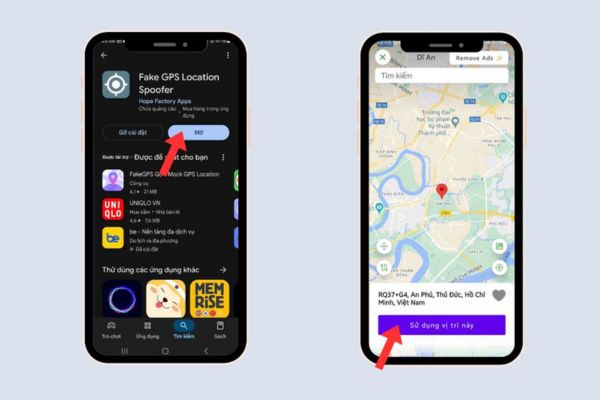
Use the map to select the desired location

Step 3: Finally, open Zalo, go to the conversation with the person you want to send, click on the three dots icon, select “Location” and send as usual. Zalo will automatically get the fake location you have set up.
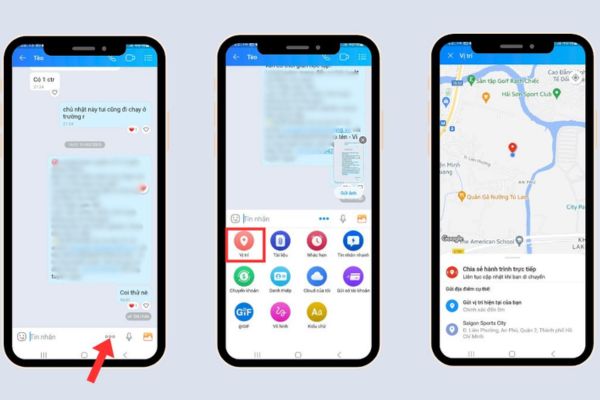
Instructions for setting up fake location on Zalo

For iPhone

Step 1: Enter Setting > Privacy & Security > Location servicethen make sure that option Location service has been activated.
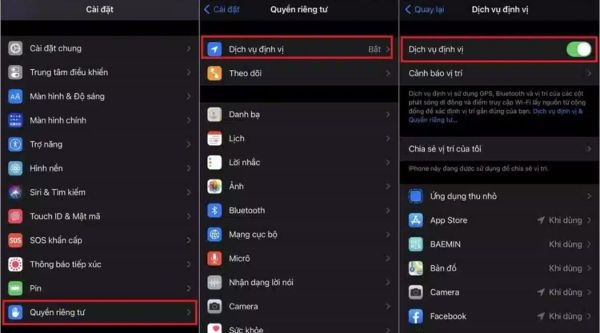
Enable Location Services

Step 2: Open a conversation on Zalo, click on the three dots icon, select “Location” and then select “Submit your current location“.
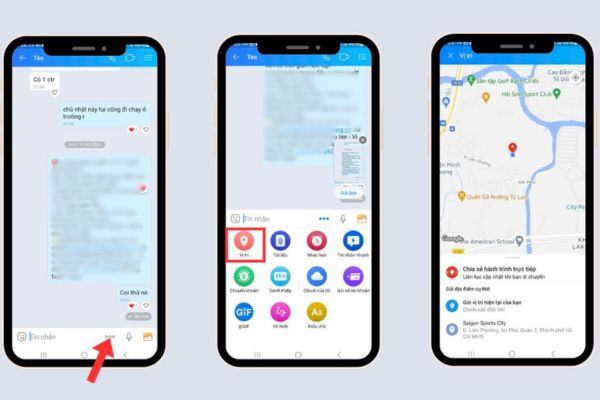
Select "Submit your current location"
Select “Send your current location”

Note when creating virtual positioning on Zalo

When using this feature, you need to pay attention to a few factors to ensure safety and limit possible risks:

  • You should carefully check the permissions that Zalo and the virtual location application are requesting. Limit location access to only when necessary to avoid information leakage.
  • Do not share fake locations arbitrarily to avoid revealing sensitive personal information.
  • If you use fake location for a long time, check and adjust it to avoid confusion when sending location to friends or relatives.
  • Creating virtual locations should not be used for deceptive purposes or in violation of the app’s policies. If detected, your account is at risk of being restricted or locked.

Conclusion

Overall, setting up fake location on Zalo is a powerful tool that gives you more flexibility in sharing location and protecting privacy. Whether you use Android or iPhone, understanding how it works and the accompanying notes will help you use this feature in the safest and most effective way.


Tags: fakeInstructionsLocationsettingZalo
Previous Post

How to register OpenClaw to join Moltbook (social network for AI Agents)

Next Post

5 search engines to replace Google to unlock the power of the internet

AnonyViet

AnonyViet

Related Posts

TruyenDrive: Turn Google Drive into a professional manga reader
Software

TruyenDrive: Turn Google Drive into a professional manga reader

May 31, 2026
How to extract text from photos using Zalo is super simple
Software

How to extract text from photos using Zalo is super simple

May 29, 2026
HONOR 600 in hand – High-end design, 200MP camera, not cheap price
Software

HONOR 600 in hand – High-end design, 200MP camera, not cheap price

May 28, 2026
Instructions for getting 4 months of Adobe copyright for free
Software

Instructions for getting 4 months of Adobe copyright for free

May 28, 2026
The truth about the 7,000 mAh battery on Xiaomi 17T Pro: What benefits do users get?
Software

The truth about the 7,000 mAh battery on Xiaomi 17T Pro: What benefits do users get?

May 28, 2026
Instructions on how to turn text into stickers on Gboard
Software

Instructions on how to turn text into stickers on Gboard

May 26, 2026
Next Post
5 search engines to replace Google to unlock the power of the internet

5 search engines to replace Google to unlock the power of the internet

0 0 votes
Article Rating
Subscribe
Login
Notify of
guest

guest

0 Comments
Oldest
Newest Most Voted
Inline Feedbacks
View all comments

Recent News

How to record reaction videos with Android phones, no app needed

How to record reaction videos with Android phones, no app needed

June 1, 2026
Instructions on how to get Google AI Pro 1 year for free for new accounts

Instructions on how to get Google AI Pro 1 year for free for new accounts

June 1, 2026
Top free AI tools to help write, test and optimize content

Top free AI tools to help write, test and optimize content

June 1, 2026
TruyenDrive: Turn Google Drive into a professional manga reader

TruyenDrive: Turn Google Drive into a professional manga reader

May 31, 2026
How to record reaction videos with Android phones, no app needed

How to record reaction videos with Android phones, no app needed

June 1, 2026
Instructions on how to get Google AI Pro 1 year for free for new accounts

Instructions on how to get Google AI Pro 1 year for free for new accounts

June 1, 2026
Top free AI tools to help write, test and optimize content

Top free AI tools to help write, test and optimize content

June 1, 2026
AnonyViet - English Version

AnonyViet

AnonyViet is a website share knowledge that you have never learned in school!

We are ready to welcome your comments, as well as your articles sent to AnonyViet.

Follow Us

Contact:

Email: anonyviet.com[@]gmail.com

Main Website: https://anonyviet.com

Recent News

How to record reaction videos with Android phones, no app needed

How to record reaction videos with Android phones, no app needed

June 1, 2026
Instructions on how to get Google AI Pro 1 year for free for new accounts

Instructions on how to get Google AI Pro 1 year for free for new accounts

June 1, 2026
No Result
View All Result
  • Home
  • News
  • Software
  • Knowledge
  • MMO
  • Tips
  • Security
  • Network
  • Office

wpDiscuz
0
0
Would love your thoughts, please comment.x
()
x
| Reply