Instructions for creating MC AI using Gemini is the perfect solution to turn dry news into more attractive on social networking platforms. With intelligent image processing capabilities, Gemini can preserve important details such as military insignia or industry uniforms. Below is the standard process for creating a complete video product.
| Join the channel Telegram belong to AnonyViet 👉 Link 👈 |
Instructions for creating MC AI Police using Gemini are extremely easy
To create a virtual character that is both professional and maintains industry style while still being modern and friendly, users need to follow a strict process from choosing images to creating motion.
Step 1: Prepare quality reference images
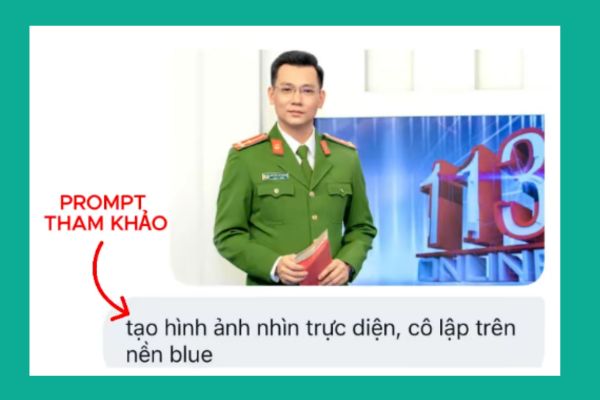
The first and most important step in the process is choosing a standard original photo. This photo acts as a “template” for the AI to learn from, so it is necessary to choose photos with good lighting, clear faces, and especially the right style and outfit (for example: police and army uniforms).
- A small tip is to use photos of professional news MCs on a blue or monochrome background so that the AI can easily separate and process the subject.
- Then insert the image Gemini > Paste the command: Create a frontal view image, isolated on a blue background >Enter.
Step 2: Convert character style to 3D
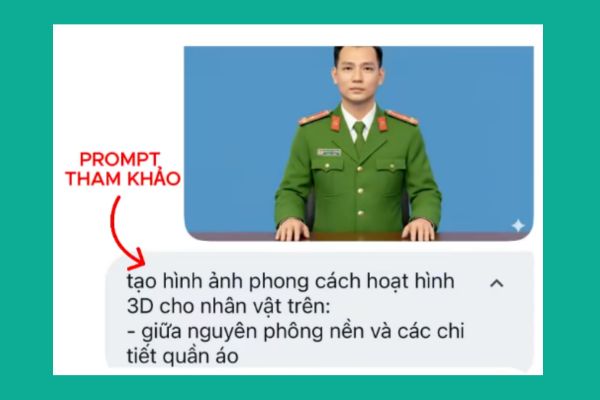
Once you have the input image, the next step is to use the prompt to request it Gemini convert to desired style. The current trend is 3D or Pixar animation style because it creates a friendly feeling and is easy to receive information.
You can use the following prompt: Create a 3D cartoon style image for the Police officer character above, keeping the background and clothing details intact.
Step 3: Set up the virtual scene and studio
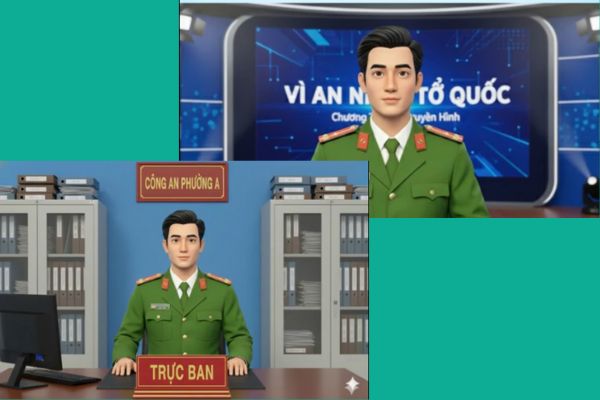
A virtual MC cannot stand in an empty space, so it is necessary to create a suitable setting such as a workplace or news studio. Users can combine this step right when creating a character or separate it into a post-processing step.
When describing the context, attention should be paid to details such as the unit nameplate and slogan on the back. An important technical note is to ask the AI to use a font that supports Vietnamese (Unicode) to avoid text display errors on the signs in the image, and to remind the AI not to arbitrarily add misleading logos or maps.
Reference prompt:
Tạo hình ảnh nhân vật đang ngồi trong trường quay chương trình “VÌ AN NINH TỔ QUỐC”
Toàn bộ văn bản trên hình sử dụng font chữ chuẩn tiếng việt unicode
Không tự ý thêm logo, bản đồ
Or:
Tạo hình ảnh nhân vật ngồi trong phòng làm việc của Công an phường A,
Phía sau là bảng tên đơn vị chất liệu gỗ, nền đỏ chữ vàng “CÔNG AN PHƯỜNG A” Toàn bộ văn bản sử dụng font chữ chuẩn tiếng Việt unicode
Không tự ý thêm logo
Trên bàn làm việc có biển “TRỰC BAN” nền đỏ chữ vàng; có máy tính
2 bên là tủ hồ sơ
Step 4: Create motion and voice for the video
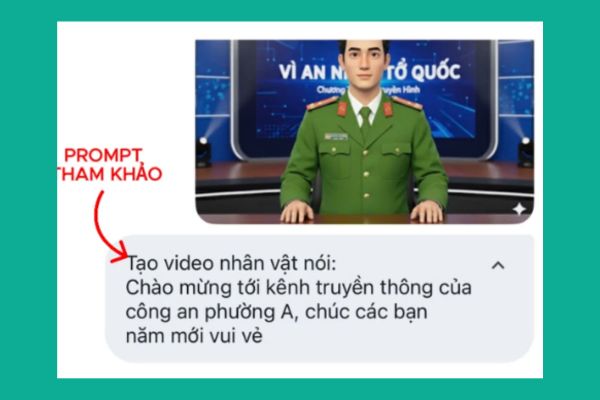
Once you have the perfect still image of the MC in the scene, the final step is to bring the character to life by creating a motion video. At this step, integration or federation tools (like Veo 3) will be used.
Users just need to enter the text they want the MC to say, such as greetings, New Year wishes or news announcements. AI will automatically process lip movements (lip-sync) and body gestures to match the dialogue, creating a complete video ready
Conclusion
Hope Instructions for creating MC AI using Gemini The above will help you confidently produce high-quality propaganda newsletters. Applying this technology not only saves resources but also increases interaction with the community. Let’s get started now to experience this convenience!