• Home
  • News
  • Software
  • Knowledge
  • MMO
  • Tips
  • Security
  • Network
  • Office
AnonyViet - English Version
  • Home
  • News
  • Software
  • Knowledge
  • MMO
  • Tips
  • Security
  • Network
  • Office
No Result
View All Result
  • Home
  • News
  • Software
  • Knowledge
  • MMO
  • Tips
  • Security
  • Network
  • Office
No Result
View All Result
AnonyViet - English Version
No Result
View All Result

Instructions for creating a .reg file to Hack Registry on Windows

AnonyViet by AnonyViet
August 31, 2024
in Tips
0

Registry is one of the components related to Windows configuration. Anonyviet has shared many instructions related to Registry to help customize Windows. So today, I will guide you to hack the registry by creating a .reg file on Windows.

Join the channel Telegram belong to AnonyViet 👉 Link 👈

Before we begin, I would like to remind you that customizing or changing keys in the Registry can cause problems for your computer. Remember to back up the registry before doing so.
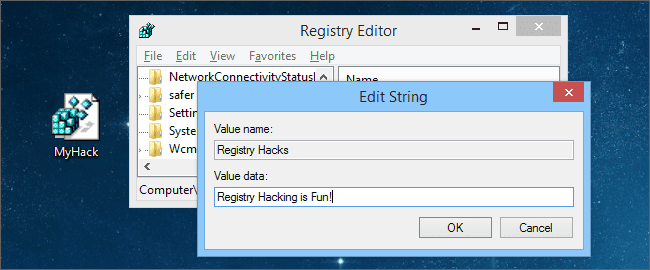
how to hack registry by creating .reg file

So what is Registry Hack?

Anytime you modify a key or value in the registry, it’s a registry hack. Simple, but in this article, I’m referring to downloadable registry hack files with the .reg extension, as a bonus.

In simpler terms, a registry hack file is a backup of all the changes you have made to your registry, saved in a file so that you can apply the same changes if you reinstall or on a new computer.

If none of the above satisfies you, don't worry, keep reading.

Create Registry hack file

After changing the values ​​of the keys in the Registry, you can export it to a .reg file. Right-click on the folder you want to back up, select Export and save it somewhere.
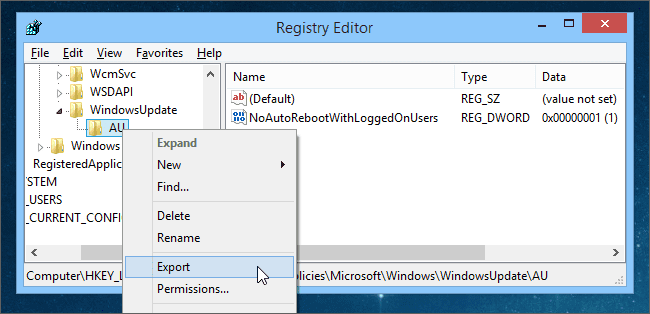
Instructions for creating a .reg file to Hack Registry on Windows

Now that you have successfully saved the file, you can double-click it to sync the values ​​back into the Registry, it won't make any sense, since you've already changed it. Copy it to another computer and merge the values ​​into the Registry.

And in this case, it will work fine because there is only one key edited. But you will need to edit the file. So right click on it and select Edit.

how to edit registry

Now, we have seen what is inside the Registry hack file, it is quite simple, but needs a little explanation. Every Registry hack contains this line at the top, without this line, it will not work properly.

Windows Registry Editor Version 5.00

You only need this line once in the file, and it must be the first line.
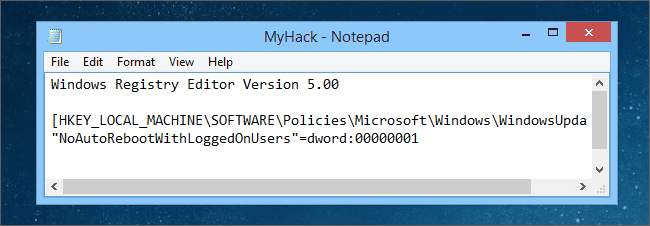
Instructions for creating a .reg file to Hack Registry on Windows

The next section is the address and value of the keys you want to edit. It is organized into sections for the key (on the left) and the value of the key. For example, SOMEKEYWHERE is the address to the key to change, SomeVariableName is the value of the key on the right, ANOTHERKEY and SomeValue is similar.

[HKEY_LOCAL_MACHINE\SOFTWARE\SOMEKEYHERE] "SomeVariableName"=dword:00000000 [HKEY_LOCAL_MACHINE\SOFTWARE\ANOTHERKEY] "SomeValue"=dword:00000001

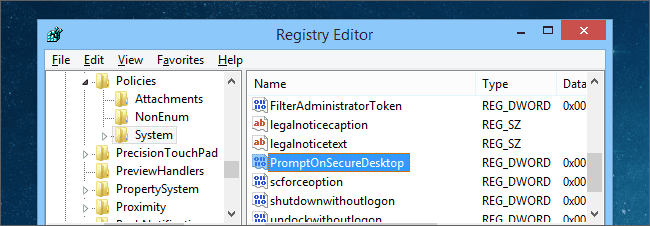
Let's take a few examples. Go to key PromptOnSecureDesktopaddress for those who are blind here:

HKEY_LOCAL_MACHINE\SOFTWARE\Microsoft\Windows\CurrentVersion\Policies\System
Instructions for creating a .reg file to Hack Registry on Windows

This key will determine whether User Account Control (UAC) Does the screen black out when the window pops up? Every time you run the application with Admin rights, a window pops up and the screen blacks out.

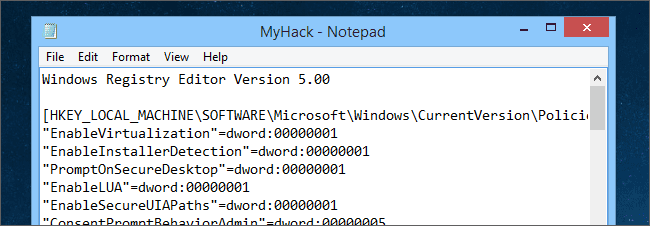
Now export the file, open the hack file Registry and you will see a whole bunch of other things, PromptOnSecureDesktop It's fine to have it there, you don't need to worry about the other things.
Instructions for creating a .reg file to Hack Registry on Windows

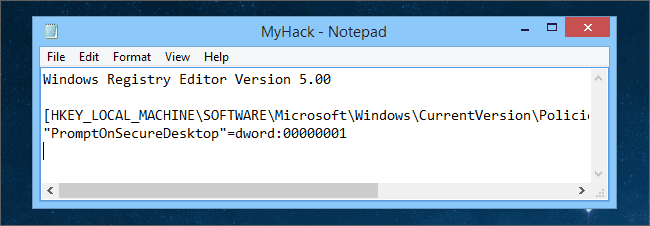
But when you sync that file on another computer, those extra lines will also be synced. So just delete them.
Instructions for creating a .reg file to Hack Registry on Windows

Just don't delete the first line and address.

Add key to hack Registry

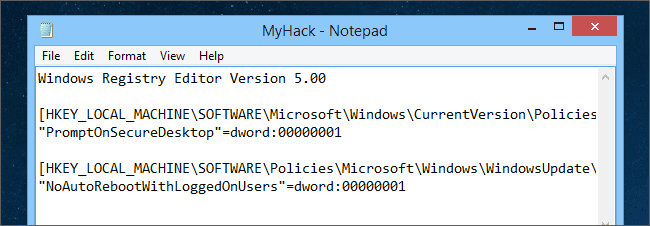
Remember, every time an update is finished, Windows will automatically reboot. To turn that off, you just need to add these 2 lines to the Registry hack file.

HKEY_LOCAL_MACHINE\SOFTWARE\Policies\Microsoft\Windows\WindowsUpdate\AU]
"NoAutoRebootWithLoggedOnUsers"=dword:00000001
Add key to hack Registry

You can also add as many keys as you want to change to the file. This is very convenient when you reset your computer or get a new computer, just open the file and everything will be automatically synchronized.

Delete Registry Value

In some cases, you will have to delete the old value and recreate a new one with a new format. Just delete the part after the “=” sign and add the “-” sign there.

"NoAutoRebootWithLoggedOnUsers"=dword:00000001

After deleting…

"NoAutoRebootWithLoggedOnUsers"=-
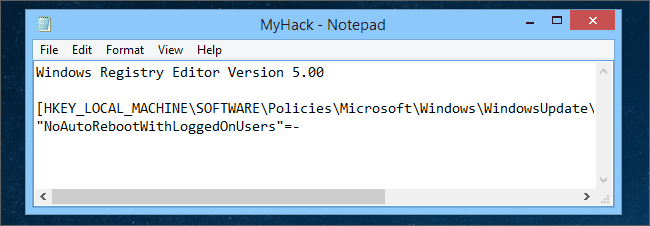
Delete Registry Value

So what if you want to delete a key instead of a value? Again, we have to use the “-” after the “[“:

[HKEY_LOCAL_MACHINE\SOFTWARE\Policies\Mic…]

Wall:

[-HKEY_LOCAL_MACHINE\SOFTWARE\Policies\Mic…]

See that minus sign? This tells Registry Editor to completely delete that key and any values ​​below it.

A word of advice. Don't touch the Registry if you want to reinstall Windows. Always backup the registry before making any changes. Also freeze your computer before doing this. This is the software computer freeze for anyone who needs it
Previous Post

How to check if your computer is being monitored

Next Post

How to Active Key Sublime Text 4 – Download Sublime Text 4 Full Key

AnonyViet

AnonyViet

Related Posts

How to add a face to a photo of a Tet ao dai without Photoshop
Tips

How to add a face to a photo of a Tet ao dai without Photoshop

January 5, 2026
Tự động gửi tin nhắn hàng loạt trên Facebook Messenger 2021
Tips

Tự động gửi tin nhắn hàng loạt trên Facebook Messenger 2021

January 4, 2026
Instructions for creating MC AI with Gemini are extremely simple
Tips

Instructions for creating MC AI with Gemini are extremely simple

January 3, 2026
11 Chrome extensions to increase study productivity for Students
Tips

11 Chrome extensions to increase study productivity for Students

January 3, 2026
How to specify the window opening position on Windows
Tips

How to specify the window opening position on Windows

January 2, 2026
How to get 12 months of ChatGPT Plus for free through military incentives
Tips

How to get 12 months of ChatGPT Plus for free through military incentives

January 1, 2026
Next Post
How to Active Key Sublime Text 4 – Download Sublime Text 4 Full Key

How to Active Key Sublime Text 4 - Download Sublime Text 4 Full Key

0 0 votes
Article Rating
Subscribe
Login
Notify of
guest

guest

0 Comments
Oldest
Newest Most Voted
Inline Feedbacks
View all comments

Recent News

How to add a face to a photo of a Tet ao dai without Photoshop

How to add a face to a photo of a Tet ao dai without Photoshop

January 5, 2026
Instructions for receiving 400k Tet 2026 support money via VNeID

Instructions for receiving 400k Tet 2026 support money via VNeID

January 4, 2026
Instructions for viewing League of Legends recap with full hidden stats

Instructions for viewing League of Legends recap with full hidden stats

January 4, 2026
Tự động gửi tin nhắn hàng loạt trên Facebook Messenger 2021

Tự động gửi tin nhắn hàng loạt trên Facebook Messenger 2021

January 4, 2026
How to add a face to a photo of a Tet ao dai without Photoshop

How to add a face to a photo of a Tet ao dai without Photoshop

January 5, 2026
Instructions for receiving 400k Tet 2026 support money via VNeID

Instructions for receiving 400k Tet 2026 support money via VNeID

January 4, 2026
Instructions for viewing League of Legends recap with full hidden stats

Instructions for viewing League of Legends recap with full hidden stats

January 4, 2026
AnonyViet - English Version

AnonyViet

AnonyViet is a website share knowledge that you have never learned in school!

We are ready to welcome your comments, as well as your articles sent to AnonyViet.

Follow Us

Contact:

Email: anonyviet.com[@]gmail.com

Main Website: https://anonyviet.com

Recent News

How to add a face to a photo of a Tet ao dai without Photoshop

How to add a face to a photo of a Tet ao dai without Photoshop

January 5, 2026
Instructions for receiving 400k Tet 2026 support money via VNeID

Instructions for receiving 400k Tet 2026 support money via VNeID

January 4, 2026
  • Home
  • Home 2
  • Home 3
  • Home 4
  • Home 5
  • Home 6
  • Next Dest Page
  • Sample Page

https://go99.ae.org/ https://nohu90.bid/

No Result
View All Result
  • Home
  • News
  • Software
  • Knowledge
  • MMO
  • Tips
  • Security
  • Network
  • Office

https://go99.ae.org/ https://nohu90.bid/

wpDiscuz
0
0
Would love your thoughts, please comment.x
()
x
| Reply