How to watch YouTube Recap 2025 is becoming a top topic of concern as the end of the year gradually comes to a close. This is an ideal time for each user to look back on their journey of experiencing digital content and the memories associated with their favorite videos over the past 12 months. The article below will provide useful information and detailed instructions so you don’t miss this interesting feature.
| Join the channel Telegram belong to AnonyViet 👉 Link 👈 |
What is YouTube Recap?
YouTube Recap is understood as a yearly review feature, where the platform re-systemizes users’ entire viewing and listening history to create a comprehensive picture of entertainment habits. Instead of just listing simple statistics, YouTube cleverly transformed the data into a concise, vivid and colorful video.
The appeal of this feature lies in its ability to connect emotions and evoke memories. It is like a digital diary, helping viewers relive the happy and sad moments associated with songs or videos that caused a stir. Furthermore, with an optimized design for sharing, users can easily post this summary to different social networking platforms, creating connections and sharing interests with friends.
Instructions on how to watch YouTube Recap 2025
To help you easily access this colorful summary, here are the specific actions to take.
Step 1: Check and upgrade the application
The prerequisite to experience the new feature is that you need to secure the application YouTube or YouTube Music on a device that has been upgraded to the latest version from the app store (If you watch on your phone).
Step 2: Find the notification card in the app
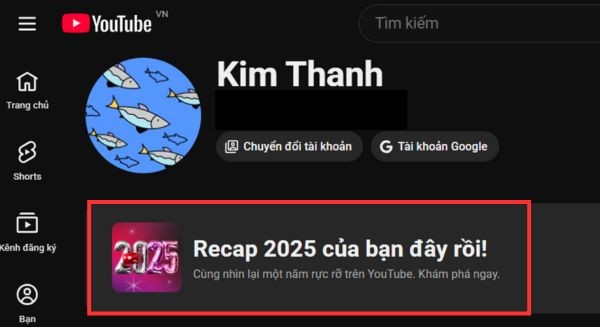
After opening the application, scroll to the “ tabFriend“(You) is located in the lower right corner of the screen, where all personal activity history is stored. In this area, if the account is eligible, a prominent banner with a message about Recap 2025 will appear to invite you to experience it.
Step 3: View and explore your journey
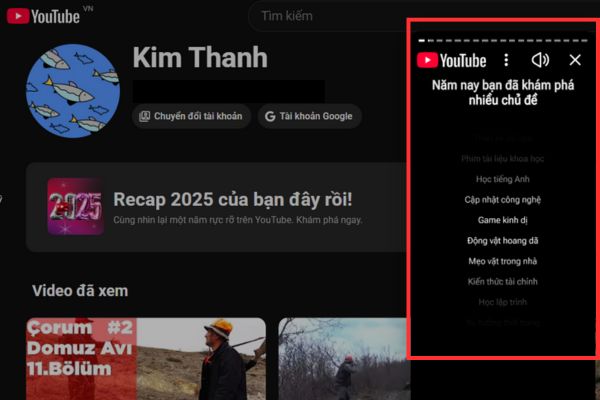
You just need to lightly touch the banner for the system to start showing a series of stories summarizing your entire video viewing habits for the year. If you do not see the notification directly on the application, users can also access it via the official link that YouTube announced at the time of launch.
How to share YouTube Recap on social networks
After fully enjoying the summary, the need to share personal joy and interests with friends is very natural. Users can flexibly choose the sharing format as still images or animated videos depending on their needs and the platform they want to post.
The built-in share button allows you to send content directly to Instagram Stories, Facebookor download your device’s photo library quickly.
What outstanding indicators will appear?
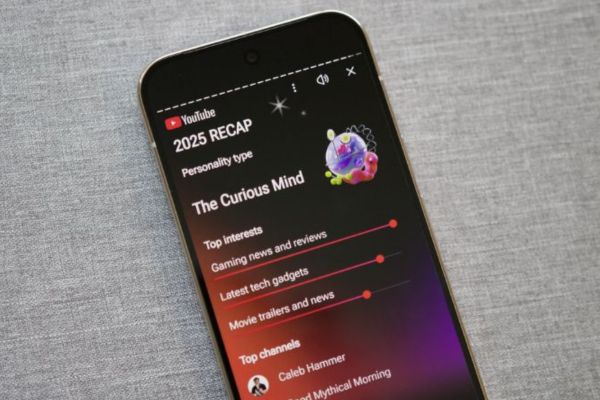
A complete Recap will provide a comprehensive and in-depth view of your content trends through diverse metrics.
- Total watch time shows the exact amount of time you spent entertaining and learning on the platform.
- The Top Channels and Creators list reflects the faces that have made the biggest impact on your viewing habits.
- Favorite content genres such as Games, Life Vlogs or Education are clearly analyzed by proportion.
- Featured Music Lists the songs and artists you’ve listened to repeatedly throughout the year.
- The number of short videos viewed shows how receptive you are to new fast and trending content.
- Memorable moments often recall the first video you watched of the year or the most rewatched video.
- The level of community interaction is measured through the number of likes, comments and new channel registrations.
- The viewer personality analysis section will provide interesting insights into your own content consumption style.
Frequently asked questions
1. When will this feature officially be available?
This feature is usually introduced by YouTube around the end of November or early December every year and lasts throughout the year-end holiday season.
2. What should I do if I don’t see Recap?
The main reason is usually because the application has not been updated to a new version or your account does not have enough activity data for the system to synthesize.
3. Can the summary be posted on social networks?
Absolutely, this feature is designed to encourage users to share on a variety of social networking platforms.
4. What is the difference between YouTube Recap and Music Recap?
YouTube Recap covers all types of videos and diverse content, while YouTube Music Recap focuses specifically on music listening habits and audio metrics.
Conclusion
Hope the above detailed information has helped you understand How to watch YouTube Recap 2025 to get ready for the emotional year-end review season. Looking back at statistics not only brings joy but also helps you better understand the changes in your preferences and thinking over each period. Remember to update the app regularly and don’t hesitate to share your unique achievements with everyone!