AI Text Watermark Remover is a tool to check and clean hidden accents/characters in text copied from websites, emails, PDF documents, editors or AI tools. This tutorial uses the correct labels that users see in the tool, from buttons Load sample text to section Code Point Log.
📢 Join the channel Telegram belong to AnonyViet
Update new articles, cool tools and IT tips fastest
Technically, the engine handles Unicode characters and hidden formatting that appear in text strings. The product name has the phrase “Watermark Remover” to describe the removal of hidden marks in text, tools Are not removes the AI model’s statistical watermark, does not identify the author, and does not verify the origin of the content.
When should you use AI Text Watermark Remover?
A piece of text can contain zero-width space, soft hyphen, NO-BREAK SPACE, byte order mark, Unicode Tag or writing direction control characters that the reader cannot see. These code points are sometimes needed for emojis, complex scripts, or right-to-left text; but if they appear in the wrong place, they can cause irregular display spacing, cause search mismatches, or create errors when pasting content into the form.
AI Text Watermark Remover doesn’t erase everything with the click of a button. The tool displays the original, preview, and each detection so users can check before copying. This is especially useful for WordPress editors, content writers, website administrators, and people who frequently copy text between multiple platforms.
Right at the top, the label AI TEXT WATERMARK REMOVER · 01 goes with the title Inspect hidden text marks.. This area clearly describes the Unicode range of the tool and has two quick action buttons: Load sample text to load illustration content and Reset to clear the workspace.
| The label displays in the tool | Meaning and usage |
|---|---|
| EN/VI | The language change button is right at the top of the tool. Interface initialized with EN; click VI to convert all labels into Vietnamese. |
| Runs in your browser | Indicates the test is run in the visitor’s browser. |
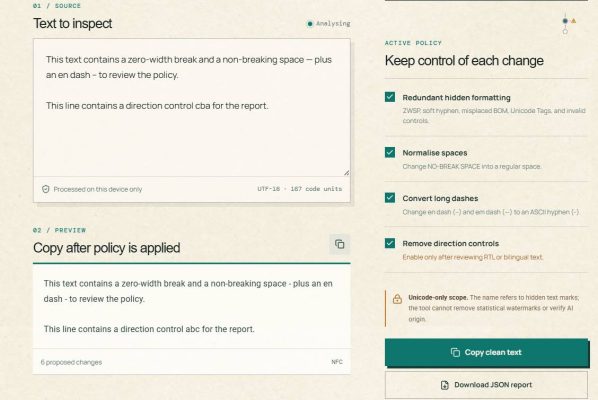
| Text to inspect | The text paste area needs to be checked. Placeholder display: Paste the text here. Nothing is sent away. |
| Clean preview | Text version after applying the current policy, to preview before copying. |
| Code Point Log | Logs each notable character/mark, including Unicode name, U+XXXX code, location and context. |
| Keep control of each change | Policy panel to enable/disable cleaning rules, while retaining user discretion. |
Instructions for using AI Text Watermark Remover
You access the page https://anonyviet.com/ai-watermark-remover/
Paste the content into Text to inspect
Paste the text into the cell Text to inspect. The indicator strip below the introduction will update with numbers Source chars, Words, Review, Warnings and Planned changes. If you want to try the function first, select Load sample text; The template comes with zero-width space, non-breaking space, dashes, and writing direction controls so you can see how the log works.
Check Clean preview
Just below the input area is Clean preview. This section shows what happens after the enabled policies are applied. Don’t copy right away if the text contains emojis, language-specific characters, or RTL content; Please continue to review the policies and logs to determine if the change is appropriate.
Adjust Keep control of each change
In the right column, block Keep control of each change There are four enabled policies available to create a full preview. Each option can be turned off when it is not suitable for the document being processed.
| English policy | When should keep on | When to consider turning off |
|---|---|---|
| Redundant hidden formatting | When you need to remove zero-width space, soft hyphen, misplaced BOM, invalid Unicode Tags or controls. | When checking a string whose technical format needs to be preserved. |
| Normalize spaces | When you want to change NO-BREAK SPACE to regular white space for easy pasting and searching. | When non-breaking spaces have a clear formatting purpose. |
| Convert long dashes | When editing standards require converting – and — to ASCII hyphens -. | When the line is long, choose the typeface you want to keep. |
| Remove direction controls | When unintended direction controls are detected in regular LTR content. | When text contains Arabic, Hebrew, or RTL/bilingual passages that require these controls. |
Read the Code Point Log and use the Keep button
Pull up Code Point Log to see each finding. Each line indicates the character type, code point, position and a piece of context. If a character should not be changed, press Keep. The button’s state will change to Keptand that character will be retained in Clean preview whether the related policy is enabled.
Select Copy clean text or Download JSON report
When the preview is correct, click Copy clean text to copy clean content to clipboard. If you need to save test history, select Download JSON report. The JSON report includes when created, interface language, applicable policy, number of changes, and a list of code points found.
How to change language between English and Vietnamese
Default, button EN has a green background to indicate that the interface is in English. Click VI to convert labels, descriptions, notices and sample content into Vietnamese. Click EN Anytime to come back. This does not delete the pasted text, policy selections, or clicked items Keep.
With WordPress, the shortcode attribute only determines the initialization language of the Page. So,
AI Text Watermark Remover should only be inserted once on the same page.
Open English first, still
The AI Text Watermark Remover tool should only be inserted once per page.
open Vietnamese first; Visitors can still change using the switch EN | VI.
How to install plugins on WordPress
Download Plugins ai-text-watermark-remover.ziplog in to WordPress Admin and open Plugins → Add New → Upload Plugin. Select the ZIP file, install then activate the plugin. Then create or open a Page/Post, insert block Shortcode and paste the following code:
AI Text Watermark Remover should only be inserted once on the same page.
Shortcodes without the lang attribute will open the interface English default. Readers can still immediately switch to Vietnamese with a button VI on the top bar. If you want the Page to open in Vietnamese, use:
Công cụ AI Text Watermark Remover chỉ nên được chèn một lần trên mỗi trang.
If the article already has its own detailed instructions, only display the tool to avoid repeating content with the following shortcode:
AI Text Watermark Remover should only be inserted once on the same page.
Frequently asked questions
Does the tool really remove AI watermark?
The tool handles hidden Unicode/formatting characters present in text, such as zero-width space or direction controls. The tool does not remove the statistical watermark of the AI model, does not evaluate the author, and does not determine whether the article was created by AI or humans.
Is text sent to the server?
Are not. Label Runs in your browser reflects that the inspection process and Clean preview runs in the browser. The report is only generated when the user selects it Download JSON report.
Why are all policies enabled?
This setting helps users fully see the expected changes in Clean preview. You can still disable individual policies or use them Keep to preserve a particular finding before copying.
Conclude
AI Text Watermark Remover is a transparent text cleaning tool: users see hidden text marks, preview changes and decide for themselves what content is kept. When writing tutorials or tool introductions, use the correct English label names such as Text to inspect, Clean preview, Code Point Log, Keep and Copy clean text so that readers can operate correctly the first time.