Recently, Anonyviet has posted some tutorials on how to create a Website like NextCloud nice X-ui But have you ever thought about whether your website may be subject to denial of service attacks or your website is overloaded with traffic? Today I will show you how to test your website using Overload DDoS Layer 7 and how to avoid a denial of service attack.
| Join the channel Telegram of the AnonyViet 👉 Link 👈 |
Why put your website to the test?
Each website will have different hosts. How much your Website can withstand depends entirely on the resources of the Website’s host. The ability of the Website to withstand is directly affected by the number of visitors to the Website at a time, or is directly related to the number of HTTP Requests of the Website.
If a web page exceeds the number of HTTP requests it has, it can cause interruptions in the user’s access to the website or, in particular, you cannot connect to the Web site. The server then responds with 5XX errors. Possible 5XX errors include: 500 to 505.
Neither businesses nor users want to have this problem and so it is very important to test your website’s stamina. In this article, I will use a simple Dos tool with the HTTP Request method. For those of you who do not know what Dos / DDos is, you can see more articles: GoldenEye – Tool to test your website’s endurance here Please!
Some notes before implementation
- Absolutely do not Dos / DDos Anonyviet and Websites you do not own or manage. Anonyviet will not be responsible for your acts of vandalism.
- Overload is a lightweight tool and only uses HTTP methods, so it will not consume machine resources like GoldenEye but I recommend using a network with high transmission or connecting the computer to the Router via network wire to achieve the highest efficiency.
Platform Tool can work
Instructions for using Overload to test the stamina of the Website
Attention! Only perform the DDOS Test on your Website or Server. Any act of DDOS entering the Website of another person or organization is against the law.
Install Overload On Windows
Step 1: You install the latest version of Python here.
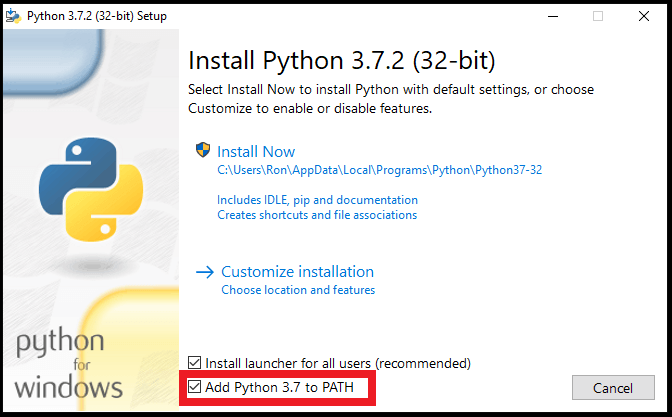
Step 2: After running, you right-click on MyPC and select Properties -> Advanced system settings -> Environment Variables -> Look in the section System variables Path section -> click Edit -> Click new -> enter the path of Python.
Or you can check the Add Python to PATH section while SetUp
Step 3: Download Tool DDoS Overload of 7zx here.
Step 4: Go to CMD or Powershell, move to the downloaded folder
Step 5: Write the following command to load the required PIP:
pip install -r requirements.txt
Using DDOS Layer 7 Overload on Linux
Note: you should give the terminal Super User permission!
Step 1: You update Linux with the following command:
sudo apt update
Step 2: Download Python for Linux
sudo apt install python3 python3-pip git -y
Step 3: Download Overload from github using git command
git clone https://github.com/7zx/overload
For those of you who do not have git, you can download using the following command
sudo apt install git-all
Step 4: You go to Overload’s folder by typing
cd overload
Step 5: Write the following command to load the required PIP:
pip3 install -r requirements.txt
If you do not have PIP3, use the following command to download it
sudo apt-get update -y && sudo apt-get install python3-pip -y
Install DDos OverLoad on Termux
First, you need to have knowledge of the installation and using Termux on Android. Then perform the following steps:
Step 1: You update Termux with the following command:
pkg update
Step 2: Download Python for Linux
pkg install python3 python3-pip git -y
Step 3: Download Overload from github using git command
git clone https://github.com/7zx/overload
Bước 4: Các bạn vào thư mục của Overload bằng cách nhập
cd overload
Step 5: Write the following command to load the required PIP:
pip3 install -r requirements.txt
Using Overload
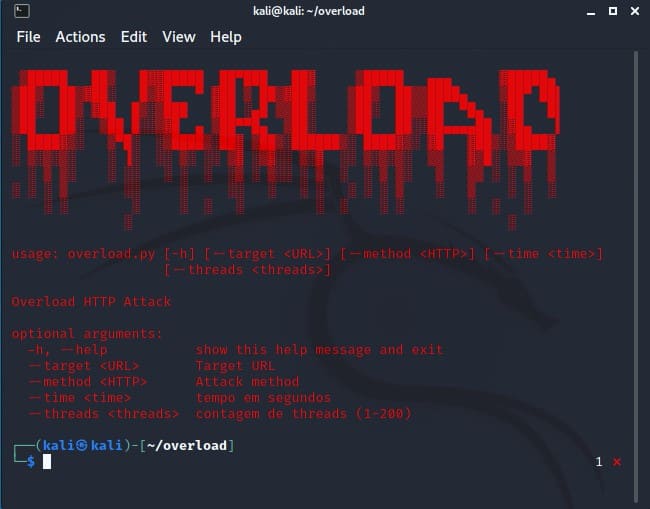
Command syntax:python3 overload.py [-h] [--target <URL>] [--method <HTTP>] [--time <time>][--threads <threads>]
Inside
-H nice –help : show overload’s help item
–target
–method
–time
— thread
Eg
python3 overload.py --target vietnamconghoa.us --method HTTP --time 500 --thread 200
In the last command I used Max thread to see if my web is still alive and here are the results
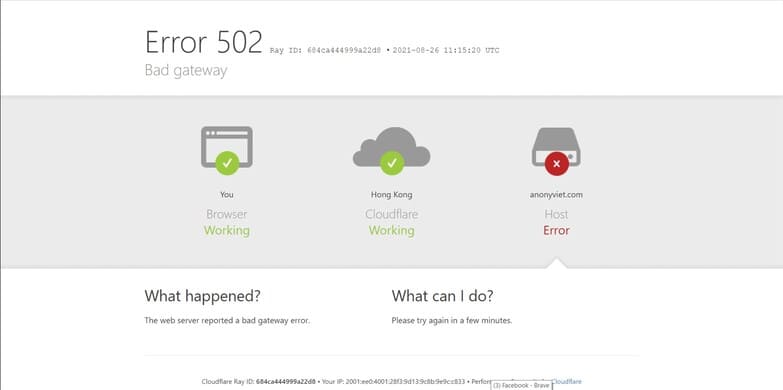
Thanks to that, I know that my website is quite easy to die. Here’s how to prevent denial of service attacks
Ways to prevent DDOS / DOS
Technical measures
- Enhance system processing ability
- Algorithm optimization
- Server upgrade
- Bandwidth upgrade
- Full installation of patches from the server
- Use firewall
DDOS Prevention Tool
- Using a system of equipment, software or services to monitor network safety
- Use a network protection device with DDoS protection service
- Hard or soft firewall
So Anonyviet has just instructed you how to test the website’s endurance with the DDOS Layer 7 overload tool and how to prevent Dos / Ddos. If you have an idea, don’t hesitate to send it to [email protected] Please.