• Home
  • News
  • Software
  • Knowledge
  • MMO
  • Tips
  • Security
  • Network
  • Office
AnonyViet - English Version
  • Home
  • News
  • Software
  • Knowledge
  • MMO
  • Tips
  • Security
  • Network
  • Office
No Result
View All Result
  • Home
  • News
  • Software
  • Knowledge
  • MMO
  • Tips
  • Security
  • Network
  • Office
No Result
View All Result
AnonyViet - English Version
No Result
View All Result

How to create a free Windows 10/Ubuntu VPS on Gitpot

AnonyViet by AnonyViet
January 1, 2023
in Network
0

Today I will show you how to create a free VPS with no cost, no credit card. VPS can create WINdows or Ubuntu operating system and use it for 50 hours with extremely high configuration, but the network is a bit laggy. Follow the steps below to create a free Windows 10/Ubuntu VPS on Gitpot.

Requirements to create a VPS

To create a Free Windows 10 and Ubuntu VPS, you need:

  1. Account Github.com and ngrok.com (both are free to register)
  2. Computer install software VNC Viewer (Windows)

How to create a free VPS from Gitpod

First of all, you need to create an account on gitpod.io and login with your Github account
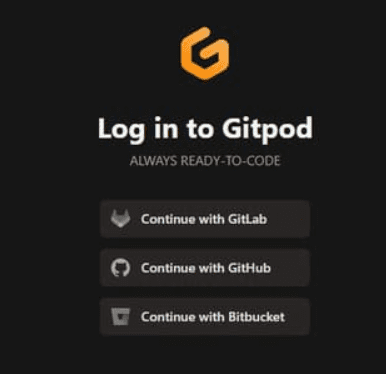
I'm free vps in Gitpot

Next, you need to create a new workspace by clicking on “New Workspace” or use the keyboard shortcut Ctrl + O.
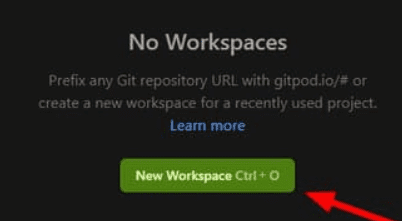
New Workspace

In the Open in Gitpot section, look for “python-django”
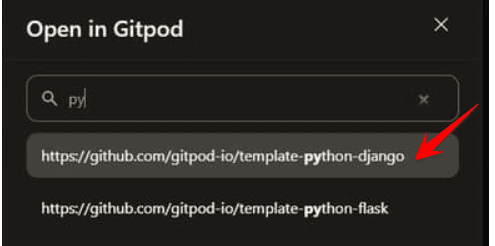
python-django

Now that we have entered the Python Terminal on Gitpot, next I will guide you to create a free Windows 10/Ubuntu VPS on Gitpot.

You see a command line interface in the bottom corner of the screen. You select the Terminal Tab and press Ctrl + Z.
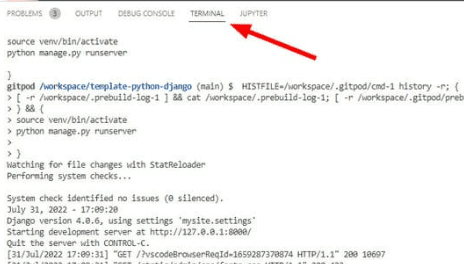
terminal gitpot

How to Create a Free Ubuntu VPS

Step 1: Copy the following commands into the Terminal Tab and press Enter.

sudo su
wget -O ubuntu.sh https://raw.githubusercontent.com/a2nk/G-cloud/main/ubuntu.sh?utm_source=google,+facebook,+linggahosting,+github,+ngrok > /dev/null 2>&1
chmod +x ubuntu.sh
./ubuntu.sh

Step 2: Login to ngork.com to copy Token (see how to get Token)

Step 3: Then paste the ngrok Token you just copied into the gitpod Tab.
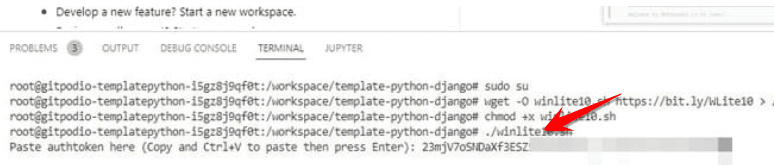
How to Create a Free Windows 10 VPS on Gitpot

Step 4: Select Server and press Enter, if you are in Vietnam, you should choose Japan quickly, type jp press Enter
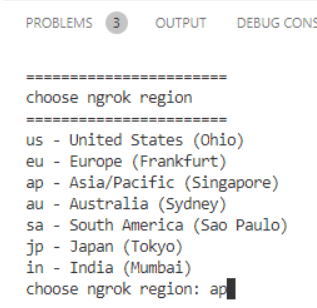
create free ubuntu vps

Step 4: After the installation is complete, the Terminal window will display the results as shown below. The address is copied to the RDP Address line.
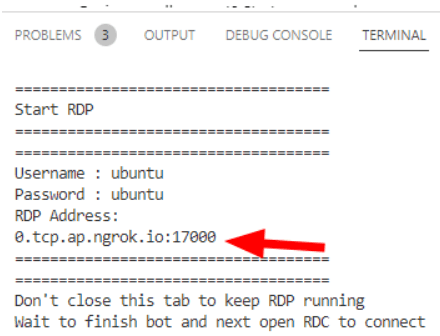
ip remote vps ubuntu

Step 5: You open Remote Desktop, Press Windows + CHEAPtype command mstscpress Enter. Enter the assigned IP and then press Connect, for example the assigned IP is 0.tcp.ap.ngork.io:17000
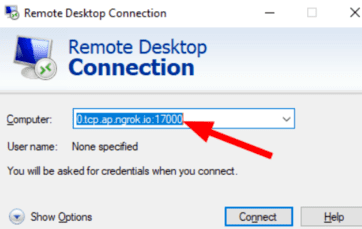
vps ubuntu free interface

And here is the free Ubuntu VPS we just created from gitpot. The configuration of this VPS includes 16 cores 64gb VRAM 38 0gb. Much less lag than a Windows VPS but not very smooth. The VPS usage period is 50 hours.
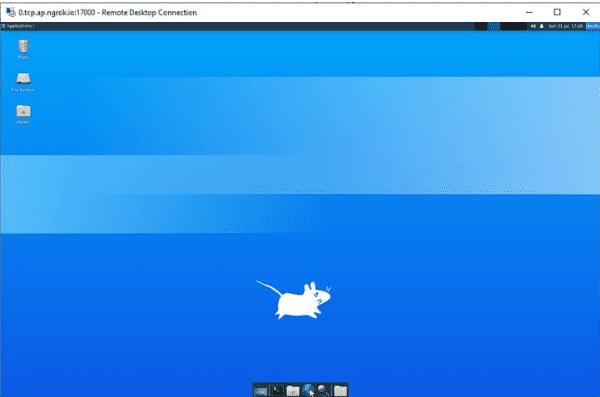
free ubuntu vps skins

How to create a free Windows 10 VPS

Step 1: Copy the following commands into the Terminal Tab and press Enter.

sudo su
wget -O winlite10.sh https://raw.githubusercontent.com/a2nk/G-cloud/main/winlite10.sh?utm_source=google,+gitpod,+linggahosting,+github,+ngrok > /dev/null 2>&1
chmod +x winlite10.sh
./winlite10.sh

Step 2: Login to ngork.com to copy Token (see how to get Token)

Step 3: Then paste the ngrok Token you just copied into the gitpod Tab.

How to Create a Free Windows 10 VPS on Gitpot

Step 4: Please keep the browser screen until Gitpot installs the necessary packages for the VPS. When done, Terminal on the gitpod page will appear as shown below. Copy your login information to Notepad to connect to the VPS.

Eg: in the picture the IP to connect the VPS is 4.tcp.ngork.io:17922
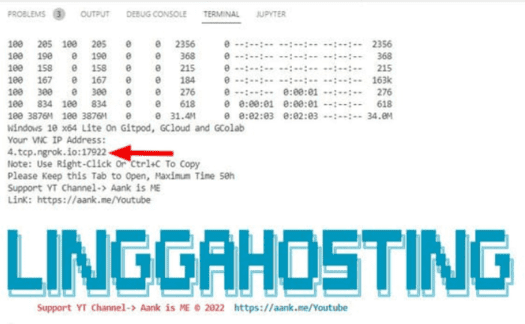
How to create a free Windows 10/Ubuntu VPS on Gitpot

Step 5: Open the VNC Viewer installed on your computer and connect to the VPS. When there is a notification, click Continue to enter the Desktop screen.
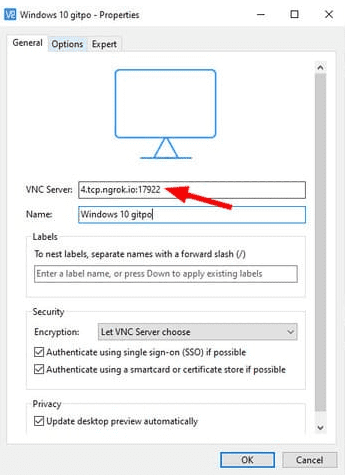
connect vnc windows

The configuration of this VPS includes 2core and 8gb. This VPS in my opinion is a bit “sluggish” but also meets the needs of light. Free goods can only be like that.
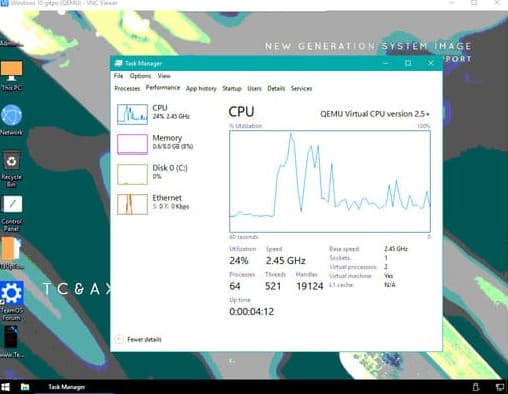
I'm free to vps every day

Note you must not close the gitpod tab. To keep the VPS working, you must keep the gitpod tab on your browser for the VPS to work. This VPS can be used for up to 50 hours.

So ANonyViet has shown you how to create free Windows VPS and Ubuntu VPS in 50 hours, although it is a bit laggy, but it is enough for basic tasks. If you want to use VPS/Hosting for free, sign up for our program Tothost Use it for 6 months without spending money.


The article achieved: 5/5 – (100 votes)

Tags: 10UbuntucreatefreeGitpotVPSWindows
Previous Post

How to get TOTHOST . 200K Voucher

Next Post

How to use Hydra to Brute Force Password

AnonyViet

AnonyViet

Related Posts

Instructions on how to register a .co.uk domain name for free for 1 year
Network

Instructions on how to register a .co.uk domain name for free for 1 year

March 12, 2026
How to Setup Paperclip AI: Create a Company for AI Agent
Network

How to Setup Paperclip AI: Create a Company for AI Agent

March 12, 2026
Compilation of free and cheap APIs to run OpenClaw stably
Network

Compilation of free and cheap APIs to run OpenClaw stably

March 10, 2026
3 Services to Determine IP Location for Website (IP Geolocation API)
Network

3 Services to Determine IP Location for Website (IP Geolocation API)

March 10, 2026
How to buy a .STORE domain name for 1 USD (2026): Detailed instructions from A–Z
Network

How to buy a .STORE domain name for 1 USD (2026): Detailed instructions from A–Z

March 3, 2026
How to register OpenClaw to join Moltbook (social network for AI Agents)
Network

How to register OpenClaw to join Moltbook (social network for AI Agents)

February 7, 2026
Next Post
How to use Hydra to Brute Force Password

How to use Hydra to Brute Force Password

0 0 votes
Article Rating
Subscribe
Login
Notify of
guest

guest

0 Comments
Oldest
Newest Most Voted
Inline Feedbacks
View all comments

Recent News

Why are iPhones and MacBooks still the number 1 “weapons” of the technology world?

Why are iPhones and MacBooks still the number 1 “weapons” of the technology world?

March 16, 2026
New features of Windows 10 21H1 are coming soon

New features of Windows 10 21H1 are coming soon

March 16, 2026
Receive Advanced SystemCare 19 Pro key for free for 6 months

Receive Advanced SystemCare 19 Pro key for free for 6 months

March 16, 2026
How to install Siri to read application notifications on iPhone 17 is extremely simple

How to install Siri to read application notifications on iPhone 17 is extremely simple

March 16, 2026
Why are iPhones and MacBooks still the number 1 “weapons” of the technology world?

Why are iPhones and MacBooks still the number 1 “weapons” of the technology world?

March 16, 2026
New features of Windows 10 21H1 are coming soon

New features of Windows 10 21H1 are coming soon

March 16, 2026
Receive Advanced SystemCare 19 Pro key for free for 6 months

Receive Advanced SystemCare 19 Pro key for free for 6 months

March 16, 2026
AnonyViet - English Version

AnonyViet

AnonyViet is a website share knowledge that you have never learned in school!

We are ready to welcome your comments, as well as your articles sent to AnonyViet.

Follow Us

Contact:

Email: anonyviet.com[@]gmail.com

Main Website: https://anonyviet.com

Recent News

Why are iPhones and MacBooks still the number 1 “weapons” of the technology world?

Why are iPhones and MacBooks still the number 1 “weapons” of the technology world?

March 16, 2026
New features of Windows 10 21H1 are coming soon

New features of Windows 10 21H1 are coming soon

March 16, 2026
No Result
View All Result
  • Home
  • News
  • Software
  • Knowledge
  • MMO
  • Tips
  • Security
  • Network
  • Office

wpDiscuz
0
0
Would love your thoughts, please comment.x
()
x
| Reply