Nowadays, you will see many websites with links starting from https instead of http like old time. Having more letters S This website proves that this website is using a Certificate to encrypt data when sending and receiving to ensure the safety of users when browsing the web. This encryption will go through stages performed by Certificate chains. In this article we will learn How the certificate chain works.
| Join the channel Telegram of the AnonyViet 👉 Link 👈 |
Certificate chains are only used to verify end-user certificates against an intermediate list and root privileges. Sounds confusing right? If you don’t understand, then read on.
Currently, there are many commercial CAs (certificate authorities) that users have to pay for when using the service. Organizations and governments can also have their own CAs. Besides, there are also CAs that provide free services.
Certificate Authority
For an SSL certificate to be trusted, it must be issued by a certification authority (CA). If the certificate was not issued by a trusted CA, the connecting device checks if the issuing CA’s certificate was provided by a trusted CA. Because the CA acts as a third party (trusted by both parties) to support the secure exchange of information.
General Certificate Authority
Commonly used certificate authorities, such as Verisign, DigiCert and Entrust, are automatically accepted by most browsers. However, if you create your own certificate for internal use, that certificate will not be trusted when going to the Internet, you will be blocked by your browser when you try to connect.
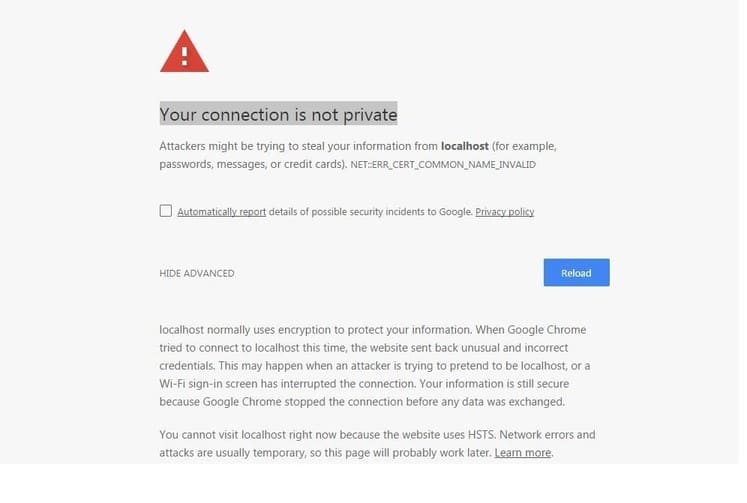
Here is an example of an untrusted SSL certificate. If you for some reason want to access a website with a situation like the example below, you can refer to the article Instructions to fix the “Your connection is not private” error on Windows 7 thoroughly.
.
Because when the CA can be compromised, the security of the system will be broken. If an attacker (Mallory) can intervene to create a fake certificate that is tied to the attacker’s public key with the identity of another user (Alice), any other person’s transactions with Alice can be hacked by Mallory. intervention.
How does the certificate chain work
Suppose you decide to purchase a certificate for the domain google.com from a certificate provider named certificates.ca. The most important is certificates.ca not root so this CA is not trusted.
A trusted certificate chain must be built by certificates.ca and all certificate chains including intermediate certificates must be root.
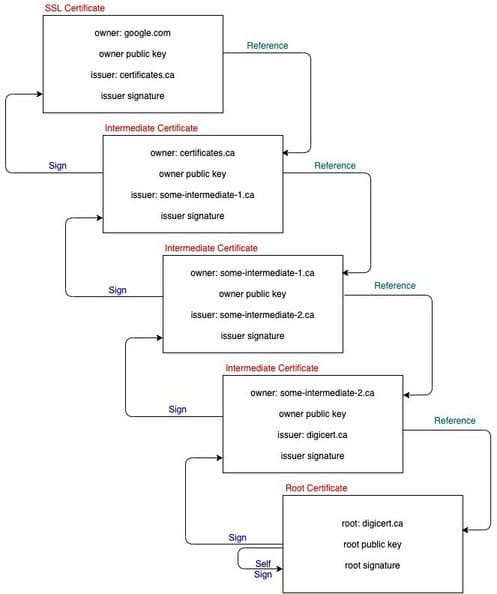
Here are 5 examples of certificate chains:
- google.com – issued by certificates.ca (end user certificates)
- Trung Giang certificates – issued for certificates.ca, by some-intermediate-1.ca
- Intermediate certificate – issued to some-intermediate-1.ca, by some-intermediate-2.ca
- Intermediate certificate – issued to some-intermediate-2.ca, by digicert.ca
- Root certificate – issued to digicert.ca, by digicert.ca
-----BEGIN RSA PRIVATE KEY-----
(Your Private Key: your_domain_name.key)
-----END RSA PRIVATE KEY-----
-----BEGIN CERTIFICATE-----
(Your Primary SSL certificate: your_domain_name.crt)
-----END CERTIFICATE-----
-----BEGIN CERTIFICATE-----
(Your Intermediate certificate: DigiCertCA.crt)
-----END CERTIFICATE-----
-----BEGIN CERTIFICATE-----
(Your Root certificate: TrustedRoot.crt)
-----END CERTIFICATE-----
Install the certificate
When you install end-user certificates, such as the one in the example above purchased from certificates.ca, you must bundle the intermediate certificates and install them.
This certificate chain allows the recipient to determine that the sender and all certificates in the chain are trusted, but if the SSL certificate chain is invalid or corrupted, your certificate will be trusted by some equipment.
List of CAs
Below is a list of some well-known CAs. When using any CA, the user must also trust that CA. In the event that the web browser has found the certificate of the incoming website to be trusted, it will grant the user access. In the opposite case, the user will make a decision whether to trust the CA or not. Some CAs claim to be trusted by 99% of browsers.