• Home
  • News
  • Software
  • Knowledge
  • MMO
  • Tips
  • Security
  • Network
  • Office
AnonyViet - English Version
  • Home
  • News
  • Software
  • Knowledge
  • MMO
  • Tips
  • Security
  • Network
  • Office
No Result
View All Result
  • Home
  • News
  • Software
  • Knowledge
  • MMO
  • Tips
  • Security
  • Network
  • Office
No Result
View All Result
AnonyViet - English Version
No Result
View All Result

Delete all Event Logs on Windows to remove activity traces

AnonyViet by AnonyViet
February 4, 2023
in Tips
0

Professionals can rely on Event Logs to monitor computer activity. Especially tracing or troubleshooting problems with Windows and other applications. However, you can also Delete All Event Logs on Windows to remove traces of your activity on your computer. First, you need to learn the Event Logs and Event Viewer:

Join the channel Telegram belong to AnonyViet 👉 Link 👈

Event Viewer is a tool that displays detailed information in the form of an event log about important events on your PC.

Event logs are special files that record important events on your PC. For example when the user logs into the PC or when the application crashes. Whenever these types of events occur, Windows logs the event in Event logs which you can read using EventViewer.

You can consult How to track the time of turning on and off the computer with Event Viewer.
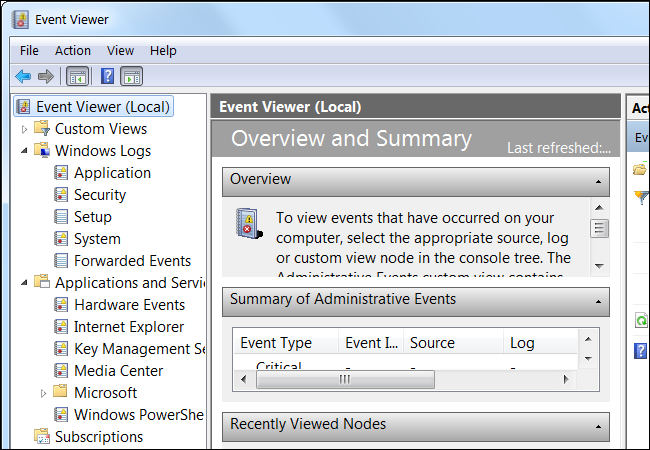
Delete all Event Logs on Windows to remove activity traces

Delete all Event Logs on Windows

  • You must be logged in as Administrator to be able to delete all Event logs.
  • This will not delete Analytics or Debug. If you have them enabled, the wevutl command will return an error, but all other logs will be deleted.
  • Delete all Event Viewer Will delete it too Reliability.

Delete Event Viewer Logs with .bat . file

1. Download the file below to your computer

Clear_Event_Viewer_Logs.bat

2. Unzip the file, there will be a file Clear_Event_Viewer_Logs.bat

3. Right click on the .bat file and select Run as Administrator

4. A command prompt will open to delete event logs. The window will automatically close when finished.

Delete all Event Logs with 1 CMD . command

You open CMD with Adminstrator rights. Copy the command line below and press Enter:

for /F "tokens=*" %1 in ('wevtutil.exe el') DO wevtutil.exe cl "%1"

Delete all Event Logs on Windows with cmd

The process of automatically deleting Event Log will take place, you wait about 1 minute to finish.

Delete Event Viewer Logs with PowerShell

PowerShell can do all the logging in the Event Log very quickly. You open PowerShell and enter the command below:

Get-WinEvent -ListLog * | where {$_.RecordCount} | ForEach-Object -Process { [System.Diagnostics.Eventing.Reader.EventLogSession]::GlobalSession.ClearLog($_.LogName) }

OR

Get-EventLog -LogName * | ForEach { Clear-EventLog $_.Log }

OR

wevtutil el | Foreach-Object {wevtutil cl "$_"}

Event Log will be deleted. You can close PowerShell when finished.

Delete all Event Viewer Logs with PowerShell

Delete each Event Viewer Logs in Event Viewer

1. Press the Win + R keys to open the Run dialog box, type eventvwr.msc and press OK .

2. Select the type of log you want to delete (eg Application). Log types will be displayed on the left panel of EventViewer.

3. Click Clear Log in the right panel.

Delete all Event Logs on Windows to remove activity traces 4

Or

3. Right click in the log (e.g. Application) that you want to delete in the left pane of Even Viewer. Select Clear Log…

Delete all Event Logs on Windows to remove activity traces 5

The article achieved: 5/5 – (100 votes)

Tags: activitydeleteEventLogsremovetracesWindows
Previous Post

Why are minimalist games so popular?

Next Post

How to properly evolve Pokemon in Pokemon PC game

AnonyViet

AnonyViet

Related Posts

How to get 60 days of free web hosting without a card
Tips

How to get 60 days of free web hosting without a card

November 25, 2026
How to cancel Facebook Plus package to avoid automatic renewal
Tips

How to cancel Facebook Plus package to avoid automatic renewal

November 23, 2026
How to unlock iPhone Duo face on iOS 27.3 Beta 2
Tips

How to unlock iPhone Duo face on iOS 27.3 Beta 2

November 23, 2026
Naykia: App saves posts across multiple platforms, keeping the post intact even if the original post is deleted
Tips

Naykia: App saves posts across multiple platforms, keeping the post intact even if the original post is deleted

November 22, 2026
Free CNSF certification exam guide from Red Team Leaders
Tips

Free CNSF certification exam guide from Red Team Leaders

November 21, 2026
Instructions for registering Google AI Pro for 2 years for free until 2028
Tips

Instructions for registering Google AI Pro for 2 years for free until 2028

November 21, 2026
Next Post
How to properly evolve Pokemon in Pokemon PC game

How to properly evolve Pokemon in Pokemon PC game

0 0 votes
Article Rating
Subscribe
Login
Notify of
guest

guest

0 Comments
Oldest
Newest Most Voted

Recent News

How to get 60 days of free web hosting without a card

How to get 60 days of free web hosting without a card

November 25, 2026
Instructions on how to report to the police via SOS Security and order

Instructions on how to report to the police via SOS Security and order

November 24, 2026
How to cancel Facebook Plus package to avoid automatic renewal

How to cancel Facebook Plus package to avoid automatic renewal

November 23, 2026
SSHWATCH: Dashboard to see realtime VPS attacks using Honeypot

SSHWATCH: Dashboard to see realtime VPS attacks using Honeypot

November 23, 2026
How to get 60 days of free web hosting without a card

How to get 60 days of free web hosting without a card

November 25, 2026
Instructions on how to report to the police via SOS Security and order

Instructions on how to report to the police via SOS Security and order

November 24, 2026
How to cancel Facebook Plus package to avoid automatic renewal

How to cancel Facebook Plus package to avoid automatic renewal

November 23, 2026
AnonyViet - English Version

AnonyViet

AnonyViet is a website share knowledge that you have never learned in school!

We are ready to welcome your comments, as well as your articles sent to AnonyViet.

Follow Us

Contact:

Email: anonyviet.com[@]gmail.com

Main Website: https://anonyviet.com

Recent News

How to get 60 days of free web hosting without a card

How to get 60 days of free web hosting without a card

November 25, 2026
Instructions on how to report to the police via SOS Security and order

Instructions on how to report to the police via SOS Security and order

November 24, 2026
  • Home
  • Home 2
  • Home 3
  • Home 4
  • Home 5
  • Home 6
  • Next Dest Page
  • Sample Page

say88 tỷ lệ kèo nhà cái kèo nhà cái 5 febet

No Result
View All Result
  • Home
  • News
  • Software
  • Knowledge
  • MMO
  • Tips
  • Security
  • Network
  • Office

say88 tỷ lệ kèo nhà cái kèo nhà cái 5 febet

wpDiscuz
0
0
Would love your thoughts, please comment.x
()
x
| Reply