After the concussion about Facebook being hacked to leak user information. This social network has decided to be stricter on security issues. After the continuous updates of Facebook to prevent the Token disclosure, we no longer have F12 and get the Facebook Token as before.
| Join the channel Telegram belong to AnonyViet 👉 Link 👈 |
Back in the day it was very easy to get Tokens. Just open the Browser Console (F12). Then Search the phrase AEEEXXX the Token can be found. But after this security update of Facebook, it seems that this way no longer works.
What is a token and what role does it play in relation to user accounts?
Tokens were invented to protect user accounts and protect online transactions. Knowledge about it a lot. So I can’t say it all in one post. I will summarize the concept of Token for you to understand better.
Token is also understood as a form of Electronic Signature for user authentication. This data will be encoded as a string of letters and numbers. Every time a user intends to do something related to security, the server system checks the Token carefully.
The purpose is to identify the user, one user cannot obtain or use the other user’s product. A practical example is that in Online transactions, each transaction process must carefully check the Token to authenticate the customer.
Instructions to get Token Full rights
Get Full Rights IPhone Token
Step 1: Open the Bookmark Bar on the browser with the key combination Ctrl + Shift + CANCEL
Step 2: Right-click on the Bookmarks Bar and select Add Page

The screen will display the content you need to create Bookmark:
- Name: name as you like. Example: Get Tooken IPhone Full Rights
- URL: paste the code below and press Save
javascript: var email = prompt("Nhập tài khoản:", "username/email/sđt");var password = prompt("Nhập password:", "pass");var url = "https://b-graph.facebook.com/auth/login?email=" + email + "&password=" + password + "&access_token=6628568379|c1e620fa708a1d5696fb991c1bde5662&method=post";var win = window.open(url, '_blank');win.focus();
Step 3: Go to Facebook.com and click on Bookmark”Get Tooken IPhone Full Rights”.
Enter the Username and Password of the account that needs to get the IPhone Token.
Watch the video tutorial of the author TUT Hieu Pham Doan:
https://www.youtube.com/watch?v=Zt7mNILFkgc
Get Full Rights Tokens with Instagram
Access to Permission link for Instagram. Select Continue under… to the end.
Then Open the Console interface by pressing F12 or combination Ctrl + Shift + C.
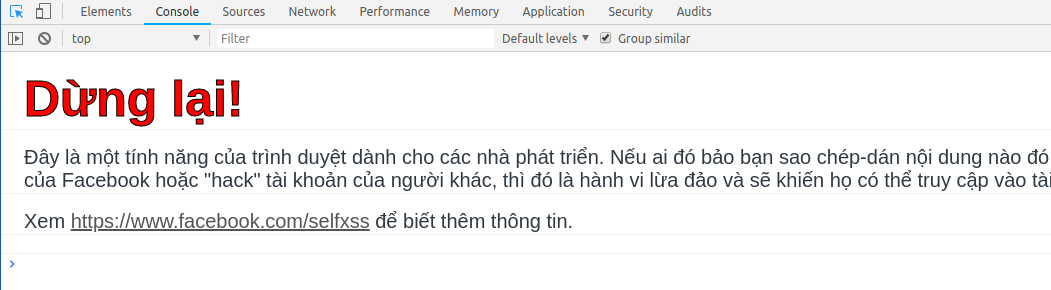
Switch the window to the Console Tab as shown above and then paste the JavaScript below and press Enter.
javascript:var uid = document.cookie.match(/c_user=(\d+)/)[1],dtsg = document.getElementsByName("fb_dtsg")[0].value,http = new XMLHttpRequest,url = "//www.facebook.com/v1.0/dialog/oauth/confirm",params = "fb_dtsg=" + dtsg + "&app_id=124024574287414&redirect_uri=fbconnect://success&display=page&access_token=&from_post=1&return_format=access_token&domain=&sso_device=ios&_CONFIRM=1&_user=" + uid;http.open("POST", url, !0), http.setRequestHeader("Content-type", "application/x-www-form-urlencoded"), http.onreadystatechange = function() {if (4 == http.readyState && 200 == http.status) {var a = http.responseText.match(/access_token=(.*)(?=&expires_in)/);a = a ? a[1] : "Failed to Get Access Token.", prompt("Token", a);}}, http.send(params);
Get Full rights token 2019 need User and Pass
You need to enter Email and Password in the first 2 lines, then copy the Code to the Console in F12.
Author’s code dieudv at github:
var email = "youremail";
var password = "yourpassword";

var BASE_URL = "https://api.facebook.com/restserver.php";
var API_SECRET = "62f8ce9f74b12f84c123cc23437a4a32";
var md5 = function(d){result = M(V(Y(X(d),8*d.length)));return result.toLowerCase()};function M(d){for(var _,m="0123456789ABCDEF",f="",r=0;r<d.length;r++)_=d.charCodeAt(r),f+=m.charAt(_>>>4&15)+m.charAt(15&_);return f}function X(d){for(var _=Array(d.length>>2),m=0;m<_.length;m++)_[m]=0;for(m=0;m<8*d.length;m+=8)_[m>>5]|=(255&d.charCodeAt(m/8))<<m%32;return _}function V(d){for(var _="",m=0;m<32*d.length;m+=8)_+=String.fromCharCode(d[m>>5]>>>m%32&255);return _}function Y(d,_){d[_>>5]|=128<<_%32,d[14+(_+64>>>9<<4)]=_;for(var m=1732584193,f=-271733879,r=-1732584194,i=271733878,n=0;n<d.length;n+=16){var h=m,t=f,g=r,e=i;f=md5_ii(f=md5_ii(f=md5_ii(f=md5_ii(f=md5_hh(f=md5_hh(f=md5_hh(f=md5_hh(f=md5_gg(f=md5_gg(f=md5_gg(f=md5_gg(f=md5_ff(f=md5_ff(f=md5_ff(f=md5_ff(f,r=md5_ff(r,i=md5_ff(i,m=md5_ff(m,f,r,i,d[n+0],7,-680876936),f,r,d[n+1],12,-389564586),m,f,d[n+2],17,606105819),i,m,d[n+3],22,-1044525330),r=md5_ff(r,i=md5_ff(i,m=md5_ff(m,f,r,i,d[n+4],7,-176418897),f,r,d[n+5],12,1200080426),m,f,d[n+6],17,-1473231341),i,m,d[n+7],22,-45705983),r=md5_ff(r,i=md5_ff(i,m=md5_ff(m,f,r,i,d[n+8],7,1770035416),f,r,d[n+9],12,-1958414417),m,f,d[n+10],17,-42063),i,m,d[n+11],22,-1990404162),r=md5_ff(r,i=md5_ff(i,m=md5_ff(m,f,r,i,d[n+12],7,1804603682),f,r,d[n+13],12,-40341101),m,f,d[n+14],17,-1502002290),i,m,d[n+15],22,1236535329),r=md5_gg(r,i=md5_gg(i,m=md5_gg(m,f,r,i,d[n+1],5,-165796510),f,r,d[n+6],9,-1069501632),m,f,d[n+11],14,643717713),i,m,d[n+0],20,-373897302),r=md5_gg(r,i=md5_gg(i,m=md5_gg(m,f,r,i,d[n+5],5,-701558691),f,r,d[n+10],9,38016083),m,f,d[n+15],14,-660478335),i,m,d[n+4],20,-405537848),r=md5_gg(r,i=md5_gg(i,m=md5_gg(m,f,r,i,d[n+9],5,568446438),f,r,d[n+14],9,-1019803690),m,f,d[n+3],14,-187363961),i,m,d[n+8],20,1163531501),r=md5_gg(r,i=md5_gg(i,m=md5_gg(m,f,r,i,d[n+13],5,-1444681467),f,r,d[n+2],9,-51403784),m,f,d[n+7],14,1735328473),i,m,d[n+12],20,-1926607734),r=md5_hh(r,i=md5_hh(i,m=md5_hh(m,f,r,i,d[n+5],4,-378558),f,r,d[n+8],11,-2022574463),m,f,d[n+11],16,1839030562),i,m,d[n+14],23,-35309556),r=md5_hh(r,i=md5_hh(i,m=md5_hh(m,f,r,i,d[n+1],4,-1530992060),f,r,d[n+4],11,1272893353),m,f,d[n+7],16,-155497632),i,m,d[n+10],23,-1094730640),r=md5_hh(r,i=md5_hh(i,m=md5_hh(m,f,r,i,d[n+13],4,681279174),f,r,d[n+0],11,-358537222),m,f,d[n+3],16,-722521979),i,m,d[n+6],23,76029189),r=md5_hh(r,i=md5_hh(i,m=md5_hh(m,f,r,i,d[n+9],4,-640364487),f,r,d[n+12],11,-421815835),m,f,d[n+15],16,530742520),i,m,d[n+2],23,-995338651),r=md5_ii(r,i=md5_ii(i,m=md5_ii(m,f,r,i,d[n+0],6,-198630844),f,r,d[n+7],10,1126891415),m,f,d[n+14],15,-1416354905),i,m,d[n+5],21,-57434055),r=md5_ii(r,i=md5_ii(i,m=md5_ii(m,f,r,i,d[n+12],6,1700485571),f,r,d[n+3],10,-1894986606),m,f,d[n+10],15,-1051523),i,m,d[n+1],21,-2054922799),r=md5_ii(r,i=md5_ii(i,m=md5_ii(m,f,r,i,d[n+8],6,1873313359),f,r,d[n+15],10,-30611744),m,f,d[n+6],15,-1560198380),i,m,d[n+13],21,1309151649),r=md5_ii(r,i=md5_ii(i,m=md5_ii(m,f,r,i,d[n+4],6,-145523070),f,r,d[n+11],10,-1120210379),m,f,d[n+2],15,718787259),i,m,d[n+9],21,-343485551),m=safe_add(m,h),f=safe_add(f,t),r=safe_add(r,g),i=safe_add(i,e)}return Array(m,f,r,i)}function md5_cmn(d,_,m,f,r,i){return safe_add(bit_rol(safe_add(safe_add(_,d),safe_add(f,i)),r),m)}function md5_ff(d,_,m,f,r,i,n){return md5_cmn(_&m|~_&f,d,_,r,i,n)}function md5_gg(d,_,m,f,r,i,n){return md5_cmn(_&f|m&~f,d,_,r,i,n)}function md5_hh(d,_,m,f,r,i,n){return md5_cmn(_^m^f,d,_,r,i,n)}function md5_ii(d,_,m,f,r,i,n){return md5_cmn(m^(_|~f),d,_,r,i,n)}function safe_add(d,_){var m=(65535&d)+(65535&_);return(d>>16)+(_>>16)+(m>>16)<<16|65535&m}function bit_rol(d,_){return d<<_|d>>>32-_};

var data = {
    "api_key": "882a8490361da98702bf97a021ddc14d",
    "email": email,
    "format": "JSON",
    "locale": "vi_vn",
    "method": "auth.login",
    "password": password,
    "return_ssl_resources": 0,
    "v": "1.0"
};

var str = "";
for (var key in data){
    if (data.hasOwnProperty(key)) {
        str += key + "=" + data[key];
    }
}
str += API_SECRET;
var sig = md5(str);
data["sig"] = sig;
var params = "";

for (var key in data){
    if (data.hasOwnProperty(key)) {
        params += "&" + key + "=" + data[key];
    }
}

var url = BASE_URL + "?" + params;
var win = window.open(url, '_blank');
win.focus();
Update get Token Full Permission without entering Password
(Disabled)
Use the Code below and paste it into the Console in F12
javascript:var uid = document.cookie.match(/c_user=(\d+)/)[1],dtsg = document.getElementsByName("fb_dtsg")[0].value,http = new XMLHttpRequest,url = "//www.facebook.com/v1.0/dialog/oauth/confirm",params = "fb_dtsg=" + dtsg + "&app_id=124024574287414&redirect_uri=fbconnect%3A%2F%2Fsuccess&display=page&access_token=&from_post=1&return_format=access_token&domain=&sso_device=ios&_CONFIRM=1&_user=" + uid;http.open("POST", url, !0), http.setRequestHeader("Content-type", "application/x-www-form-urlencoded"), http.onreadystatechange = function() {if (4 == http.readyState && 200 == http.status) {var a = http.responseText.match(/access_token=(.*)(?=&expires_in)/);a = a ? a[1] : "Failed to Get Access Token.", prompt("Token", a);}}, http.send(params);
In the field where the Code cannot be used, do the following steps:
Step 1: Visit this link: http://bit.ly/2TlLQK0
Step 2: Click Accept permission
Step 3: Go back and repeat the steps on the manual.
Code to get HTC Token
(Disabled)
var uid = document.cookie.match(/c_user=(\d+)/)[1],
    dtsg = document.getElementsByName("fb_dtsg")[0].value,
    http = new XMLHttpRequest,
    url = "//www.facebook.com/v1.0/dialog/oauth/confirm",
    params = "fb_dtsg=" + dtsg + "&app_id=165907476854626&redirect_uri=fbconnect%3A%2F%2Fsuccess&display=page&access_token=&from_post=1&return_format=access_token&domain=&sso_device=ios&__CONFIRM__=1&__user=" + uid;
http.open("POST", url, !0), http.setRequestHeader("Content-type", "application/x-www-form-urlencoded"), http.onreadystatechange = function() {
    if (4 == http.readyState && 200 == http.status) {
        var a = http.responseText.match(/access_token=(.*)(?=&expires_in)/);
        a = a ? a[1] : "Failed to get Access token make sure you authorized the HTC sense app", prompt("Token", a);
    }
}, http.send(params);
Code to get Iphone Token
(Disabled)
var fb_dtsg = document.getElementsByName('fb_dtsg')[0].value;
var http = new XMLHttpRequest;
var data = new FormData();
data.append('fb_dtsg', fb_dtsg);
data.append('app_id', '165907476854626');
data.append('redirect_uri', 'fbconnect://success');
data.append('display', 'popup');
data.append('access_token', '');
data.append('sdk', '');
data.append('from_post', '1');
data.append('private', '');
data.append('tos', '');
data.append('login', '');
data.append('read', '');
data.append('write', '');
data.append('extended', '');
data.append('social_confirm', '');
data.append('confirm', '');
data.append('seen_scopes', '');
data.append('auth_type', '');
data.append('auth_token', '');
data.append('default_audience', '');
data.append('ref', 'Default');
data.append('return_format', 'access_token');
data.append('domain', '');
data.append('sso_device', 'ios');
data.append('__CONFIRM__', '1');

http.open('POST', 'https://www.facebook.com/v1.0/dialog/oauth/confirm');
http.send(data);
http.onreadystatechange = function(){
if(http.readyState == 4 && http.status == 200){
    var token_ios = http.responseText.match(/access_token=(.*?)&/)[1];
    var http2 = new XMLHttpRequest;
    http2.open('GET', 'https://b-api.facebook.com/restserver.php?method=auth.getSessionForApp&format=json&access_token='+token_ios+'&new_app_id=6628568379&generate_session_cookies=1&__mref=message_bubble');
    http2.send();
    http2.onreadystatechange = function(){
    if(http2.readyState == 4 && http2.status == 200){
        var json_token_iphone = JSON.parse(http2.responseText);
        var access_token = json_token_iphone.access_token;
        prompt('Token Iphone', access_token);
    }
    }
}
}
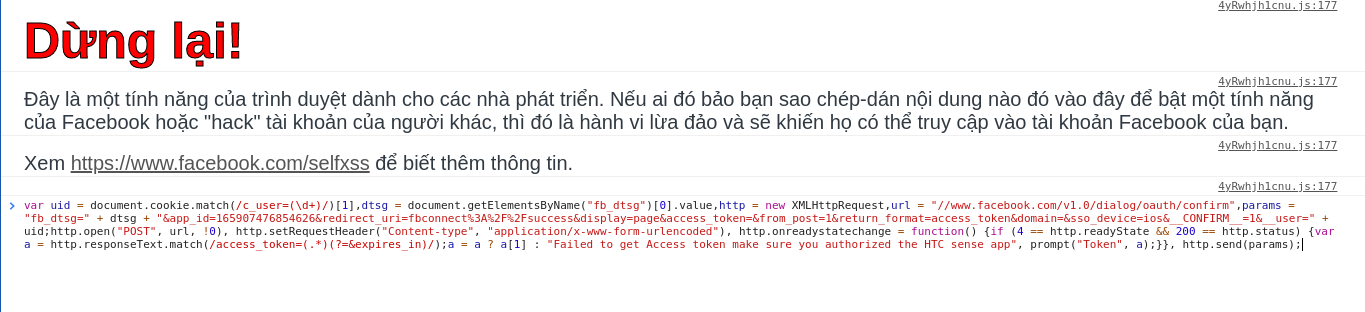
Press Enter and Token will be returned immediately.
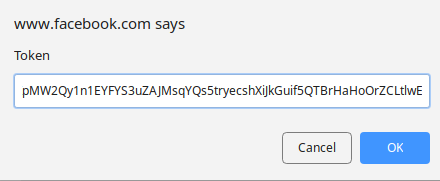
Facebook tokens are very important to your account. What to use this Facebook Full Rights Token for is up to you.
Like Fanpage or follow website for quick updates of good articles.
Good luck.