• Home
  • News
  • Software
  • Knowledge
  • MMO
  • Tips
  • Security
  • Network
  • Office
AnonyViet - English Version
  • Home
  • News
  • Software
  • Knowledge
  • MMO
  • Tips
  • Security
  • Network
  • Office
No Result
View All Result
  • Home
  • News
  • Software
  • Knowledge
  • MMO
  • Tips
  • Security
  • Network
  • Office
No Result
View All Result
AnonyViet - English Version
No Result
View All Result

Lesson 236: Column chart in Excel

AnonyViet by AnonyViet
January 25, 2023
in Office
0

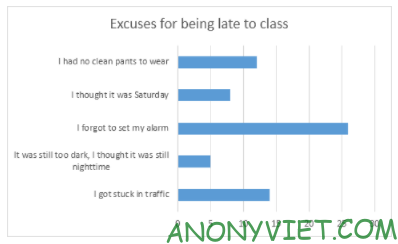
This article will show you how to create a column chart in Excel.

Join the channel Telegram of the AnonyViet 👉 Link 👈

Column chart

This article will guide you to create a column chart in Excel

1. Select the range A1:B6.
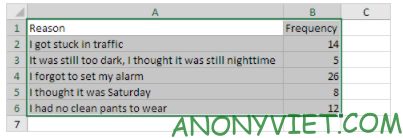
Lesson 236: Column chart in Excel

2. On the Insert tab, click the Columns icon.
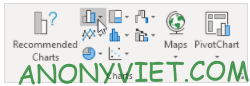
Lesson 236: Column chart in Excel 8

3. Select Clustered Bar.

Lesson 236: Column chart in Excel 9

Result

Lesson 236: Column chart in Excel 10

In addition, you can also view many other excel articles here.

The article achieved: 5/5 – (100 votes)

Tags: ChartColumnExcelLesson
Previous Post

How to install Minecraft Crack Java Edition for you who can’t afford it

Next Post

TOP 3 tools that people watching Youtube should install

AnonyViet

AnonyViet

Related Posts

Instructions on how to convert text into QR codes in Word
Office

Instructions on how to convert text into QR codes in Word

October 5, 2026
Tool to adjust the format of administrative documents according to Decree 30
Office

Tool to adjust the format of administrative documents according to Decree 30

October 1, 2026
How to add Watermark to Google Docs to protect copyright
Office

How to add Watermark to Google Docs to protect copyright

April 19, 2026
Instructions on how to hide formulas in Excel to secure data
Office

Instructions on how to hide formulas in Excel to secure data

February 6, 2026
Top who creates the most beautiful presentation slide today
Office

Top who creates the most beautiful presentation slide today

September 23, 2025
Automatically check and correct spelling errors on Google Docs
Office

Automatically check and correct spelling errors on Google Docs

February 23, 2025
Next Post
TOP 3 tools that people watching Youtube should install

TOP 3 tools that people watching Youtube should install

0 0 votes
Article Rating
Subscribe
Login
Notify of
guest

guest

0 Comments
Oldest
Newest Most Voted

Recent News

What is eTax Mobile? How to install, log in and look up tax code on the phone

What is eTax Mobile? How to install, log in and look up tax code on the phone

November 13, 2026
Instructions on how to turn off the blue dot on the MacBook screen

Instructions on how to turn off the blue dot on the MacBook screen

November 13, 2026
Instructions to follow the trend to fill the room with ChatGPT

Instructions to follow the trend to fill the room with ChatGPT

November 12, 2026
What to eat for lunch today: Website suggested dishes for CS2-style office workers

What to eat for lunch today: Website suggested dishes for CS2-style office workers

November 11, 2026
What is eTax Mobile? How to install, log in and look up tax code on the phone

What is eTax Mobile? How to install, log in and look up tax code on the phone

November 13, 2026
Instructions on how to turn off the blue dot on the MacBook screen

Instructions on how to turn off the blue dot on the MacBook screen

November 13, 2026
Instructions to follow the trend to fill the room with ChatGPT

Instructions to follow the trend to fill the room with ChatGPT

November 12, 2026
AnonyViet - English Version

AnonyViet

AnonyViet is a website share knowledge that you have never learned in school!

We are ready to welcome your comments, as well as your articles sent to AnonyViet.

Follow Us

Contact:

Email: anonyviet.com[@]gmail.com

Main Website: https://anonyviet.com

Recent News

What is eTax Mobile? How to install, log in and look up tax code on the phone

What is eTax Mobile? How to install, log in and look up tax code on the phone

November 13, 2026
Instructions on how to turn off the blue dot on the MacBook screen

Instructions on how to turn off the blue dot on the MacBook screen

November 13, 2026
  • Home
  • Home 2
  • Home 3
  • Home 4
  • Home 5
  • Home 6
  • Next Dest Page
  • Sample Page

say88 tỷ lệ kèo nhà cái kèo nhà cái 5 febet

No Result
View All Result
  • Home
  • News
  • Software
  • Knowledge
  • MMO
  • Tips
  • Security
  • Network
  • Office

say88 tỷ lệ kèo nhà cái kèo nhà cái 5 febet

wpDiscuz
0
0
Would love your thoughts, please comment.x
()
x
| Reply