How to report to the police via SOS Security and order is an extremely necessary skill in today’s busy life. Sometimes just a few touches on the phone screen are enough to help resolve the problem smoothly. I see that this application is directly managed by the Ho Chi Minh City Police, so the level of reputation and security is off the table. Let’s go together AnonyViet Learn in detail how to install and use it.
📢 Join the channel Telegram belong to AnonyViet
Update new articles, cool tools and IT tips fastest
What is the Security and Order SOS application of HCM Police?
In the simplest terms, this is a direct communication channel between the people and the Ho Chi Minh City Police force. In the past, every time something happened on the street like a robbery or a car crash, people were often confused and couldn’t remember the phone number of the local police station. Thanks to that, since this app was born, everything has become much neater. You just need to turn on your phone to immediately send information, images and your exact location to the authorities.
However, there is one small point you need to pay careful attention to. This application currently only serves citizens living and working in Vietnam Ho Chi Minh City area. Therefore, if you are traveling in Da Lat or Hanoi and open the app to report news, the system will definitely not be able to support you promptly.

Instructions on how to report to the police via SOS Security and order
To avoid being surprised when something urgent happens, I recommend that you download and register an account right now.
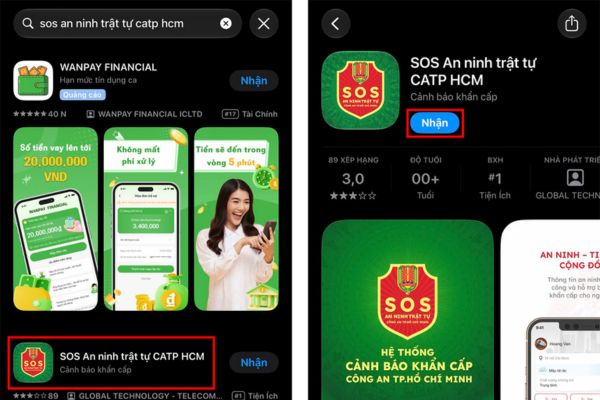
Step 1: You pick up your phone and open the App Store if you use an iPhone or the Google Play Store if you use Android. Type in search name SOS Security and order of Ho Chi Minh City Police Department then click download to your device. Remember to look carefully at the logo to avoid downloading miscellaneous apps by mistake.
Step 2: Open the application, the system will ask you to log in. There are many options here such as using Apple account, Google account, account VNeID or scan QR code on the Citizen Identification card. I personally see it Log in with VNeID is the fastest. If you choose to scan a QR code, remember to find a bright place, clean the camera, and make sure the code is in the middle of the frame.

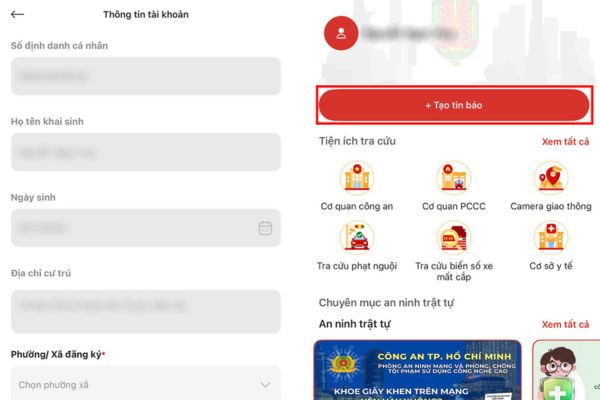
Step 3: After scanning, look back to see if the personal information displayed on the screen is correct. Fill in the remaining blank cells and then click Confirm. At this point, you have entered the main interface, right in front of your eyes is the big and neat SOS button Create news.
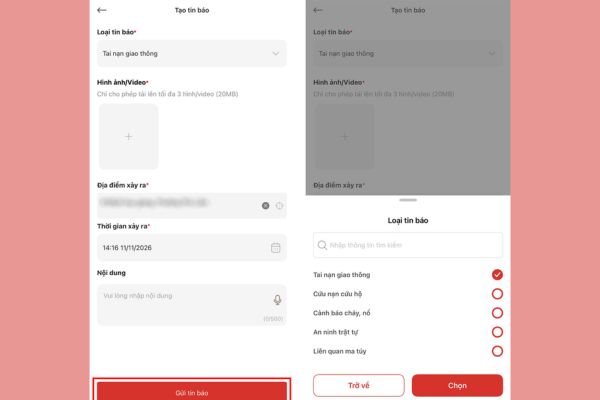
Step 4: This is the time for you to report to the police via SOS Security and Order when there is an incident. You choose the appropriate notification type, for example Traffic accident, Fire and explosion warning nice Drug related. Fill in all scene information and then click Send news.
Step 5: Sit and wait for the authorities to receive and process. Meanwhile, you can track your notification status right on the app.
What information do I need to prepare to send accurate notifications?
Many people in a panic often text very curtly like help me or there’s an accident here. If you write it like that, the police will know which way to go. Instead, to maximize the effectiveness of reporting to the police via SOS Security and Order, you should calmly type briefly but with enough meaning.
First, the location must be clear. Just write down the house number, street name, and district properly. If you stand on an empty road without a house number, try to look to see if there is any large, easily recognizable landmark like a gas station or supermarket. Next is the time and events. For example, if you just type, around 8pm, in front of that alley number, I saw two motorbikes collide, and someone is injured.
If you feel safe, it would be best if you took a photo and attached it. But remember to prioritize your life first, don’t be foolish enough to rush into a fire or a fight just to take a photo to report to the police.

Cool features of SOS Security and Order
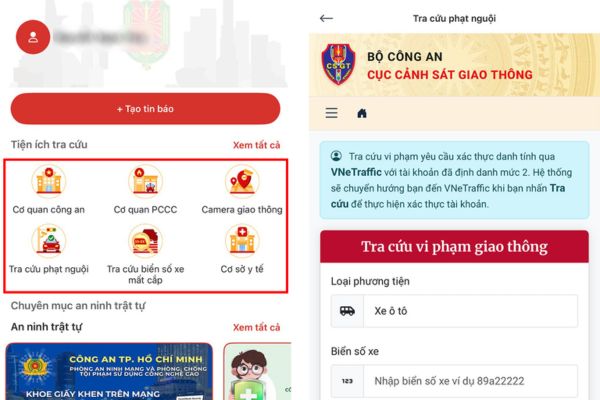
When I first downloaded it, I thought this app was only used to call for help, but after a while of searching around, I found it had a ton of cool features. I like the item the most View traffic cameras. Every morning when I get ready to go to work, I turn it on to see if there are any traffic jams at intersections. Thanks to that, I can avoid traffic jams or flooded roads.
In addition, the app also allows you to look up police station location or unit fire protection and prevention nearest. Instead of having to run around asking passersby, you just need to open the map in the app and it will show you clear directions. You can even read the latest security and order news in the city right in this application.
Conclusion
Knowing clearly How to report to the police via SOS Security and order gives us a greater sense of peace of mind when living in this crowded city. The authorities will receive information very quickly and be there to provide timely support when there is an incident. Thanks to this, the security and order situation in the neighborhood has also improved significantly.
Frequently Asked Questions (Q&A)
1. Can this app be used on iPhones?
Yes, my friend. The application is now fully available on the App Store for iPhone and iPad models. Just go up and type in the correct name to download and use normally.
2. Can I press the SOS button to see if the interface is okay?
Absolutely do not click send test alert if there is no real problem in real life. Reporting fake news will cause confusion in the system and waste valuable time of the authorities.
3. I can’t scan the QR code on my ID card all the time, what should I do?
Try using a towel to clean your phone camera and move it to a place with better lighting. Remember to angle your phone slightly to avoid the bright light hitting the card face, blinding the QR code so it can be scanned immediately.