The App automatically aligns the photo angle using AI is becoming a trend for those who are often confused when holding a camera. Today I happened to see that HuiPai AI Pro Camera offers a free lifetime copy so I had to share it right away. Let’s go together AnonyViet Learn in detail how to receive and use this tool.
📢 Join the channel Telegram belong to AnonyViet
Update new articles, cool tools and IT tips fastest
Introducing the app that automatically aligns photography angles with HuiPai AI
Today, when I had free time to browse the App Store looking for some cool apps, I accidentally came across them HuiPai AI Pro Camera. The point that caught my attention the most is that this app is having extremely good promotions. They allow users to unlock the Lifetime package completely free of charge. Normally, professional photography apps like this charge a rather expensive recurring subscription fee ($29.99). Therefore, this is a great opportunity for you to fully experience the great features without worrying about spending money.
Talking a little about HuiPai AI Pro Camera, this is an application created for those who often have shaky hands or do not know how to align the angle beautifully. Especially guys who are often nagged by their lovers take a photo completely distorted. This is not the type of app that takes photos of instant noodles and clicks to eat them immediately. It is more about helping users learn how to create more balanced and harmonious photos.
Good points of the HuiPai AI Pro Camera application
From my personal experience, I find that the app does a very good job of supporting users. Below are the biggest plus points that I find extremely pleasing.
AI assistant gives easy-to-understand instructions
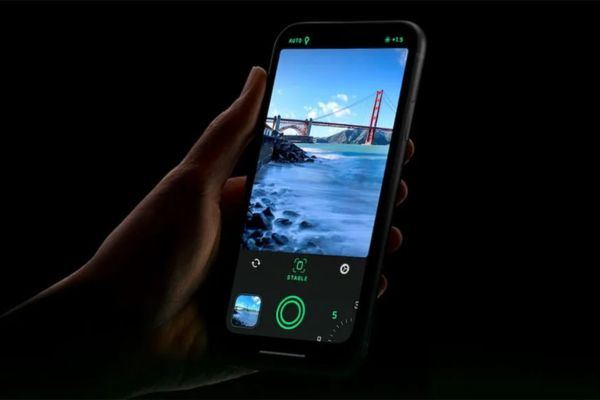
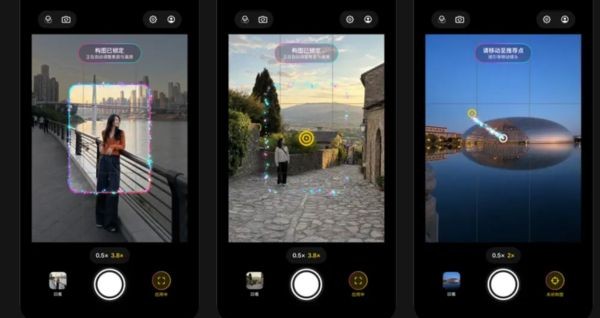
Its biggest selling point is its smart layout support feature using AI. When you turn this feature on, the application will automatically scan and analyze the entire scene before you. It recognizes people, landscapes, horizons and important visual highlights in the frame.
Instead of having to fumble around with vague manual alignment and then take distorted photos, you just need to follow an extremely intuitive on-screen instruction. With this app that automatically aligns the photo angle, you just need to move your phone to the right angle The yellow point coincides with the white point. When these two points match, the application will automatically lock the frame it thinks is the most beautiful. At the same time, it also automatically adjusts the focus, focusing and exposure metering to the correct level.
Absolute security
A big plus point of the HuiPai auto-angle photography app is the way they process image data. All AI analysis is performed entirely locally on your device. Images are never uploaded to any external servers providing complete peace of mind regarding privacy. Feel free to take sensitive personal photos or important documents without fear of data leaking.
Supports in-depth color correction
Regarding hardware, this application provides all the necessary tools for daily photography needs. Feel free to switch the front and rear cameras, turn the flash on and off, use the timer or turn on the traditional layout grid if you want to align the angle yourself.
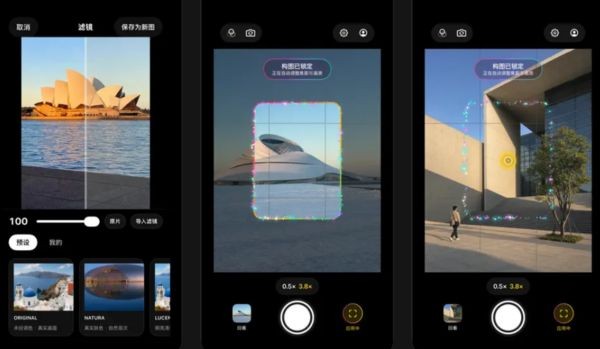
Not only is it a simple app that automatically aligns photo angles, the Pro version also unlocks many more editing features with extremely diverse filters. You can preview color styles in real time while you’re shooting. It also allows inserting a very professional looking watermark. Most notably, the ability to support importing .cube or HaldCLUT format files. This feature is usually only available on computers, but now you can use it for advanced color correction right on your phone.
Instructions for receiving a free Lifetime package
To own this app that automatically aligns photo angles for 0 VND, just follow these extremely simple steps:
Step 1: Download the HuiPai AI Pro Camera app from the App Store HERE.
Step 2: Open the application and access the introduction section or look for the membership upgrade banner in the corner of the screen.
Step 3: Check carefully to see if the Lifetime package is showing a price of 0 VND or not.
Step 4: If it is indeed 0 VND, click confirm payment with Face ID or Touch ID to own it for life.
Note that if the price still displays money as usual, it means the promotion has ended. Remember to check carefully before scanning your face or fingerprint to avoid having money deducted unfairly.
Conclusion
If you are looking for a photography support tool, this app that automatically aligns photography angles is not a bad choice. AI’s intuitive guidance saves a lot of alignment time. Remember to carefully check the price before clicking to receive the Lifetime package.
Frequently Asked Questions (Q&A)
1. How does HuiPai AI Pro Camera process images?
The application processes image data completely locally right on your phone, so you don’t have to worry about personal information being leaked to outside parties.
2. How do I know if I receive a free Lifetime package?
Go to the introduction section or upgrade banner in the app, if you see the displayed price is 0 VND, then click to confirm payment.
3. Does this application support professional color correction?
Yes, the Pro version supports importing .cube or HaldCLUT format files so you can freely customize advanced colors to your liking.