

1 month of ElevenLabs Creator free will help you unlock the most advanced features that regular accounts cannot access. ElevenLabs’ technology has the ability to simulate extremely realistic, natural voices and a full range of different emotions. Join AnonyViet to learn the simple steps to own this great account completely free.
📢 Join the channel Telegram belong to AnonyViet
Update new articles, cool tools and IT tips fastest
Introducing the ElevenLabs tool
In today’s digital era, artificial intelligence technology is completely changing the way we create content. ElevenLabs emerged as one of the transformational platforms text to speech The best thanks to the ability to create sounds that are extremely natural, soulful and difficult to distinguish from a real human voice.
For professional content creators, Creator package is the ideal solution to upgrade product quality. This version offers cutting-edge features that optimize workflow and expand audio customization capabilities.
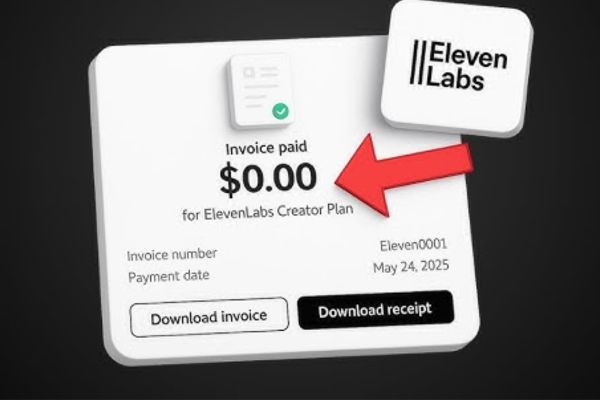
To help you have a more objective view, below is a detailed comparison table between the standard free version and the Creator upgraded version:
| Core features | Standard free plan | Creator Pack |
| Monthly character count | 10,000 characters | 100,000 characters |
| Commercial ownership | Not supported | There is full support |
| In-depth voice cloning | Not available | PVC technology supported |
| Output audio file quality | Standard | Highest level 128kbps |
| Customizable voice count | Maximum 3 voices | Maximum 30 voices |
Things to prepare
Before starting the steps to receive 1 month of ElevenLabs Creator for free, you need to prepare some necessary tools for the process to go smoothly.
- 1 Discord account that was set up at least a week ago. The developer’s automatic system will check the account’s uptime to minimize spam or mass creation of virtual accounts.
- 1 normally active GitHub account used to log into the event portal.
- An active international payment card such as Visa or Mastercard is required. Your card needs to have a small balance of about 1-2 USD so that the system can perform identity verification when registering for a service package without any actual fee being deducted.
Instructions for receiving 1 month of ElevenLabs Creator for free
The process of receiving this gift package is simplified through the linking steps between the event platform and the project’s official Discord server.
Step 1: First you have to change VPN to another country (For example, America). Then, you proceed to access the event program’s website at the address HERE on your web browser.
Step 2: The system will ask you to link log in Personal GitHub account to authenticate membership to participate in the technology festival.
Step 3: At the main interface of the event page, scroll down the screen and click on the command button with the text Claim offer.
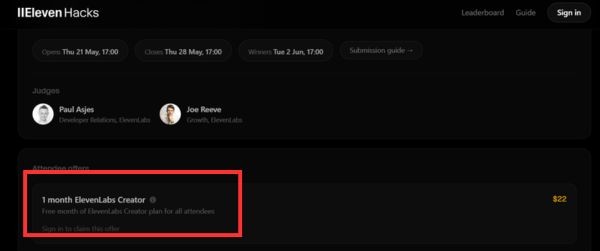
Step 4: Visit the Discord app and proceed to join the developer’s official server via the link https://discord.gg/elevenlabs
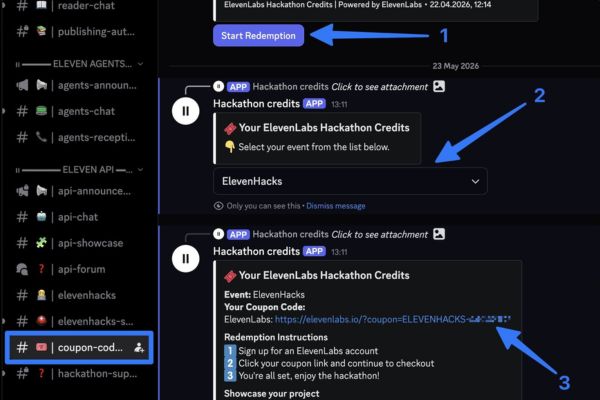
Step 5: In the list of chat channels on the left side of the screen, find and click on the channel named #coupon-codes.
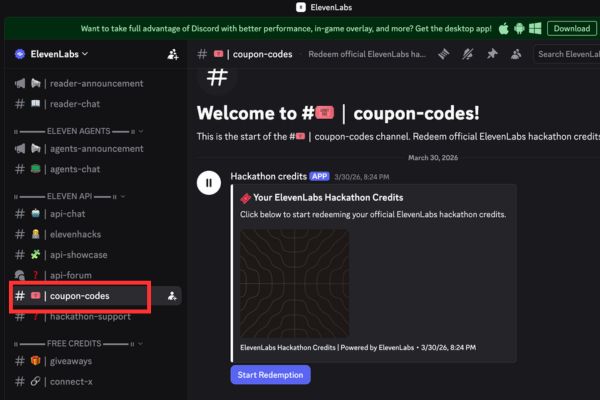
Step 6: In this channel’s interface, click on the blue button with text Start Redemption to call the bot to automatically distribute discount codes.
Step 7: When the dialog box appears on the screen, in the event selection list, click to select the correct program name ElevenHacks.
Discord’s bot system will immediately send you a private secure message containing a special link in the form of a gift coupon code.
Step 8: Please click directly on this link, log in to your ElevenLabs account and complete the payment card linking procedures to activate the service package for 0 VND.
Conclusion
Experience program 1 month of ElevenLabs Creator free is truly a great opportunity to access leading artificial voice technology at no cost. Please quickly follow the instructions above to not miss this extremely valuable promotion. Wishing you success!
Frequently Asked Questions (Q&A)
1. Will money be deducted from my international payment card when registering to receive this service package?
You will not be charged any service fees during the first month of use.
2. How do I avoid having the 22 USD fee automatically deducted after the end of one month of experience?
You can proactively access the account management section on the ElevenLabs homepage and select Cancel Subscription at any time. Your Creator Edition benefits will remain intact until one month expires from the date of activation.
3. Why can’t my Discord account receive promo codes from automated bots?
The most common cause is that your Discord account is less than a week old, or you chose the wrong event name in the category. Make sure your account meets the uptime requirements and select the correct ElevenHacks section when interacting with the bot.







