How to run OpenClaw using Crawbot is a life-saving solution for those who are passionate about AI Agent but have limited finances. Instead of paying hundreds of dollars in API fees every day, you can take advantage of cheap web plans. This method is both safe and without worrying about violating policies leading to account locking. Let’s explore each step in detail with AnonyViet below!
📢 Join the channel Telegram belong to AnonyViet
Update new articles, cool tools and IT tips fastest
Why should you use this trick for AI Agent?
Operating autonomous AI Agents requires the system to continuously think, analyze and call support tools. If you plug in the official API from LLM providers directly, the amount of tokens consumed per day can be up to several tens or even hundreds of dollars. This turns the AI playing field into a major barrier for those with limited budgets.
To solve this problem, how to run OpenClaw by Crawbot was born as a savior. This trick allows you to take advantage of monthly subscription accounts (like ChatGPT Plus or Gemini Pro) for only a few hundred thousand dong. Moreover, businesses that have existing accounts issued to employees but rarely use them can also “raise shrimp” thoroughly.
Cost comparison table when applying OpenClaw using Crawbot
Below is an overview to help you understand why this method is so popular with the community:
| Evaluation criteria | Use official API (OpenAI/Google) | Use WebAuth through software |
| Estimated cost | Charged by token (Very expensive, can be >$100/day) | Fixed monthly (~$20/month) |
| Limitation of use | Depends on credit card limit | Depends on Web plan message limits |
| Risk of account locking | Low (If paid in full) | Very low (Thanks to the Anti-detect mechanism simulating real people) |
| Installation complexity | Easy (Just paste the API key) | A bit confusing at first step |
Instructions on how to run OpenClaw with Crawbot
To get started, you need to prepare a computer with a stable network connection and follow the following order:
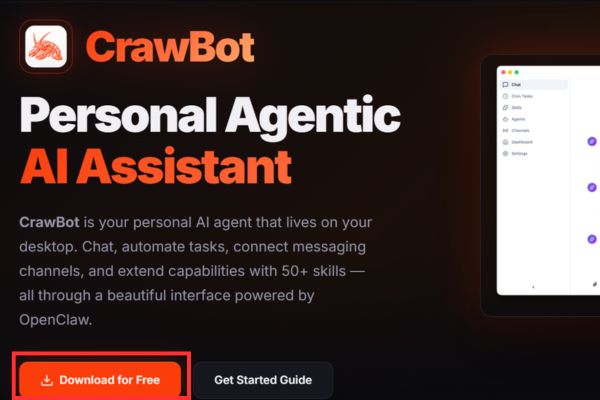
Step 1: Download Crawbot software from the homepage https://crawbot.net/ and proceed with the installation on your computer.
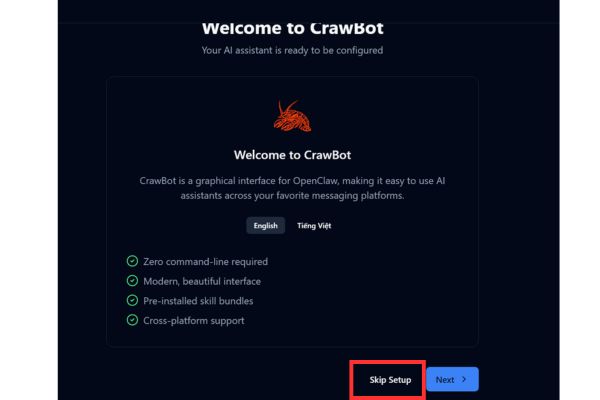
Step 2: Open the app, click the button Skip Setup to skip the initial intro screen.
Step 3: Access the section Settingsnavigate to section Browser Extensions. Here, you click Install, then press Open Extension Folder to open the folder containing the utility and copy the path of that folder.
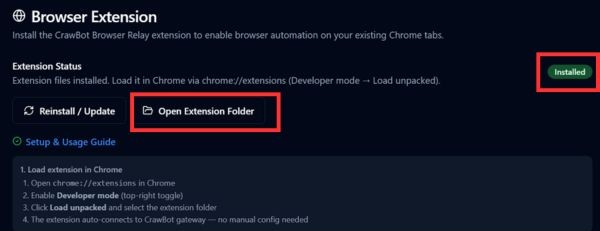
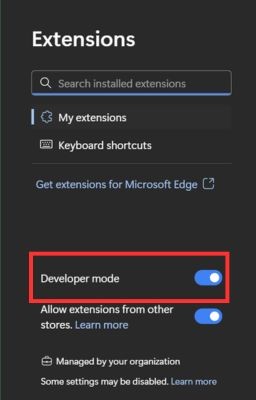
Step 4: Open Chrome browser, type chrome://extensions go to the address bar and turn on the mode Developer Mode (Developer mode) in the right corner.
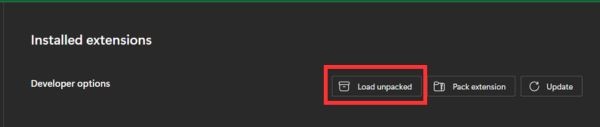
Step 5: Click the button Load Unpacked.
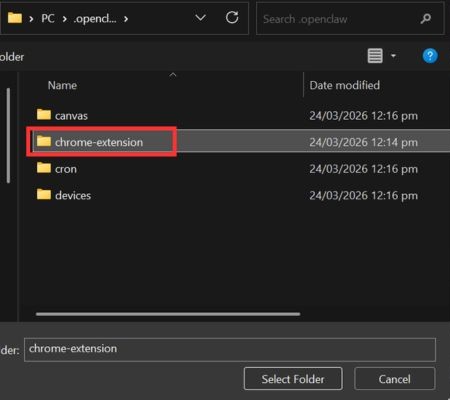
Paste the link you just copied above to download the chrome-extension folder to the browser.
After installing the extension, we will proceed to get a login session (session) to grant permissions to the Agent.
Step 6: Keep the Chrome window intact (make sure you’re signed in to your ChatGPT or Google Gemini account).
Step 7: Return to the Settings section of the software. At section WebAuth Providersyou press the button Add and select the platform you want to use (ChatGPT or Gemini).
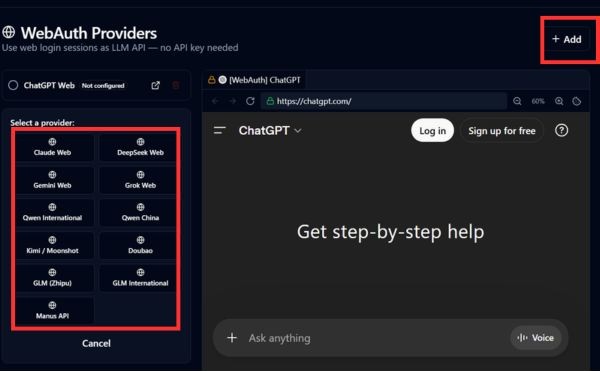
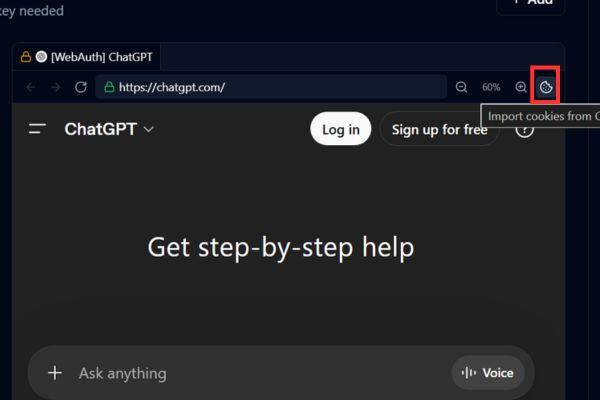
Step 8: When the chat website screen appears inside the software, click on the car icon cookies. This action helps the system automatically import accounts from Chrome into the anti-detect browser.
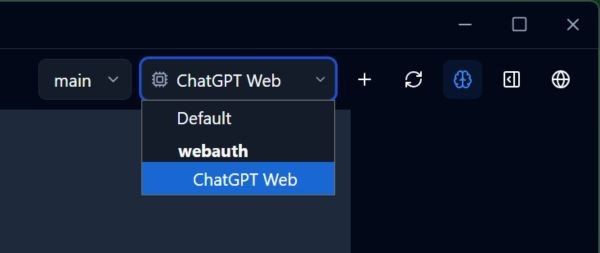
Follow the above steps correctly and you have completed how to run OpenClaw with Crawbot perfectly. Now, you just need to return to the main interface, select the model WebAuth ChatGPT or WebAuth Gemini and start chatting, reading photos and calling tools as smoothly as the paid API.
Conclusion
In short, How to run OpenClaw using Crawbot is an extremely useful trick for the technology enthusiast community. It not only helps you satisfy your passion for dabbling in AI but also protects your wallet to the maximum. Wishing you a successful installation and great experiences with your virtual assistant.
Frequently Asked Questions (Q&A)
1. Using this method, are you afraid of having your ChatGPT account locked?
It happens very rarely. The software uses an anti-detect browser to help simulate a real user environment, so it is not scanned as harshly as regular data scraping tools.
2. Can I use a free account to run?
You can still use a free account, but for AI Agent to work intelligently and call the tool most accurately, you should invest in paid packages like ChatGPT Plus or Gemini Advanced.
3. If the Chrome browser updates, will the extension fail?
Sometimes changes in AI’s web interface can disrupt connections. At that time, you just need to wait for the software developer to release a new update to be able to sync normally again.