OpenClaw.ai is an open source AI assistant project that is attracting great attention in the technology community in early 2026. This is not simply a chatbot like ChatGPT, but a AI Agent (autonomous task) capable of performing actions directly on the user’s computer.
| Join the channel Telegram belong to AnonyViet 👉 Link 👈 |
What is OpenClaw?
OpenClaw (formerly known as Clawdbot and Moltbot) is a self-hosted AI assistant platform. It acts as a “control station” that connects artificial intelligence models (like GPT-4, Claude 3) with your everyday applications through messaging platforms.
This project was created by developer Peter Steinberger. It has undergone two name changes:
- Clawdbot: Original name (pun on “Claude” and “Claw”).
- Moltbot: Alternate name after copyright request from Anthropic.
- OpenClaw: Current official name, reflecting open source and community nature.
Outstanding features
- Having “hands” (Agency): Unlike chatbots that only answer questions, OpenClaw can perform practical tasks such as: managing schedules, sending emails, checking flights, or even running terminal commands on the computer.
- Run locally (Self-hosted): You install OpenClaw on your own hardware (PC, Mac Mini, Raspberry Pi or VPS). This helps personal data and chat history be stored locally instead of on large companies’ servers.
- Multi-channel integration: You can control OpenClaw through familiar messaging applications such as WhatsApp, Telegram, Discord, Slack or iMessage.
- Persistent Memory: It has the ability to remember information, preferences, and decisions from previous conversations to personalize responses over time.
- Automatic browser: OpenClaw integrates a “headless” browser that allows it to access the web, fill out forms, collect data (scrape), and interact with websites on your behalf.
How OpenClaw works
OpenClaw acts as a “message router” running with Node.js. The basic process is as follows:
- You send messages via Telegram/WhatsApp/Zalo.
- OpenClaw receives and sends requests to the AI model (via API keys of OpenAI, Anthropic, etc.).
- The AI decides which tool to use (e.g., search the web or run a script).
- OpenClaw executes that command on your computer and returns the result in a message.
Detailed instructions for using OpenClaw
Once installed, continue typing commands
openclaw onboard --install-daemon

Press Y to agree
Select QuickStartpress Enter
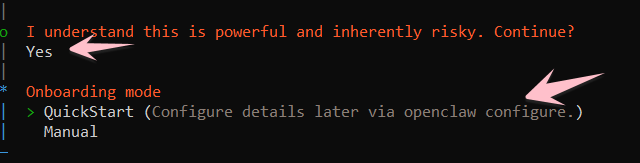
Just press Enter continuously, until the Open AI browser (ChatGPT) appears, log in to get the authentication link.
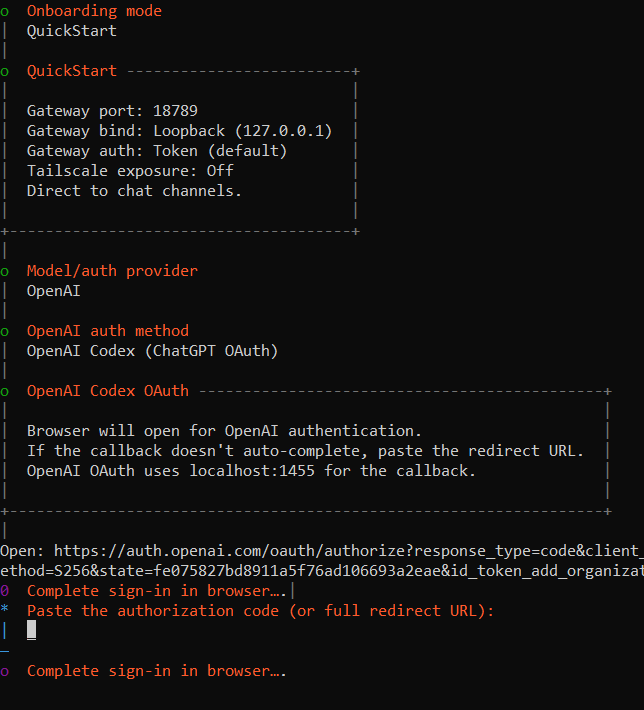
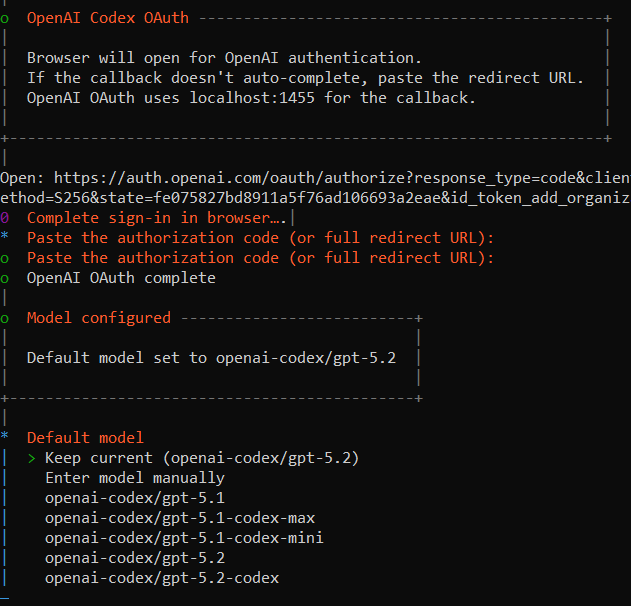
After logging in to OpenAI, you copy link, is created in the browser paste into Terminal window (CMD)
After pasting the link, select Model AI to be your assistant, press the up and down arrow button to select, then press Enter.
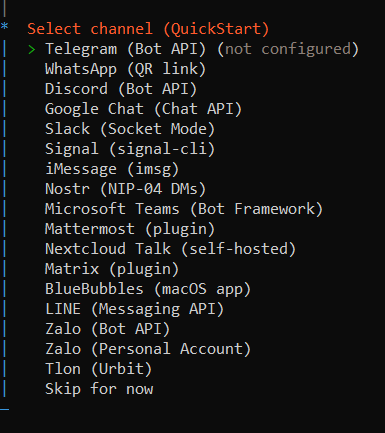
Next is to choose the interface channel with OpenClaw, I will choose Telegram to issue commands to OpenClaw, (It also supports Zalo, guys).
Now we will create a Telegram bot (it will be our assistant):
- Go to telegram and find the bot @BotFather
- Type: /newbot
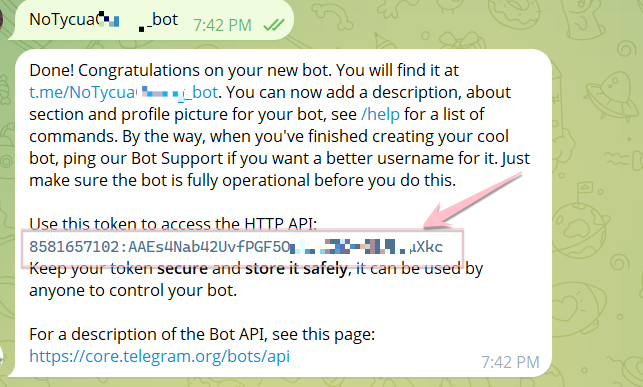
- Enter the bot name (remember to put the word bot right after it), for example: TroLyAnoyViet_bot
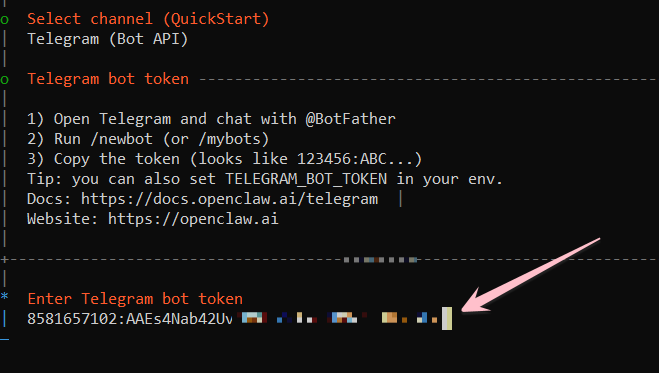
- After success, copy the generated API Token and paste it into Terminal (CMD).
Paste into Terminal, press Enter
Select configuration Skillspress No
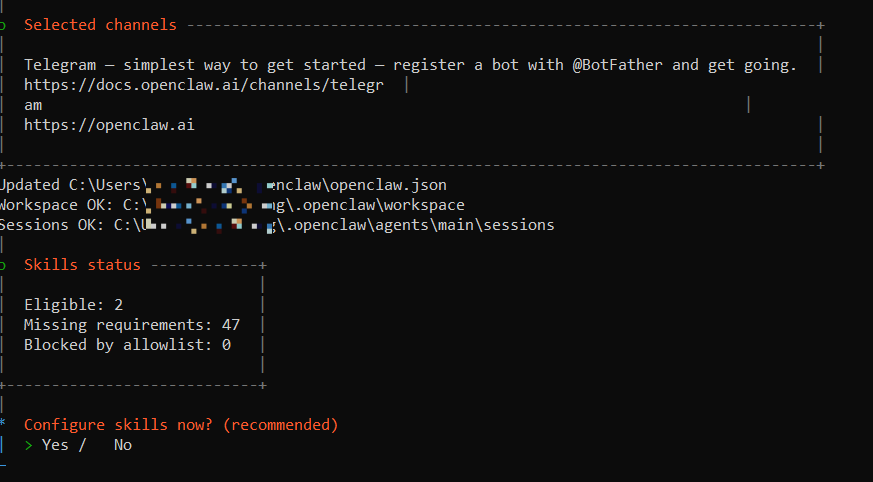
In the following steps, just choose Yes, then use the Space button to select and then Enter until the end. In the final step, you will create your OpenClaw management page according to the link http://127.0.0.1:18789/?token=……

If you can’t access the link, continue using the command
openclaw gateway --port 18789 --verbose
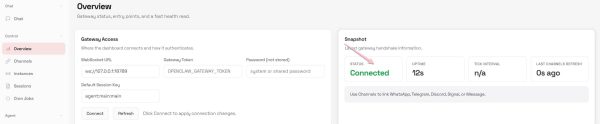
Then open a Web browser and access the link http://127.0.0.1:18789/?token=……
If you see Connected, you have successfully installed OpenClaw
Next, confirm the Telegram Bot with OpenClaw, try chatting any content with the Telegram Bot you just created above, it will display the code.
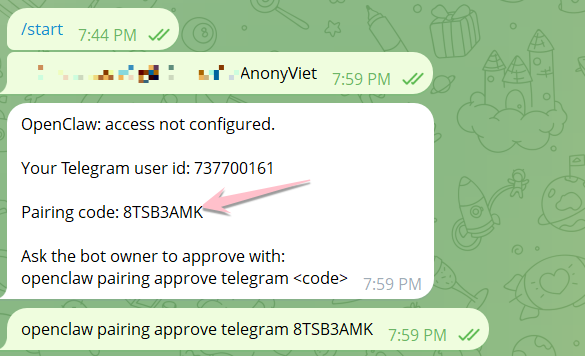
Open CMD and type the command: openclaw pairing approve telegram

Continue at the CMD screen and type the command:
npm i -g openclaw
openclaw node run --host localhost --port 18789 --display-name "My PC"
pair OpenClaw Gateway
Now go back to the Telegram Bot and tell OpenClaw to work:
Some easy-to-use sample commands
Create files
Tạo file note.txt với nội dung chào mừng anonyviet đến với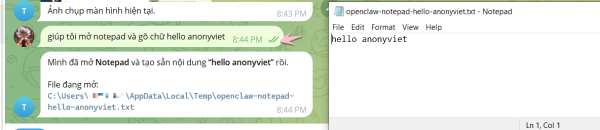
Folder management
Tạo thư mục backup và copy toàn bộ file pdf vào đóMake a plan
Lập lịch học tiếng Anh 30 phút mỗi ngàyCompose emails
Soạn email gửi cho Admin AnonyViet đề nghị hướng dẫn sử dụng OpenClaw (giọng lịch sự, ngắn gọn)Skill concept in OpenClaw
Skills is a skill that helps OpenClaw do specific things, for example:
- File Skills: file/folder manipulation
- Shell Skills: run system commands
- Web/API Skills: call API, access web
You can turn skills on/off depending on your needs, or write your own skills if you want to expand your capabilities.
Mỗi ngày lúc 23h, hãy di chuyển file video sang thư mục Video, file ảnh sang thư mục ImagesAgent will plan and execute according to schedule (depending on scheduler/permission configuration).
Important security note
- Do not grant high rights (admin/root) if not needed
- Only use skills/plugins from trusted sources
- Do not share API keys (.env)
- If running on a server: limit IP access, use firewall and strong password
How is OpenClaw different from ChatGPT?
| Criteria | ChatGPT | OpenClaw |
|---|---|---|
| Answer the question | Have | Have |
| Execute the task | Limit | Yes (depending on skill/permission) |
| Process automation | Not the focus | Is the focus |
| Expand plugins/skills | Depends on the ecosystem | Strong, flexible |
Important notes when using OpenClaw
- Technical knowledge: Installing OpenClaw requires users to have basic knowledge of Docker and server management.
- Security risks: Because OpenClaw has deep access to the system (reading/writing files, running terminal commands), if not configured properly or attacked via “prompt injection”, it can endanger personal data. Security experts recommend running it in an isolated environment (VM or Docker).
- Expense: Even though the software is free (open source), you still have to pay API usage fees to the model providers (like OpenAI or Anthropic).
Frequently Asked Questions (FAQ)
Is OpenClaw free?
The source code/platform may be free, but you may need to pay for the AI API (depending on the model provider you use).
Can people who don’t know how to code use it?
Have. You can assign tasks using natural language. However, advanced configuration will require a basic understanding of the settings.
Does it run on the server?
Maybe. But you need to pay attention to security and authorization, especially if the agent has the right to run system commands.
Conclude
OpenClaw is an AI Agent approach that helps you turn AI into a “working assistant”, suitable if you want Work automation, save time and building smart processes.