The mastery How to update residential address on VNeID is becoming more urgent than ever with important changes in administrative regulations about to take effect at the end of 2025. Instead of having to worry about preserving hard copy documents, people can fully take advantage of the benefits of technology to digitize personal data right on their smartphones.
| Join the channel Telegram belong to AnonyViet 👉 Link 👈 |
New penalty regulations related to residence information
According to the content of Decree 282/2025/ND-CP, starting from December 15, 2025, regulations on sanctioning administrative violations in the field of security and order will officially be applied more strictly. One of the most notable points is the obligation of citizens to present residence information when requested by the authorities.
If an individual cannot provide valid residency information at the time of inspection, a warning or fine from 500,000 VND to 1,000,000 VND will be enforced. For violating organizations, this fine will be doubled. This is why it is so important to have residency data ready.
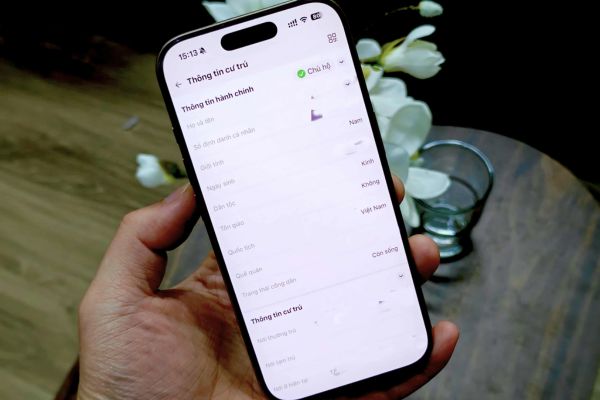
Conditions for using VNeID to replace traditional documents
In the era of digital transformation, VNeID application considered the most convenient and legal alternative to hard copy identification documents. However, for this feature to work smoothly and be recognized, users need to meet certain technical standards.
Citizens’ electronic identity accounts must be activated Level 2this procedure needs to be done directly at the police station. In addition, users’ mobile devices also need to update the VNeID application to the latest version to ensure there are no errors during the data retrieval process.

Instructions on how to update residential address on VNeID online
To help people carry out procedures without wasting time traveling to the police station, the application has integrated a very intuitive online declaration feature. Procedure for updating residential address above VNeID includes the following specific steps:
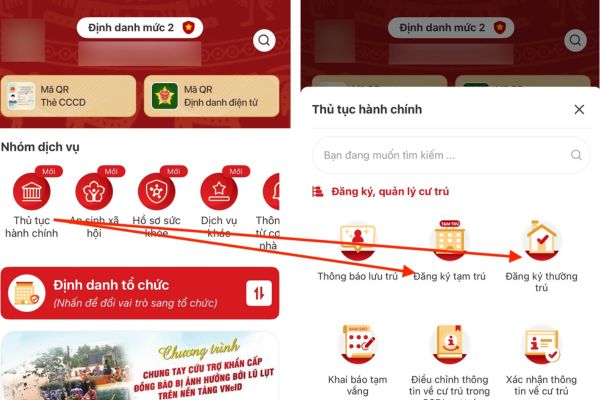
- Users access the main interface of the application after logging in and find the item Administrative procedures.
- The system will display two options: Register for temporary residence or Register for permanent residence for people to choose based on their actual needs.
- After selecting the type of residence, the user clicks on the button Create new request and choose to declare for Self or Open for others.
- Information fields marked in red are required, so users need to fill in these data completely and accurately.
- The operator needs to press the button Check Let the system review all the information you just entered before going to the final step.
- The completion step requires the user to check the box pledging responsibility for the testimony and click Submit to transfer the data to the authorities for processing into the National Population Database.
Action to present residence information when being inspected
When facing the authorities or needing to perform administrative transactions requiring proof of residence, data extraction from VNeID happens very quickly.
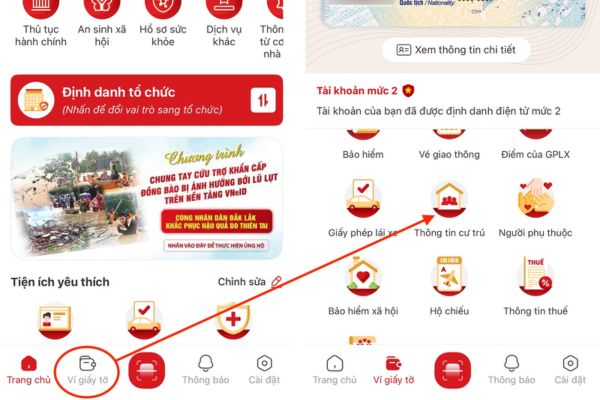
- People access the application and select items Document wallet in the menu bar below or search for the item Residence information in the Favorites section.
- To ensure security and privacy, the application will require users to enter a passcode (password protection) before displaying data.
- The screen will display all important information such as current residence, permanent address, full name of the householder and relationship with the householder.
- Features Other household members also supports users to view information of people with the same household registration. If there are errors, they need to contact the local police to correct the original.
Clearly distinguish permanent residence and temporary residence to avoid errors
In order for the declaration process to proceed smoothly, it is necessary to properly understand the nature of these two types of residence.
- Permanent residence is understood as a stable, long-term residence of a citizen, usually attached to a legally owned house or a place approved by the householder for import.
- Temporary residence is a place where a citizen lives for 30 days or more but is outside the permanent residence address, with a maximum registration period of 2 years and can be renewed multiple times.
Conclusion
Proactive research and implementation How to update residential address on VNeID Not only does it help each individual avoid legal troubles or unnecessary fines, but it also contributes to accelerating the process of digitizing administrative procedures. Please check and update your information today to be ready for all testing requirements from December 15.