• Home
  • News
  • Software
  • Knowledge
  • MMO
  • Tips
  • Security
  • Network
  • Office
AnonyViet - English Version
  • Home
  • News
  • Software
  • Knowledge
  • MMO
  • Tips
  • Security
  • Network
  • Office
No Result
View All Result
  • Home
  • News
  • Software
  • Knowledge
  • MMO
  • Tips
  • Security
  • Network
  • Office
No Result
View All Result
AnonyViet - English Version
No Result
View All Result

HUSH: A annoying bonding tool on Safari

AnonyViet by AnonyViet
April 13, 2025
in Software
0

Surfing the web today is sometimes like walking through a “mines” full of cookies Banners. Each website bothers you with a pop-up window asking if you accept cookies or not. Although this is a mandatory requirement to comply with security regulations, they are really annoying. If you are using Safari on Mac, iPhone or iPad, there is a great solution to help you eliminate this problem once and forever: HUSH.

Join the channel Telegram belong to Anonyviet 👉 Link 👈

What is Hush?

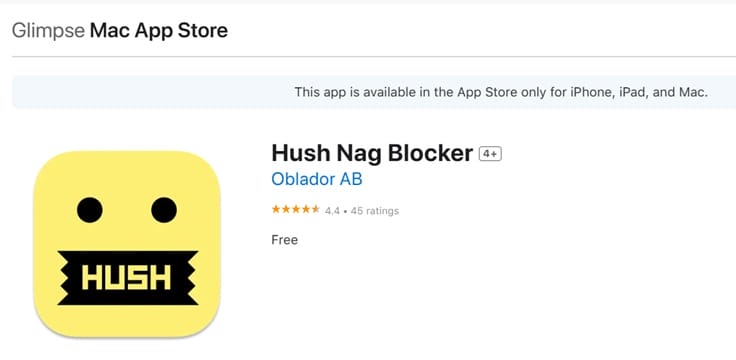
HUSH (Also known as Hush Nag Blocker) is a free and open source extension, designed to block the Cookies Banners and tracking codes that often come with them.

Unlike other blocking tools, HUSH does not automatically click “accept” or “refuse”. Instead, it simply eliminates these annoying notices before they appear. As a result, you can enjoy the smooth browsing experience without affecting your privacy.

What is Hush?
What is Hush?

Why is Hush useful?

Cookie Banners is not only annoying but can also slow down your web browser. Every time you visit a new website, you have to stop to handle these notifications, which can interrupt your experience.

Hush solves this problem by automatically hiding cookies Banners, helping you focus on the content you are interested in.

See also: Minibin – Access the trash fast On the Taskbar bar

Instructions for installing and activating HUSH on Safari

Installing Hush very quickly and easily, whether you are using Mac, iPhone or iPad. Just follow the simple steps below:

On iPhone and iPad

Download Hush from App Store
  • Open application Settings And choose Safari.
  • Go to the part Extensions And turn on Hush.
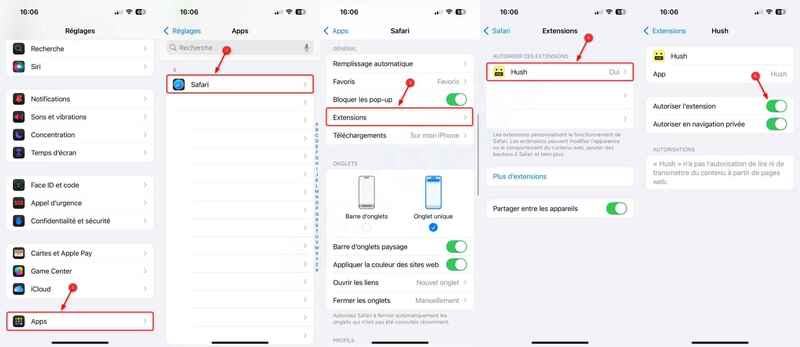
Go to the extensions and turn on HUSH

On Mac

Download Hush from Mac App Store
  • Open Safari, choose Settings and go to the part Extensions.
  • Turn on HUSH and let it automatically operate.

Hush does not directly block ads, but it has an impact on the display of ads. When there is no clear consent of cookies, theoretical advertising networks are not allowed to display ads. If you still see ads appear, it means that some websites do not comply with general data protection regulations.

See also: Explorerblurmica: Create shimmering effects for the Explorer interface

Conclusion

HUSH A great tool for Safari users, helping to eliminate annoying cookies and bring a smoother browsing experience. With a simple and completely free installation, Hush deserves an indispensable utility in your browser.


Tags: annoyingbondingHUSHSafaritool
Previous Post

Facebook Neighborhoods: Social network for neighbors

Next Post

Create 64GB RAM 16 core for free on Google IDX

AnonyViet

AnonyViet

Related Posts

TruyenDrive: Turn Google Drive into a professional manga reader
Software

TruyenDrive: Turn Google Drive into a professional manga reader

May 31, 2026
How to extract text from photos using Zalo is super simple
Software

How to extract text from photos using Zalo is super simple

May 29, 2026
HONOR 600 in hand – High-end design, 200MP camera, not cheap price
Software

HONOR 600 in hand – High-end design, 200MP camera, not cheap price

May 28, 2026
Instructions for getting 4 months of Adobe copyright for free
Software

Instructions for getting 4 months of Adobe copyright for free

May 28, 2026
The truth about the 7,000 mAh battery on Xiaomi 17T Pro: What benefits do users get?
Software

The truth about the 7,000 mAh battery on Xiaomi 17T Pro: What benefits do users get?

May 28, 2026
Instructions on how to turn text into stickers on Gboard
Software

Instructions on how to turn text into stickers on Gboard

May 26, 2026
Next Post
Create 64GB RAM 16 core for free on Google IDX

Create 64GB RAM 16 core for free on Google IDX

0 0 votes
Article Rating
Subscribe
Login
Notify of
guest

guest

0 Comments
Oldest
Newest Most Voted
Inline Feedbacks
View all comments

Recent News

How to record reaction videos with Android phones, no app needed

How to record reaction videos with Android phones, no app needed

June 1, 2026
Instructions on how to get Google AI Pro 1 year for free for new accounts

Instructions on how to get Google AI Pro 1 year for free for new accounts

June 1, 2026
Top free AI tools to help write, test and optimize content

Top free AI tools to help write, test and optimize content

June 1, 2026
TruyenDrive: Turn Google Drive into a professional manga reader

TruyenDrive: Turn Google Drive into a professional manga reader

May 31, 2026
How to record reaction videos with Android phones, no app needed

How to record reaction videos with Android phones, no app needed

June 1, 2026
Instructions on how to get Google AI Pro 1 year for free for new accounts

Instructions on how to get Google AI Pro 1 year for free for new accounts

June 1, 2026
Top free AI tools to help write, test and optimize content

Top free AI tools to help write, test and optimize content

June 1, 2026
AnonyViet - English Version

AnonyViet

AnonyViet is a website share knowledge that you have never learned in school!

We are ready to welcome your comments, as well as your articles sent to AnonyViet.

Follow Us

Contact:

Email: anonyviet.com[@]gmail.com

Main Website: https://anonyviet.com

Recent News

How to record reaction videos with Android phones, no app needed

How to record reaction videos with Android phones, no app needed

June 1, 2026
Instructions on how to get Google AI Pro 1 year for free for new accounts

Instructions on how to get Google AI Pro 1 year for free for new accounts

June 1, 2026
No Result
View All Result
  • Home
  • News
  • Software
  • Knowledge
  • MMO
  • Tips
  • Security
  • Network
  • Office

wpDiscuz
0
0
Would love your thoughts, please comment.x
()
x
| Reply