• Home
  • News
  • Software
  • Knowledge
  • MMO
  • Tips
  • Security
  • Network
  • Office
AnonyViet - English Version
  • Home
  • News
  • Software
  • Knowledge
  • MMO
  • Tips
  • Security
  • Network
  • Office
No Result
View All Result
  • Home
  • News
  • Software
  • Knowledge
  • MMO
  • Tips
  • Security
  • Network
  • Office
No Result
View All Result
AnonyViet - English Version
No Result
View All Result

3 good tips to use Chrome Devtools for people who do not know the code

AnonyViet by AnonyViet
March 8, 2025
in Tips
0

Chrome is a web browser that is so famous in Google's world. In Chrome there is Chrome Devtools good support for coder. But if you do not know the code can still apply some good tips with Chrome Devtools.


Join the channel Telegram belong to Anonyviet 👉 Link 👈

Here I will introduce and guide you 3 tips to use Chrome Devtools when you do not know the code, and of course when you do not know the code, I can not guide you to use the tools as a web programming coder that I only guide some tips not related to code but it is very useful for a normal user.

First click F12 or the left click select “Check” to turn on the Developer Tools.

Modify data on the web to troll friends

I want to remind you that this only changes the data display of the website above Your computer Not changing on all computers who are visiting the website. Chrome Devtools helps you edit the content of people quite simply.

Step 1: I will model with an article of VnExpress.

Modify data on the web to troll friends

Then click on the box as shown I marked No. 1, select an image at No. 2, left click on the number 3 and select “Edit as html”

Step 2: Delete the link of that photo, the link has the yellow image I marked below.

Elements 1

Then insert the link of another picture that you want it to appear on the website + Enter is done.

Select the “Console” tab, at the bottom of you enter the code line document.designMode="on". Then go to the website to edit
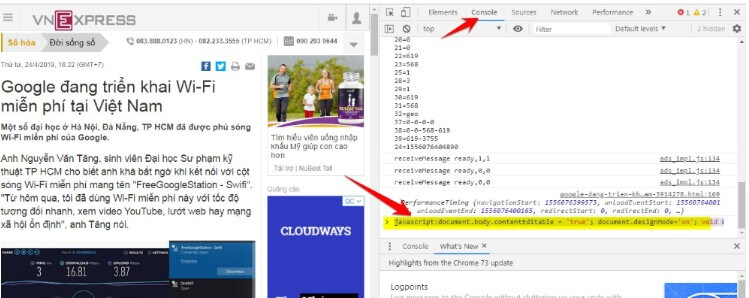
Code instead of website content

These games you can do on Facebook to troll your friends. For example, for your friends to report

Note: If you reload the page, everything you edit will disappear. How to edit the text above can also edit messages in Messenger. So someone takes the message again, do not believe it, there are many scams that happened because of it.

Chrome Devtools supports screenshots on Chrome. There will be a time when you need images from a website to work or entertain and you will often choose a third party software to do it, but from now on after reading this article, take advantage of the tool available on Chrome.

Step 1: Select the three dots + Run Command.

 Take screenshots of the website with Chrome Devtools

Step 2: Enter “screenshot” into the search box at the top.

screenshot

It will show four results as shown, you can choose one of the four ways to have the most suitable image

  • Capture Area Screenshot: You can choose the shooting area on Chrome.
  • Capture full size screenshot: Take the entire website and are only useful when the site displays text or images, and if the site is a web application, it only takes the display.
  • Capture Node Screenshot: Take photos according to the web element (code). For example

    abcxyz

  • Capture Screenshot: Just want to take screenshots of the current display area.

It will then download itself so there is no need to manipulate more.

If you see this cumbersome way can use Tinytake To make it easier to take screenshots.

Download music files, audio website

Chrome Devtools helps display audio files being loaded when listening online. You can take advantage of this feature to download music files and sounds from other websites.

Step 1: Go to the website you want to download the file, I will model at https://mp3.zing.vn/

3 good tips to use Chrome Devtools for people who do not know the code

  • Open Network tab -> Media + Click to listen to music to load the file.
  • It will then display the file name in Muc Name and the size of the file in the size.
  • You double click on the file name, it will move to the download page.

Download music with Chrome

You can download music from mp3 zing or nhaccuatui or any other online music site. This helps you save some money instead of buying a vip acc. This tip is also very helpful and a lot of support for your foreign language learning because it can download audio files from Google Translate.

In some news websites or Nhaccuatui, you can use this method to download the video. Unfortunately, this way can not download videos from 2 major social networks today are YouTube and Facebook. I tried quite a lot but still could not download it. And if you need videos from these 2 MXH, I recommend downloading 2 browsers to use Cup, Peanut (of Bkav)/

So I have introduced and instructed you 3 good tips to use Chrome Devtools. The above tips are all my heart after many years of using Chrome. I find the most useful thing is to download audio files from Google Translate because it can help many of you learn English proactively.

Collaborator: Truong Thuy Quang Nhat
Previous Post

How to exploit the holy hole of Hijacking on Windows

Next Post

Hướng dẫn tự tắt các tính năng không cần thiết của Windows 10

AnonyViet

AnonyViet

Related Posts

How to get 60 days of free web hosting without a card
Tips

How to get 60 days of free web hosting without a card

November 25, 2026
How to cancel Facebook Plus package to avoid automatic renewal
Tips

How to cancel Facebook Plus package to avoid automatic renewal

November 23, 2026
How to unlock iPhone Duo face on iOS 27.3 Beta 2
Tips

How to unlock iPhone Duo face on iOS 27.3 Beta 2

November 23, 2026
Naykia: App saves posts across multiple platforms, keeping the post intact even if the original post is deleted
Tips

Naykia: App saves posts across multiple platforms, keeping the post intact even if the original post is deleted

November 22, 2026
Free CNSF certification exam guide from Red Team Leaders
Tips

Free CNSF certification exam guide from Red Team Leaders

November 21, 2026
Instructions for registering Google AI Pro for 2 years for free until 2028
Tips

Instructions for registering Google AI Pro for 2 years for free until 2028

November 21, 2026
Next Post
Hướng dẫn tự tắt các tính năng không cần thiết của Windows 10

Hướng dẫn tự tắt các tính năng không cần thiết của Windows 10

0 0 votes
Article Rating
Subscribe
Login
Notify of
guest

guest

0 Comments
Oldest
Newest Most Voted

Recent News

Co Con Suet Tre: Game to practice Vietnamese, English, Chinese pronunciation by voice

Co Con Suet Tre: Game to practice Vietnamese, English, Chinese pronunciation by voice

November 27, 2026
The truth about POCO X8s – What are the limitations behind the Snapdragon 7 Gen 4 chip that you need to know?

The truth about POCO X8s – What are the limitations behind the Snapdragon 7 Gen 4 chip that you need to know?

November 27, 2026
How to book train tickets using VNeID is extremely easy, you should know

How to book train tickets using VNeID is extremely easy, you should know

November 26, 2026
Vietnam static residential proxy: How to choose and use the service

Vietnam static residential proxy: How to choose and use the service

November 26, 2026
Co Con Suet Tre: Game to practice Vietnamese, English, Chinese pronunciation by voice

Co Con Suet Tre: Game to practice Vietnamese, English, Chinese pronunciation by voice

November 27, 2026
The truth about POCO X8s – What are the limitations behind the Snapdragon 7 Gen 4 chip that you need to know?

The truth about POCO X8s – What are the limitations behind the Snapdragon 7 Gen 4 chip that you need to know?

November 27, 2026
How to book train tickets using VNeID is extremely easy, you should know

How to book train tickets using VNeID is extremely easy, you should know

November 26, 2026
AnonyViet - English Version

AnonyViet

AnonyViet is a website share knowledge that you have never learned in school!

We are ready to welcome your comments, as well as your articles sent to AnonyViet.

Follow Us

Contact:

Email: anonyviet.com[@]gmail.com

Main Website: https://anonyviet.com

Recent News

Co Con Suet Tre: Game to practice Vietnamese, English, Chinese pronunciation by voice

Co Con Suet Tre: Game to practice Vietnamese, English, Chinese pronunciation by voice

November 27, 2026
The truth about POCO X8s – What are the limitations behind the Snapdragon 7 Gen 4 chip that you need to know?

The truth about POCO X8s – What are the limitations behind the Snapdragon 7 Gen 4 chip that you need to know?

November 27, 2026
  • Home
  • Home 2
  • Home 3
  • Home 4
  • Home 5
  • Home 6
  • Next Dest Page
  • Sample Page

say88 tỷ lệ kèo nhà cái kèo nhà cái 5 febet

No Result
View All Result
  • Home
  • News
  • Software
  • Knowledge
  • MMO
  • Tips
  • Security
  • Network
  • Office

say88 tỷ lệ kèo nhà cái kèo nhà cái 5 febet

wpDiscuz
0
0
Would love your thoughts, please comment.x
()
x
| Reply