• Home
  • News
  • Software
  • Knowledge
  • MMO
  • Tips
  • Security
  • Network
  • Office
AnonyViet - English Version
  • Home
  • News
  • Software
  • Knowledge
  • MMO
  • Tips
  • Security
  • Network
  • Office
No Result
View All Result
  • Home
  • News
  • Software
  • Knowledge
  • MMO
  • Tips
  • Security
  • Network
  • Office
No Result
View All Result
AnonyViet - English Version
No Result
View All Result

How to share screen on Linux KDE Plasma

AnonyViet by AnonyViet
January 24, 2023
in Network
0

This is the reason KDE Plasma Desktop Built-in screen sharing feature. If you’ve ever performed remote support professionally or helped someone, have you ever been on a call where problem solving was secondary to the impossible task of figuring out what to expect? on your user’s screen. How many times have you described complex computer tasks only to realize that your user hasn’t even turned on the computer?

Join the channel Telegram of the AnonyViet 👉 Link 👈

How to share screen on Linux KDE Plasma

Network safety

DE Plasma uses a point-to-point invitation model for screen sharing. The user launches an application, starts a Virtual Network Connection (VNC) server, where the facilitator can view and even control the computer remotely. If this sounds insecure, there’s still firewall interference. If you are a supporter for someone who is not on the same network as you, you must establish a secure path from your network to the user’s network before screen sharing. Ideally, you should do this before you get a warning:

1. Configure the user’s router to route the VNC port (5900 by default, but you can use any port you like) to their computer.

2. Open a service in the user’s local firewall to allow VNC traffic (on the port you specified in the first step).

Remote screen sharing

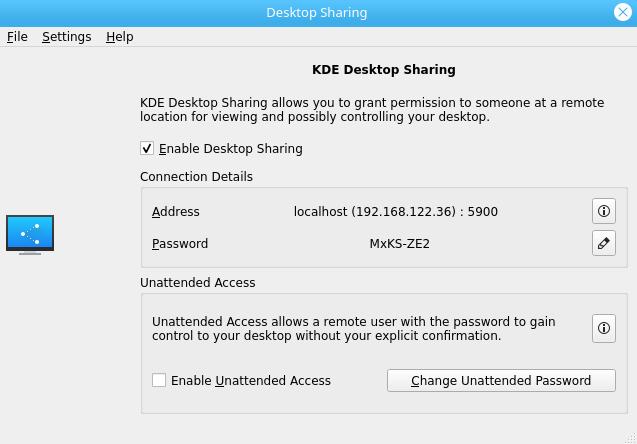
To start a screen sharing session, the user must start the application krfb (short for KDE remote frame buffer). This starts the VNC server and generates a temporary password.
How to share screen on Linux KDE Plasma 4

The default port that krfb uses is 5900, but you can change that if needed in the krfb settings. However, this is something you should do first, so you can avoid trying to explain to the user how to change the port of the protocol.

View and control

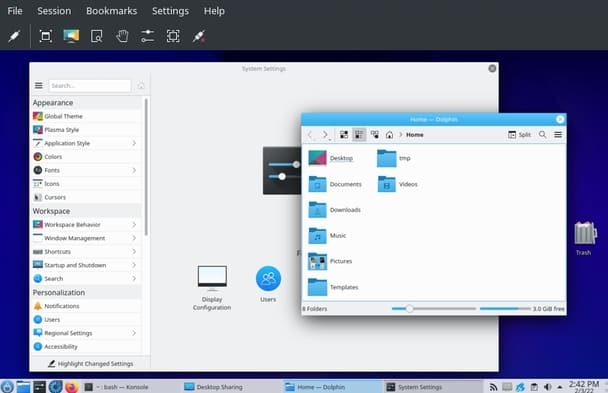
While this window is open, you can log in via VNC using your favorite VNC client. KDE includes the application krdc (short for KDE remote desktop client). On a supporting computer, launch it and give it the destination IP address. When you are prompted for a password, enter the password that is visible in the krfb session you are connecting to.
How to share screen on Linux KDE Plasma 5

Once connected, you can see the user’s screen and you can guide them. If they have trouble following your instructions, you can control their mouse. By default, krfb (that’s the app they’re running) asks them for permission before handing over control back to you.

Seeing what your users see can speed troubleshooting and reduce time for both. Provided you have your network set up for support first, the combination of krfb and krdc are valuable tools for Linux professionals to guide new users.

In addition, you can also create your own Desktop Environment on Linux here.

The article achieved: 5/5 – (100 votes)

Tags: KDELinuxPlasmascreenShare
Previous Post

How to exploit Command Injection error

Next Post

How many colors does iPhone 14 Plus have?

AnonyViet

AnonyViet

Related Posts

Instructions for detecting network vulnerabilities: How to check the system for data leaks (IP/DNS)
Network

Instructions for detecting network vulnerabilities: How to check the system for data leaks (IP/DNS)

October 9, 2026
Is Renting a Cheap VPS to Run Docker Really Effective?
Network

Is Renting a Cheap VPS to Run Docker Really Effective?

July 2, 2026
How to get a free domain for 1 year from Gravatar
Network

How to get a free domain for 1 year from Gravatar

June 23, 2026
Cloud Infrastructure Resilience: Mitigating Advanced Layer 7 Vulnerabilities and Securing High-Throughput Database Handshakes
Network

Cloud Infrastructure Resilience: Mitigating Advanced Layer 7 Vulnerabilities and Securing High-Throughput Database Handshakes

June 20, 2026
Save image as Type contains malicious code: Remove immediately before losing money unfairly!
Network

Save image as Type contains malicious code: Remove immediately before losing money unfairly!

March 19, 2026
Instructions on how to register a .co.uk domain name for free for 1 year
Network

Instructions on how to register a .co.uk domain name for free for 1 year

March 12, 2026
Next Post
How many colors does iPhone 14 Plus have?

How many colors does iPhone 14 Plus have?

0 0 votes
Article Rating
Subscribe
Login
Notify of
guest

guest

0 Comments
Oldest
Newest Most Voted

Recent News

MBTI, Big Five, DISC or Holland: which personality test should you choose?

MBTI, Big Five, DISC or Holland: which personality test should you choose?

October 15, 2026
How to create a virtual Pet, a virtual character running around on the Desktop to relax

How to create a virtual Pet, a virtual character running around on the Desktop to relax

October 15, 2026
Record first, choose focus later: how to use 4K 60 fps Cinema mode on iPhone 18 Pro

Record first, choose focus later: how to use 4K 60 fps Cinema mode on iPhone 18 Pro

October 15, 2026
How to receive 22k from Viettel Tammi on the occasion of 22nd birthday

How to receive 22k from Viettel Tammi on the occasion of 22nd birthday

October 15, 2026
MBTI, Big Five, DISC or Holland: which personality test should you choose?

MBTI, Big Five, DISC or Holland: which personality test should you choose?

October 15, 2026
How to create a virtual Pet, a virtual character running around on the Desktop to relax

How to create a virtual Pet, a virtual character running around on the Desktop to relax

October 15, 2026
Record first, choose focus later: how to use 4K 60 fps Cinema mode on iPhone 18 Pro

Record first, choose focus later: how to use 4K 60 fps Cinema mode on iPhone 18 Pro

October 15, 2026
AnonyViet - English Version

AnonyViet

AnonyViet is a website share knowledge that you have never learned in school!

We are ready to welcome your comments, as well as your articles sent to AnonyViet.

Follow Us

Contact:

Email: anonyviet.com[@]gmail.com

Main Website: https://anonyviet.com

Recent News

MBTI, Big Five, DISC or Holland: which personality test should you choose?

MBTI, Big Five, DISC or Holland: which personality test should you choose?

October 15, 2026
How to create a virtual Pet, a virtual character running around on the Desktop to relax

How to create a virtual Pet, a virtual character running around on the Desktop to relax

October 15, 2026
  • Home
  • Home 2
  • Home 3
  • Home 4
  • Home 5
  • Home 6
  • Next Dest Page
  • Sample Page

say88 tỷ lệ kèo nhà cái kèo nhà cái 5 febet

No Result
View All Result
  • Home
  • News
  • Software
  • Knowledge
  • MMO
  • Tips
  • Security
  • Network
  • Office

say88 tỷ lệ kèo nhà cái kèo nhà cái 5 febet

wpDiscuz
0
0
Would love your thoughts, please comment.x
()
x
| Reply