• Home
  • News
  • Software
  • Knowledge
  • MMO
  • Tips
  • Security
  • Network
  • Office
AnonyViet - English Version
  • Home
  • News
  • Software
  • Knowledge
  • MMO
  • Tips
  • Security
  • Network
  • Office
No Result
View All Result
  • Home
  • News
  • Software
  • Knowledge
  • MMO
  • Tips
  • Security
  • Network
  • Office
No Result
View All Result
AnonyViet - English Version
No Result
View All Result

Instructions to register a free .COM Domain from Clickfunnels

AnonyViet by AnonyViet
January 26, 2023
in Network
0

Domain .com .net .rice. Soup currently costs about 5$/year. If you are a student, it is very difficult for a student to own a genuine .com domain for yourself. Fortunately, Clickfunnels now lets you register a .com domain for free. AnonyViet has tested and succeeded 100%. Just have any 1 email to register for an account, no visa/mastercard or paypal required.

Join the channel Telegram of the AnonyViet 👉 Link 👈

Beyond the way domain name registration Free at Clickfunnels, you can also refer to the program Register hosting and get free domain name in BKHOST.vn – With the advantage that the interface is completely in Vietnamese and the support team is also Vietnamese. Therefore, you can easily manipulate and choose the right service for you.

This is the DEMO domain I registered from Clickfunnels:

I have set DNS for the domain to redirect to anonyviet.com.

Find out what Clickfunnels are

Clickfunnels in the simplest terms is an online sales channel builder. By drag and drop you can create a page for marketing, selling online. What makes Clickfunnels special is its beginner-friendly layout and the services the website offers.

When it comes to creating sales funnels, Clickfunnels is the easiest solution for features like email marketing and affiliate program creation. Why is nnos so easy? It only takes a few minutes of design to get your channel up and running. By using Clickfunnels instead of hiring a Web design service, you will save a considerable amount of money.

Instructions to register a free .COM Domain from Clickfunnels

Sign up for an account

As a member of Clickfunnels, you will be able to register a .com domain for free. That said, you want to register a domain .net, .info… whatever.

Step 1: You proceed Register an account Clickfunnels. You can use temporary virtual mail to register multiple accounts.

Step 2: Fill in your personal information in USA. Information can be obtained at fakenamegenerator.

reg acc Clickfunnels free .com domain registration

Step 3: Scroll down a little bit to fill in Credit Card. I have created a large number of Credit Cards for you to use. Download from the link below and fill it out:

Download Virtual Credit Card

(This credit card only works to reg acc trial Clickfunnels)

Fill in the card information as shown below:

cc bin reg acc Domain .COM free from Clickfunnels

Step 4: Domain registration:

Visit the Domains page: https://app.clickfunnels.com/domains

If you have reached this step, you will definitely get a free domain from Clickfunnels. Proceed Click Avatar in the right corner, select Domain then follow the steps in the image below:

Instructions to register a free .COM Domain from Clickfunnels

In step 4 you can choose any domain, according to AnonyViet, there are .com, .net, .xyz, .info, .org, .name .click.

After registration is complete, you wait for a few hours to 1 day to receive a successful Domain reg notification. See the announcement in the yellow bell upper right corner.

domain status notification

Configure DNS for Domain in Clickfunnels

After a few hours, the free .com domain you registered at Clickfunnels will be Active. Currently Clickfunnels does not allow NameServer to be transferred, so you can manually configure DNS by the following:

Visit the page domain management by Clickfunnels. Select vertical ellipsis and Edit

adjust dns zone at Clickfunnels

Scroll to the bottom, select Edit Zone Records click Expand.

Friend have to delete all the records under. Afterward Create another Record Let the Domain point to the Host’s IP or another Domain as follows:

  • Type: Alias
  • Name: leave blank
  • Value: IP or domain you want to point to.

Eg:

edit zone records

Now clear your browser cache, and try accessing your free .com domain.

Note: Domain will be free for the first year, renewal fee for the second year is $20

The article achieved: 5/5 – (100 votes)

Tags: .comClickfunnelsDomainfreeInstructionsRegister
Previous Post

RecordCast – Record screen video without installing additional software

Next Post

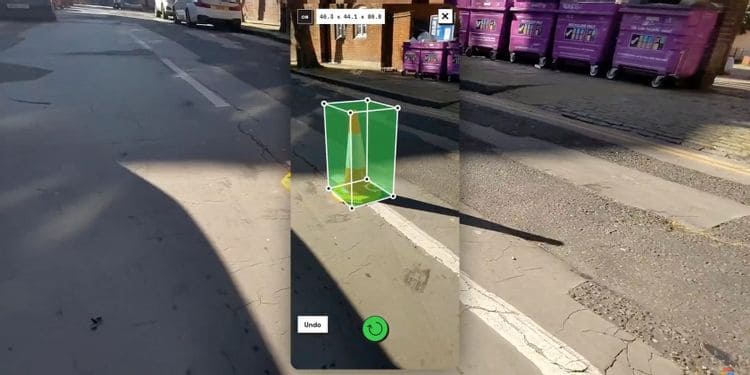
How to measure the area of ​​an object with Google’s Measure Up app

AnonyViet

AnonyViet

Related Posts

Save image as Type contains malicious code: Remove immediately before losing money unfairly!
Network

Save image as Type contains malicious code: Remove immediately before losing money unfairly!

March 19, 2026
Instructions on how to register a .co.uk domain name for free for 1 year
Network

Instructions on how to register a .co.uk domain name for free for 1 year

March 12, 2026
How to Setup Paperclip AI: Create a Company for AI Agent
Network

How to Setup Paperclip AI: Create a Company for AI Agent

March 12, 2026
Compilation of free and cheap APIs to run OpenClaw stably
Network

Compilation of free and cheap APIs to run OpenClaw stably

March 10, 2026
3 Services to Determine IP Location for Website (IP Geolocation API)
Network

3 Services to Determine IP Location for Website (IP Geolocation API)

March 10, 2026
How to buy a .STORE domain name for 1 USD (2026): Detailed instructions from A–Z
Network

How to buy a .STORE domain name for 1 USD (2026): Detailed instructions from A–Z

March 3, 2026
Next Post
How to measure the area of ​​an object with Google’s Measure Up app

How to measure the area of ​​an object with Google's Measure Up app

0 0 votes
Article Rating
Subscribe
Login
Notify of
guest

guest

0 Comments
Oldest
Newest Most Voted
Inline Feedbacks
View all comments

Recent News

How to turn off password suggestions on iPhone: Prevent Safari from auto-filling passwords

How to turn off password suggestions on iPhone: Prevent Safari from auto-filling passwords

April 27, 2026
Instructions for looking up prescriptions on VNeID instead of paper medical books

Instructions for looking up prescriptions on VNeID instead of paper medical books

April 26, 2026
Tips to completely turn off CAPTCHA codes on iPhone and Mac are super simple

Tips to completely turn off CAPTCHA codes on iPhone and Mac are super simple

April 25, 2026
Compare Poco X8 Pro and Poco X7 Pro: A new step for the “king” of mid-range performance

Compare Poco X8 Pro and Poco X7 Pro: A new step for the “king” of mid-range performance

April 24, 2026
How to turn off password suggestions on iPhone: Prevent Safari from auto-filling passwords

How to turn off password suggestions on iPhone: Prevent Safari from auto-filling passwords

April 27, 2026
Instructions for looking up prescriptions on VNeID instead of paper medical books

Instructions for looking up prescriptions on VNeID instead of paper medical books

April 26, 2026
Tips to completely turn off CAPTCHA codes on iPhone and Mac are super simple

Tips to completely turn off CAPTCHA codes on iPhone and Mac are super simple

April 25, 2026
AnonyViet - English Version

AnonyViet

AnonyViet is a website share knowledge that you have never learned in school!

We are ready to welcome your comments, as well as your articles sent to AnonyViet.

Follow Us

Contact:

Email: anonyviet.com[@]gmail.com

Main Website: https://anonyviet.com

Recent News

How to turn off password suggestions on iPhone: Prevent Safari from auto-filling passwords

How to turn off password suggestions on iPhone: Prevent Safari from auto-filling passwords

April 27, 2026
Instructions for looking up prescriptions on VNeID instead of paper medical books

Instructions for looking up prescriptions on VNeID instead of paper medical books

April 26, 2026
No Result
View All Result
  • Home
  • News
  • Software
  • Knowledge
  • MMO
  • Tips
  • Security
  • Network
  • Office

wpDiscuz
0
0
Would love your thoughts, please comment.x
()
x
| Reply