• Home
  • News
  • Software
  • Knowledge
  • MMO
  • Tips
  • Security
  • Network
  • Office
AnonyViet - English Version
  • Home
  • News
  • Software
  • Knowledge
  • MMO
  • Tips
  • Security
  • Network
  • Office
No Result
View All Result
  • Home
  • News
  • Software
  • Knowledge
  • MMO
  • Tips
  • Security
  • Network
  • Office
No Result
View All Result
AnonyViet - English Version
No Result
View All Result

Instructions for receiving CapCut Pro for 30 days for free

AnonyViet by AnonyViet
December 12, 2025
in Software
0

Get CapCut Pro 30 days free is the ideal first step for you to access a set of powerful and professional video editing tools. For creators always looking for innovation, the Pro version opens up a new horizon with advanced features that the regular version does not have.

Join the channel Telegram belong to AnonyViet 👉 Link 👈

Why is CapCut Pro a worthwhile upgrade?

This upgraded version is designed to address user limitations, providing a more seamless and efficient workflow.

Unlock exclusive creative resources

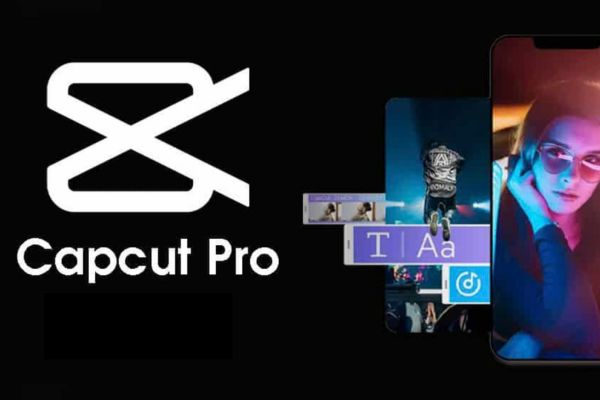
CapCut Pro provides access to a rich and premium library of resources, including visual effects, artistic color filters, dynamic text templates, and exclusive sounds. These elements not only help your video become lively and eye-catching, but also contribute to shaping your style and personal impression, helping your work stand out among countless other content.
Why is CapCut Pro a worthwhile upgrade?

Experience the power of advanced AI tools

This is the factor that makes CapCut Pro outstandingly different. Artificial intelligence algorithms are deeply integrated into the application, allowing you to perform complex tasks automatically and accurately. From perfectly separating the video background from the subject, automatically creating subtitles with high accuracy, to improving the quality of blurred videos, every step is optimized to save time and improve product quality.

Publish professional videos without watermark

One of the biggest hurdles with the free version is the CapCut logo that appears at the end of the video. With the Pro version, this barrier is completely removed. You can export video at the highest resolution, preserving image and sound quality, ensuring the final product reflects your professionalism and brand integrity.
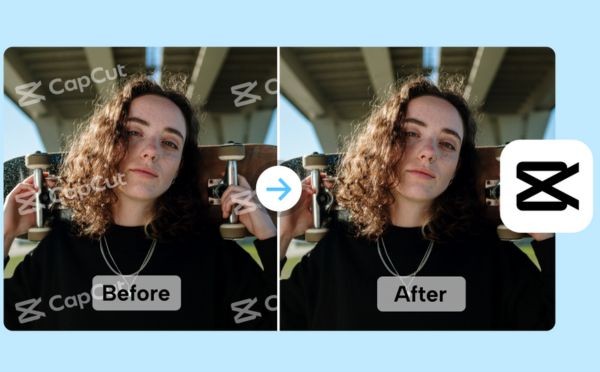
Publish professional videos without watermark

Instructions for receiving CapCut Pro for 30 days for free

The trial activation process is completely simple and requires no payment information.

Step 1: Let’s start by clicking the link HERE. Then press Download Now.
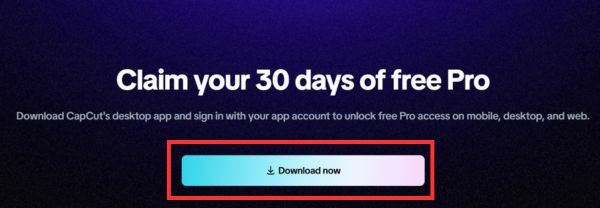
Instructions for receiving CapCut Pro for 30 days for free

Step 2: Double-click the file to start installing CapCut.

Step 3: Press Sign in to log in to your account.

After successfully logging in, your account will be automatically upgraded to the Pro package for a period of 30 days. Now you can open the CapCut app on any device, log in to your account, and immediately start using all the newly unlocked premium features.
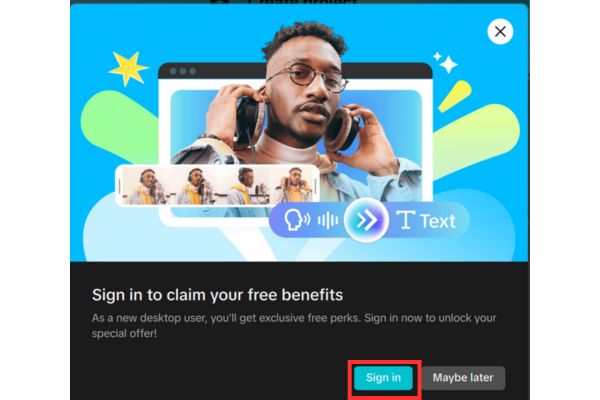
Click Sign in to log in to your account

A few important notes you need to know

To ensure the process of receiving incentives goes smoothly, you need to clearly understand some of the conditions and regulations of the program:

  • This offer is only for users who are installing CapCut on their computer for the first time, or those who have not opened the application on their computer within the past 30 days.
  • You must log in on the computer version with the correct account used on the phone for the system to synchronize and activate Pro.
  • The program operates on the principle of “first come, first served”. The number of free Pro plans is limited and may end early.
  • If your account has previously received a free Pro from another event or promotion, you will not be eligible to receive this offer again.

Conclusion

The 30-day period is a valuable opportunity for you to explore further and take full advantage of the advanced tools that CapCut Pro offers. Please follow the instructions above to Get CapCut Pro 30 days free and feel the obvious change in each of our products.


Tags: CapCutdaysfreeInstructionsProreceiving
Previous Post

How to Turn off “Seen” mode on Messenger 2021

Next Post

App MonokaiToolkit 6 – Facebook utility toolkit on Android and iOS

AnonyViet

AnonyViet

Related Posts

How to transfer music from other services to Apple Music, no app required
Software

How to transfer music from other services to Apple Music, no app required

December 8, 2025
Christmas Advent Calendar Giveaway: Daily software hunt worth ,095
Software

Christmas Advent Calendar Giveaway: Daily software hunt worth $1,095

December 4, 2025
How to update residential address on VNeID, avoid fines from December 15
Software

How to update residential address on VNeID, avoid fines from December 15

December 3, 2025
AOMEI Christmas Carnival Giveaway 2025: Receive 21 free copyrighted software
Software

AOMEI Christmas Carnival Giveaway 2025: Receive 21 free copyrighted software

November 29, 2025
Instructions for editing photos on Google Photos by voice
Software

Instructions for editing photos on Google Photos by voice

November 23, 2025
Instructions for sending a help signal using Zalo when stuck in a flood area
Software

Instructions for sending a help signal using Zalo when stuck in a flood area

November 22, 2025
Next Post
App MonokaiToolkit 6 – Facebook utility toolkit on Android and iOS

App MonokaiToolkit 6 - Facebook utility toolkit on Android and iOS

0 0 votes
Article Rating
Subscribe
Login
Notify of
guest

guest

0 Comments
Oldest
Newest Most Voted
Inline Feedbacks
View all comments

Recent News

App MonokaiToolkit 6 – Facebook utility toolkit on Android and iOS

App MonokaiToolkit 6 – Facebook utility toolkit on Android and iOS

December 12, 2025
Instructions for receiving CapCut Pro for 30 days for free

Instructions for receiving CapCut Pro for 30 days for free

December 12, 2025
How to Turn off “Seen” mode on Messenger 2021

How to Turn off “Seen” mode on Messenger 2021

December 11, 2025
Instructions for receiving Shodan Academic Membership for free

Instructions for receiving Shodan Academic Membership for free

December 11, 2025
App MonokaiToolkit 6 – Facebook utility toolkit on Android and iOS

App MonokaiToolkit 6 – Facebook utility toolkit on Android and iOS

December 12, 2025
Instructions for receiving CapCut Pro for 30 days for free

Instructions for receiving CapCut Pro for 30 days for free

December 12, 2025
How to Turn off “Seen” mode on Messenger 2021

How to Turn off “Seen” mode on Messenger 2021

December 11, 2025
AnonyViet - English Version

AnonyViet

AnonyViet is a website share knowledge that you have never learned in school!

We are ready to welcome your comments, as well as your articles sent to AnonyViet.

Follow Us

Contact:

Email: anonyviet.com[@]gmail.com

Main Website: https://anonyviet.com

Recent News

App MonokaiToolkit 6 – Facebook utility toolkit on Android and iOS

App MonokaiToolkit 6 – Facebook utility toolkit on Android and iOS

December 12, 2025
Instructions for receiving CapCut Pro for 30 days for free

Instructions for receiving CapCut Pro for 30 days for free

December 12, 2025
  • Home
  • Home 2
  • Home 3
  • Home 4
  • Home 5
  • Home 6
  • Next Dest Page
  • Sample Page

trang chủ f168 nhà cái 78win https://www.qq8827.com/ https://go99.ae.org/ https://nohu90.bid/

No Result
View All Result
  • Home
  • News
  • Software
  • Knowledge
  • MMO
  • Tips
  • Security
  • Network
  • Office

trang chủ f168 nhà cái 78win https://www.qq8827.com/ https://go99.ae.org/ https://nohu90.bid/

wpDiscuz
0
0
Would love your thoughts, please comment.x
()
x
| Reply