• Home
  • News
  • Software
  • Knowledge
  • MMO
  • Tips
  • Security
  • Network
  • Office
AnonyViet - English Version
  • Home
  • News
  • Software
  • Knowledge
  • MMO
  • Tips
  • Security
  • Network
  • Office
No Result
View All Result
  • Home
  • News
  • Software
  • Knowledge
  • MMO
  • Tips
  • Security
  • Network
  • Office
No Result
View All Result
AnonyViet - English Version
No Result
View All Result

Guide to chat history on Telegram

AnonyViet by AnonyViet
August 27, 2025
in Software
0

In the middle of the information on information that Telegram can be blocked in Vietnam, many users are urgently seeking to store their personal data. Telegram, with superior cloud storage, allows you to access the chat history from any device without manual backup. However, if you want to own an offline copy to store or share, features Chat history on Telegram Is the perfect solution.


Join the channel Telegram belong to Anonyviet 👉 Link 👈

Benefits of chat history on telegram

The history of chat on Telegram brings many practical benefits, especially in the context of this platform may be limited in Vietnam:

  • Create a copy of offline to protect important conversations.
  • Send chat history to friends, colleagues or storage for later use.
  • Keep personal information in the event that the telegram cannot be accessed.

Telegram Support data export in formats such as HTML or JSON, including text messages, images, videos, voice messages, stickers, and many other content. Below is a detailed guide from Anonyviet for you to perform this effect effectively.

Benefits of chat history on telegram

How to export Telegram chat history with a specific contact

If you just want to save the chat history of a certain contact or a group, follow these steps:

Step 1: Open the Telegram app on your computer and log in to your account. Then, click on the contact or the group you want to export chat history.

Step 2: In the chat interface, click on The three -dot symbol In the upper right corner of the screen. From the menu appears, choose Chat history.
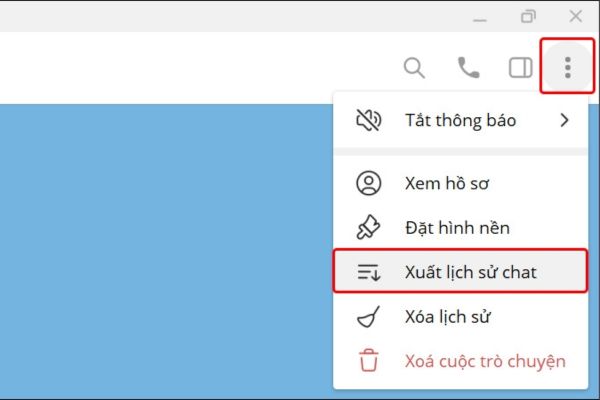
How to export chat history on telegram

Step 3: Telegram Provide multiple options for you to choose the type of data you want to download, such as text messages, images, videos, voice messages, or stickers. Accumulate the items you need. If not selected, only text messages are exported by default.
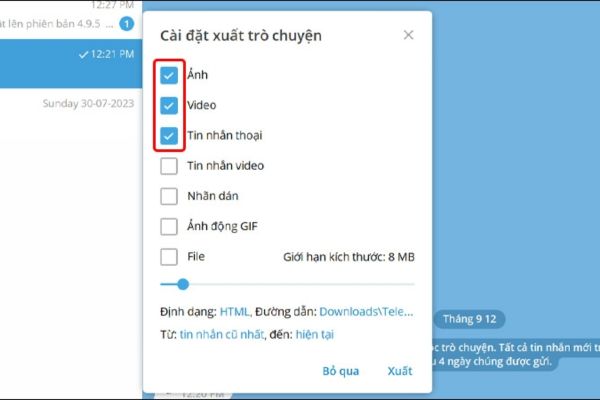
Select the type of data you want to download

Step 4: To download large files like videos or voice messages, drag the slider Size limit Right to increase the maximum capacity. You can also:

  • Select data format (HTML for easy reading, JSON for programming processing).
  • Indicate the download path to save the file.
  • Determine the scope of the chat history to be exported.
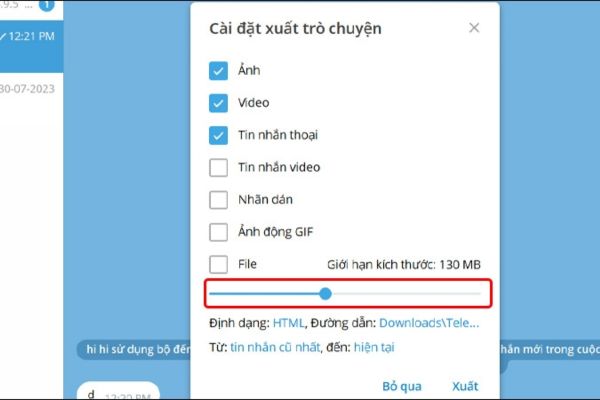
Pull the size limit slider

Step 5: Press the button Output To start the process. Depending on the amount of data, this may take a few minutes. When completed, the file will be saved in the chosen directory.

How to export the whole history of Telegram chat

If you want to download all data, including all conversations from contacts, groups, or channels, follow these steps:

Step 1: Click Three cross -line symbols In the upper left corner of the Telegram interface to open the main menu.
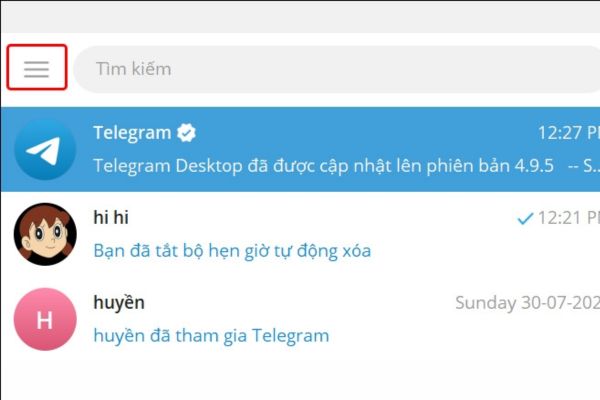
Click on the icon of the three crossroads

Step 2: In the menu, select Settingthen click Advanced To view expanded options.
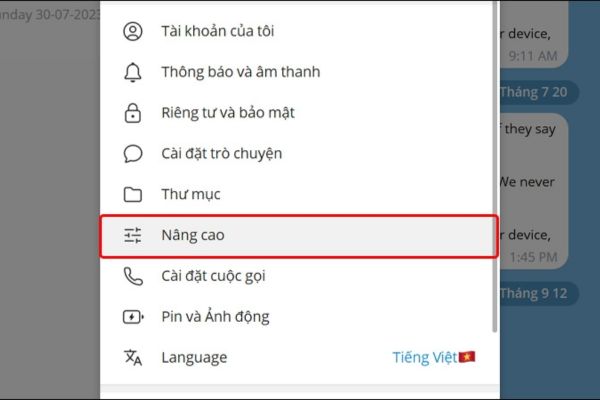
Click Advanced
Click Advanced

Step 3: Roll down Data and storageyou will see the option Export Telegram data. Click it to start.
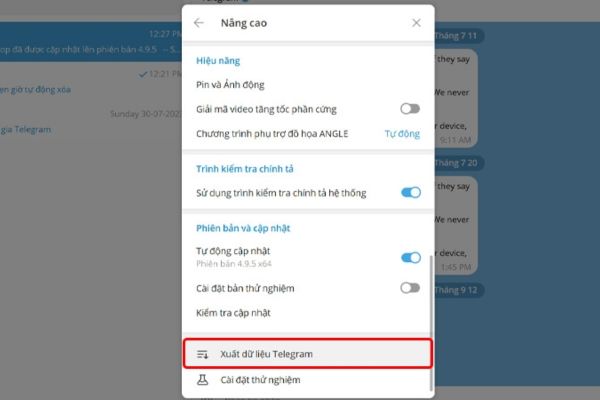
Select export Telegram data

Step 4: Similar to the historical way of a relationship, you can choose the type of data, adjust the size limit, file format and day range. After setting, press Output To download all data to the machine.

When completed, the file contains the entire chat history will be saved in the chosen directory.
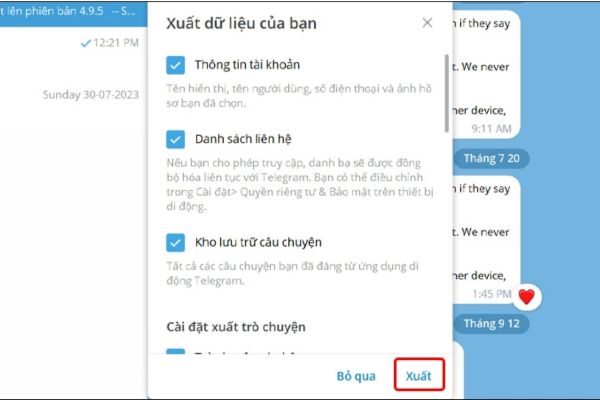
Press output
Press output

Conclude

In the context of the Telegram is at risk of being limited in Vietnam, Chat history on Telegram It is an essential step to protect personal data and keep important conversations. With simple steps instructed by Anonyviet, you can easily download chat history in just a few minutes, whether it is a relationship or all data.


Tags: chatGuidehistoryTelegram
Previous Post

Download Kylerholland conversion effect on Premiere Pro

Next Post

How to use extension to find other people’s facebook phone numbers

AnonyViet

AnonyViet

Related Posts

JG Cache Cleaner: Smart web data cleaning utility
Software

JG Cache Cleaner: Smart web data cleaning utility

June 25, 2026
How to create luxurious portrait photos using the Dola app
Software

How to create luxurious portrait photos using the Dola app

June 24, 2026
Cách hạ cấp iOS 27 xuống iOS 26 an toàn, không lo mất dữ liệu
Software

Cách hạ cấp iOS 27 xuống iOS 26 an toàn, không lo mất dữ liệu

June 20, 2026
Hướng dẫn cài đặt iOS 27 Developer Beta
Software

Hướng dẫn cài đặt iOS 27 Developer Beta

June 17, 2026
Instructions on how to activate the new Siri on iOS 27
Software

Instructions on how to activate the new Siri on iOS 27

June 15, 2026
PDF editing application on Android worth 199k is free
Software

PDF editing application on Android worth 199k is free

June 10, 2026
Next Post
How to use extension to find other people’s facebook phone numbers

How to use extension to find other people's facebook phone numbers

0 0 votes
Article Rating
Subscribe
Login
Notify of
guest

guest

0 Comments
Oldest
Newest Most Voted
Inline Feedbacks
View all comments

Recent News

Instructions on how to change Gmail address without worrying about losing data

Instructions on how to change Gmail address without worrying about losing data

June 25, 2026
JG Cache Cleaner: Smart web data cleaning utility

JG Cache Cleaner: Smart web data cleaning utility

June 25, 2026
8 quick tips for learning Excel that anyone can learn

8 quick tips for learning Excel that anyone can learn

June 25, 2026
How to create luxurious portrait photos using the Dola app

How to create luxurious portrait photos using the Dola app

June 24, 2026
Instructions on how to change Gmail address without worrying about losing data

Instructions on how to change Gmail address without worrying about losing data

June 25, 2026
JG Cache Cleaner: Smart web data cleaning utility

JG Cache Cleaner: Smart web data cleaning utility

June 25, 2026
8 quick tips for learning Excel that anyone can learn

8 quick tips for learning Excel that anyone can learn

June 25, 2026
AnonyViet - English Version

AnonyViet

AnonyViet is a website share knowledge that you have never learned in school!

We are ready to welcome your comments, as well as your articles sent to AnonyViet.

Follow Us

Contact:

Email: anonyviet.com[@]gmail.com

Main Website: https://anonyviet.com

Recent News

Instructions on how to change Gmail address without worrying about losing data

Instructions on how to change Gmail address without worrying about losing data

June 25, 2026
JG Cache Cleaner: Smart web data cleaning utility

JG Cache Cleaner: Smart web data cleaning utility

June 25, 2026
  • Home
  • Home 2
  • Home 3
  • Home 4
  • Home 5
  • Home 6
  • Next Dest Page
  • Sample Page

6789 kv999

No Result
View All Result
  • Home
  • News
  • Software
  • Knowledge
  • MMO
  • Tips
  • Security
  • Network
  • Office

6789 kv999

wpDiscuz
0
0
Would love your thoughts, please comment.x
()
x
| Reply