Are you always worried that someone is following you with hidden cameras in your home or hotel? But you don’t know how to find them, don’t worry we can take advantage of available devices to scan hidden cameras. Today I will show you how to find hidden camera with your phone.
| Join the channel Telegram of the AnonyViet 👉 Link 👈 |
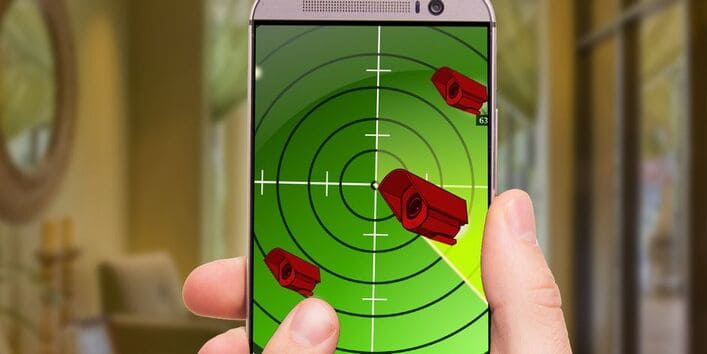
Are you being tracked by Hidden Camera?
Someone is following you. This is undeniable in today’s internet age. However, surveillance with personal information will be less disruptive than someone observing your actions through a hidden camera.
You’re not sure you’ve never been secretly filmed in public. And you’ve almost certainly been caught by CCTV (security cameras). You can even get into the lens of TV channels or Youtube.
Over the years, we have increasingly accepted hidden cameras, security cameras, etc. You may not be comfortable with this, but at least you can accept it as part of keeping society safe. .
But what if you were secretly filmed near your home? Are you comfortable with surveillance cameras in your office, den, bathroom and dressing room? Or are these people who don’t want hidden or monitored cameras to appear?
Without prior notice of such surveillance, you may find it uncomfortable to be filmed without even realizing it. Will all your gestures and actions be watched, judged or even misunderstood?
The hidden camera will be done with extremely small and sophisticated cameras. Even brought back by old phones or tablets.
Phone can detect hidden camera
Sounds like something like James Bond’s 007, but you can actually use your phone to detect hidden cameras, too. We will have 2 methods:
- Electromagnetic field detection. These applications will detect magnetic fields. However, you need to note the position of the camera. If a strong magnetic field is detected, there is a good chance that there will be hidden cameras in the area.
- Detects light reflected from the camera. Although this method is not completely reliable, it is still worth a try.
You can use the apps below on both Android and iOS.
Find hidden camera with Android phone
Several apps are available to find hidden cameras on Android.
Download: Hidden Camera Detector (Free of charge)
Download: Glint Finder (Free of charge)
Download: Hidden IR Camera Detector (Free of charge)
Use iOS to find hidden cameras
Download: Hidden Camera Detector (Free of charge)
Download: DontSpy 2 – detector ($1.99)
Download: Hidden Spy Camera Detector ($2.99)
Find hidden camera by phone
No matter which app you choose, you can spot the hidden camera.
These apps usually work the same way: show the approximate location of cameras or other surveillance devices. There should be enough information provided to give you an idea of where it is. But first, you must enter the necessary information so that the application can find the hidden camera.
For example, I tried the app Hidden Camera Detector on Android. After starting the app, it will show a red dot when the phone is near the camera. You just need to follow this red dot to find the hidden camera.
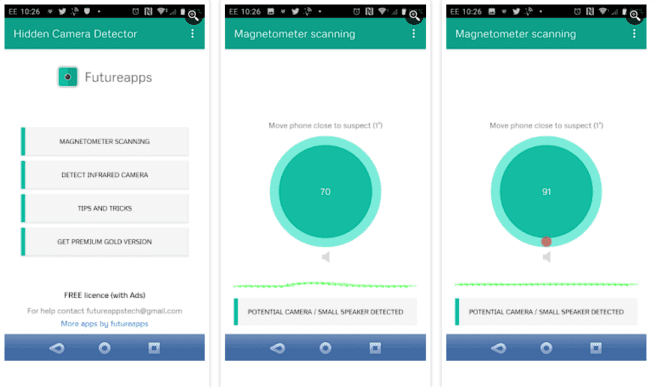
The scanner will also glow near other types of hardware, but with different results. A number displayed in the center of the screen will exceed 100 when the camera is detected.
Hidden Camera Detector also has an IR mode that helps you find hidden hidden cameras that are missed.
This is done by pointing the phone’s camera at an area where there may be hidden cameras. If a flash of light appears on your phone’s screen, there’s a good chance that there’s a hidden camera.
Detect hidden cameras more effectively
Note that when using these apps, you should first make sure you know the technologies in the room. TVs, computers, virtual assistants (such as Amazon Echo), and other hardware can cause interference.
However, holding the phone properly can also improve the efficiency and speed of detecting hidden cameras. You should hold the phone tightly, prevent it from shaking, and limit the amount of extra light in the room.
If you still have problems, remove the phone case. Certain materials on the case can block signals from other devices, as well as disrupt the radiation field of the phone itself. Removing the phone case will give you faster, more accurate results.
Find hidden cameras with specialized devices
You can also use other methods to find hidden cameras. For example, you can use infrared cameras to detect hidden cameras, while cheap devices that use wireless networks can also appear in the list of nearby Wi-Fi devices in your home.
If you are still worried, you can also consider some specialized equipment. For example, the hidden camera detector has RF signal detection, magnetic field detection, infrared detection, and can be used to find hidden cameras and microphones.
What to do when you find the hidden camera
You should report to the authorities as soon as you discover hidden cameras. Whatever the reason, you should leave the camera in an inconspicuous place while the authorities handle it. Absolutely, do not throw or damage the hidden camera, because that is the evidence to accuse the perpetrator.
You can put the hidden camera in a cover or cover it with a towel if it’s high up. Finally, good luck to you. If you read this article and you still can’t find the answer, you can continue reading this lesson Please.