• Home
  • News
  • Software
  • Knowledge
  • MMO
  • Tips
  • Security
  • Network
  • Office
AnonyViet - English Version
  • Home
  • News
  • Software
  • Knowledge
  • MMO
  • Tips
  • Security
  • Network
  • Office
No Result
View All Result
  • Home
  • News
  • Software
  • Knowledge
  • MMO
  • Tips
  • Security
  • Network
  • Office
No Result
View All Result
AnonyViet - English Version
No Result
View All Result

7 CMD commands IT people need to know

AnonyViet by AnonyViet
January 27, 2023
in Network
0

With just a few command lines, you can solve a big problem, instead of having to click on software with a graphical interface, sometimes it does not appear on the Windows interface, such as the nslookup command to find the IP address associated with the Domain…

Join the channel Telegram of the AnonyViet 👉 Link 👈

If you are in use PowerShell or Command Prompt, the execution of these commands is the same in both tools. In this article, AnonyViet only briefly introduces 10 commands you will often use when solving problems related to computer networks.

ipconfig: Find computer IP address quickly
7 CMD commands IT people need to know 9

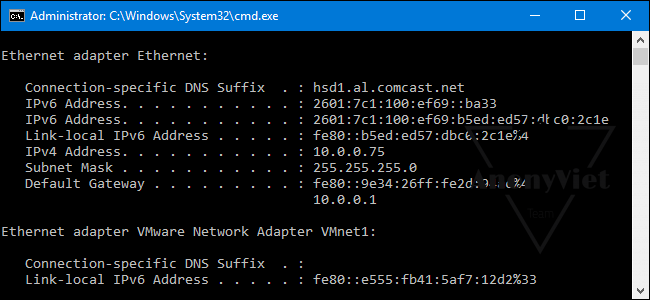
You can find your IP address from the Control Panel, but it takes a few clicks to get there.

Command ipconfig will help you quickly identify IP address your computer and other information, such as Gateway’s address to know which IP your computer’s network is routed to the Internet by

Expanding more than half would be the command ipconfig /all , with this command you will see more detailed information about MAC address of network card, DNS Server you’re using….

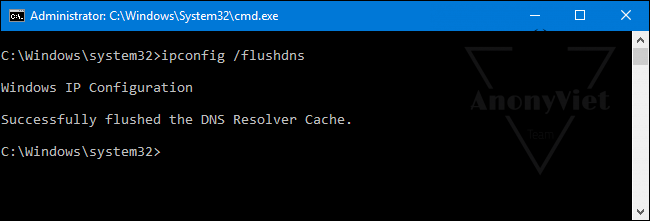
ipconfig /flushdns: help clear DNS cache
7 CMD commands IT people need to know 10

If you often change DNS to access the Website faster, or visit websites that are blocked by the network operator. For example, in the past, you used to change your DNS to Google’s 8.8.8.8 to access Facebook. However, there will be some cases Old DNS also cache (temporary memory) to reduce time Asking for Directions to the Internet, so some Website access will not be made, even if you have changed to DNS.

With the command ipconfig /flushdns will help you clear the cache of the old DNS, so that the computer will immediately ask for directions with the new DNS.

You should use the command ipconfig /flushdns as soon as I changed to another DNS.

Ping and Tracert: fix network connection problems

7 CMD commands IT people need to know 11

If you’re having trouble connecting to a website or a network connection error, Windows and other operating systems have built-in tools to help you determine the network connection status on your system.

Command ping

You use the structure ping địa-chỉ-website or ping địa-chỉ-IP 

Eg: ping anonyviet.com

Windows will now send packets to the address you just pinged, and on the screen will appear parameters about the packet sent, reply packet, response time ….

Simple if you see Request time out thi means disconnection

Still see Reply…. then it is connectable, if time The higher the speed, the slower the connection speed and vice versa

Command Tracert

Used to determine your network path. For example, if you want to find out, from your home computer, want to access AnonyViet, which IPs it will go through, use the command tracert anonyviet.com

For example, at home, the computer IP will go to the Internet Router IP, then to a series of VNPT gateways, then go through Hong Kong, and then to AnonyViet’s IP.

7 CMD commands IT people need to know

Shutdown: timer to shut down or restart the computer

This command helps you to shutdown at a preset time (in seconds).

You use with structure like this:

  • shutdown /s /f /t 10 : Turn off the computer after 10 seconds
  • shutdown /r /f /t 10: Restart the computer after 10 seconds

sfc /scannow: scan for Windows errors

This is a command to help check Windows system errors, if missing files or corrupted system files, the program will automatically fix errors and restore to help Windows work better.

nslookup: Find the IP address associated with a domain name

7 CMD commands IT people need to know 13

A domain name will be associated with one or more certain IPs, to determine what that domain’s IP is you can use the command nslookup

For example, you could type nslookup anonyviet.comGo to Command Prompt to quickly find out the IP address assigned to AnonyViet’s Server.

This is a way that you use to determine the Website IP to perform DDOS UDP

The article achieved: 5/5 – (100 votes)

Tags: CMDcommandspeople
Previous Post

How to free up RAM on Chrome to speed up Windows

Next Post

Instructions for installing Parrot Security OS on VMWare

AnonyViet

AnonyViet

Related Posts

Save image as Type contains malicious code: Remove immediately before losing money unfairly!
Network

Save image as Type contains malicious code: Remove immediately before losing money unfairly!

March 19, 2026
Instructions on how to register a .co.uk domain name for free for 1 year
Network

Instructions on how to register a .co.uk domain name for free for 1 year

March 12, 2026
How to Setup Paperclip AI: Create a Company for AI Agent
Network

How to Setup Paperclip AI: Create a Company for AI Agent

March 12, 2026
Compilation of free and cheap APIs to run OpenClaw stably
Network

Compilation of free and cheap APIs to run OpenClaw stably

March 10, 2026
3 Services to Determine IP Location for Website (IP Geolocation API)
Network

3 Services to Determine IP Location for Website (IP Geolocation API)

March 10, 2026
How to buy a .STORE domain name for 1 USD (2026): Detailed instructions from A–Z
Network

How to buy a .STORE domain name for 1 USD (2026): Detailed instructions from A–Z

March 3, 2026
Next Post
Instructions for installing Parrot Security OS on VMWare

Instructions for installing Parrot Security OS on VMWare

0 0 votes
Article Rating
Subscribe
Login
Notify of
guest

guest

0 Comments
Oldest
Newest Most Voted
Inline Feedbacks
View all comments

Recent News

Top 5+ utilities to install for Gmail to speed up work processing

Top 5+ utilities to install for Gmail to speed up work processing

April 22, 2026
Decoding the problem of 4GB RAM and processing performance

Decoding the problem of 4GB RAM and processing performance

April 21, 2026
How to add sliders to Facebook Stories to easily rewind videos

How to add sliders to Facebook Stories to easily rewind videos

April 21, 2026
Reputable LG repair service in Hanoi & Ho Chi Minh City with LGservicecenter

Reputable LG repair service in Hanoi & Ho Chi Minh City with LGservicecenter

April 21, 2026
Top 5+ utilities to install for Gmail to speed up work processing

Top 5+ utilities to install for Gmail to speed up work processing

April 22, 2026
Decoding the problem of 4GB RAM and processing performance

Decoding the problem of 4GB RAM and processing performance

April 21, 2026
How to add sliders to Facebook Stories to easily rewind videos

How to add sliders to Facebook Stories to easily rewind videos

April 21, 2026
AnonyViet - English Version

AnonyViet

AnonyViet is a website share knowledge that you have never learned in school!

We are ready to welcome your comments, as well as your articles sent to AnonyViet.

Follow Us

Contact:

Email: anonyviet.com[@]gmail.com

Main Website: https://anonyviet.com

Recent News

Top 5+ utilities to install for Gmail to speed up work processing

Top 5+ utilities to install for Gmail to speed up work processing

April 22, 2026
Decoding the problem of 4GB RAM and processing performance

Decoding the problem of 4GB RAM and processing performance

April 21, 2026
No Result
View All Result
  • Home
  • News
  • Software
  • Knowledge
  • MMO
  • Tips
  • Security
  • Network
  • Office

wpDiscuz
0
0
Would love your thoughts, please comment.x
()
x
| Reply