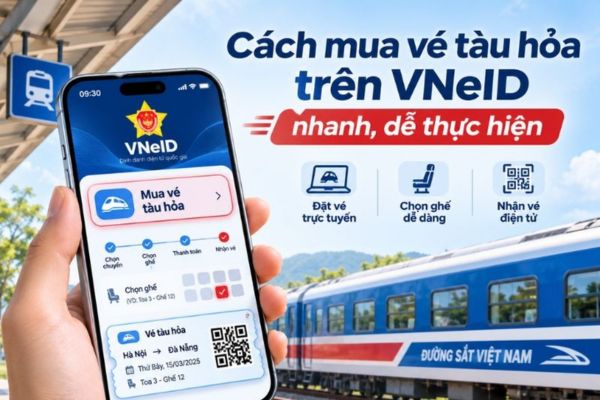
How to book train tickets using VNeID is a topic that many people are interested in recently. This application has just updated the extremely cool online ticket buying feature. Instead of having to download the railway industry’s own software for heavy machines, everything is now integrated on VNeID. Let’s go together AnonyViet Let’s explore the steps in detail.
📢 Join the channel Telegram belong to AnonyViet
Update new articles, cool tools and IT tips fastest
Detailed instructions on how to book train tickets using VNeID
Lately, I’ve seen people talking about the new utility on the electronic identification app. I was also curious and tried it out and found it to be really convenient. In the past, every time I wanted to go somewhere, I had to run all the way to the station to line up to buy tickets, which was extremely tiring. Later, having the railway’s own app made it a little better, but unfortunately my phone had little capacity, downloading a lot of junk apps annoyed me.
Now I’m healthy again. Operate how to book train tickets by VNeID Actually, there is no puzzle at all. The interface design is quite intuitive, so even a little older person can follow it immediately.
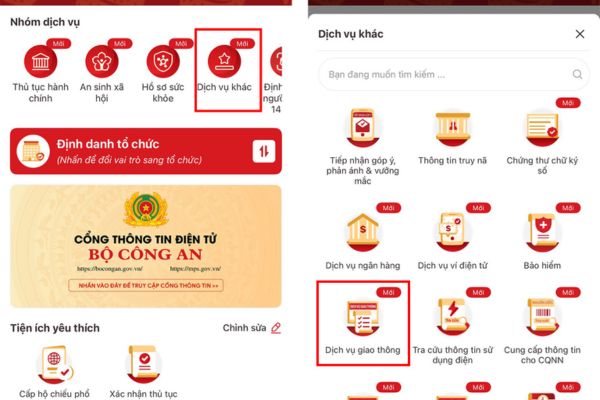
Step 1: First you open the application VNeID Go up and find the section Other services. Then click to select the item Traffic service.
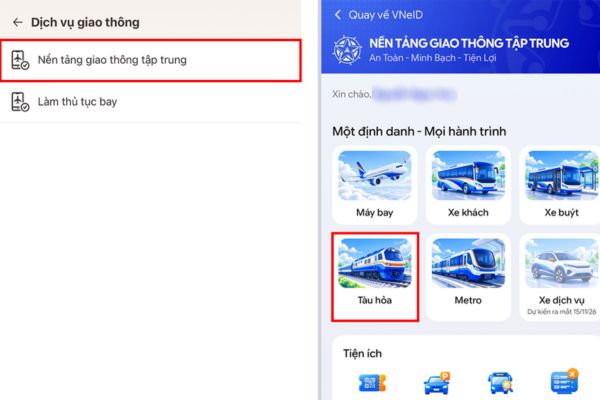
Step 2: On the next screen you will see the section Centralized transportation platform. Just click on it and select Train okay.
Step 3: At this point, the system will display two options: Travel or Cultural cruise ship. Depending on the purpose of your trip, choose accordingly. Next, just fill in your personal information and complete the ticket purchasing steps.
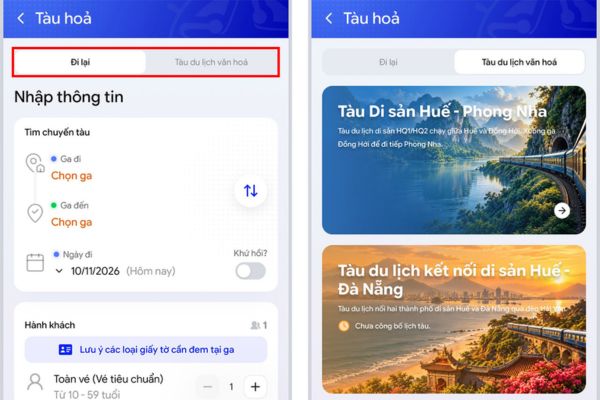
Things to remember before paying
Operation is easy, but it’s better to be careful. Before pressing the pay button, carefully review the arrival station and departure date and time. The train route or individual passenger information must also be accurate. I see a lot of people get confused here. If you buy a ticket for a relative, remember to enter the information of the person directly taking the train. Don’t get used to filling in your name or you’ll be in big trouble at the station.
Each transaction, the system only allows maximum bets 10 tickets Stop. Another thing is that you only have 10 minutes to complete payment after choosing your ticket. Therefore, prepare a payment method for smoother operations. You can scan the QR code via the bank app, use a domestic ATM card or an international card. Thanks to that, the payment process goes smoothly, without worrying about being thrown out and having to start over.
Super cool ticket transfer feature
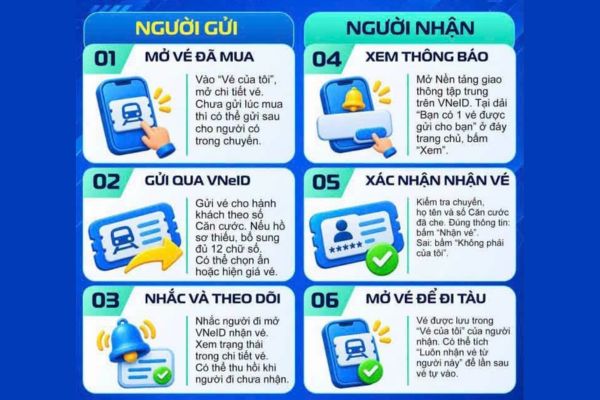
This app has a feature called Send tickets over VNeID extremely psychological. It allows you to transfer the e-ticket you just purchased directly to the train passenger’s account. You even have a choice Hide or show ticket prices again. For example, if you buy a gift for your lover but don’t want them to know the price, just hide it, it’s extremely delicate.
The recipient just needs to open their app and confirm Get tickets that’s it. On the day of departure, just open it and use it when boarding the train. This way helps your relatives be much more proactive when they need to present documents. No need to take screenshots and send them via blurry messages like before. Instead, everything syncs straight to the user’s computer, both professional and safe.
Conclusion
Reality How to book train tickets using VNeID It’s not as complicated as many people think. Clear Vietnamese interface with specific instructions help anyone can do it themselves. Next time you have the opportunity to travel or work, remember to take out the app to try it. The actual experience will definitely satisfy you.
Frequently Asked Questions (Q&A)
1. Is there a limit to the number of tickets purchased through this app?
The system stipulates that you are only allowed to book a maximum of 10 tickets per transaction.
2. How long is the payment allowed?
You need to complete payment within 10 minutes after selecting your ticket to avoid transaction cancellation.
3. Can I transfer tickets to someone else?
Yes, you can use the ticket sending feature to transfer electronic tickets directly to the train passenger’s account, which is very convenient.