Create an avatar to welcome April 30 is an extremely hot trend to spread the national spirit during major holidays. Instead of using a normal photo, wearing the red flag shirt with yellow star through the avatar brings profound meaning. Let’s explore this extremely simple method with AnonyViet!
📢 Join the channel Telegram belong to AnonyViet
Update new articles, cool tools and IT tips fastest
Instructions for creating an avatar to welcome April 30 on Zalo
To start the process of creating an avatar to celebrate April 30, you just need to prepare a smartphone with the latest version of the Zalo application pre-installed. Below are details of the operations you need to perform:
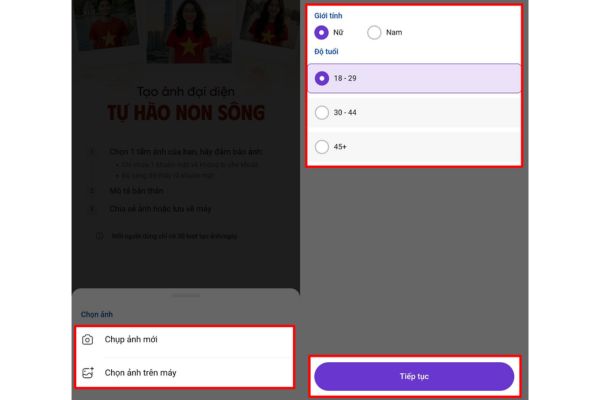
Step 1: Open Zalo application on your mobile device. At the main screen interface, click on “Diary“. In this area, the system will display one banner carrying the message of spreading patriotism (often with the theme of Proud of the Country). You just need to click directly on that banner to activate the tool.

Step 2: When the new interface appears, click on “Start creating photos“. At this point, the system will request input image data.
You have two options: select “Take a photo” to take a selfie right then and there, or “Download photos” from the phone gallery. The advice is to use a clear personal photo with a clear face for best recognition by AI.
Step 3: Once you’ve uploaded your photos, the next step is to provide additional information to optimize your results. You need to choose the right one.Sex” and “AgeThis classification helps AI process and create a more realistic avatar to celebrate April 30, more suitable for your body shape and facial features.
After selecting, wait a moment for the system to automatically cut and fine-tune.
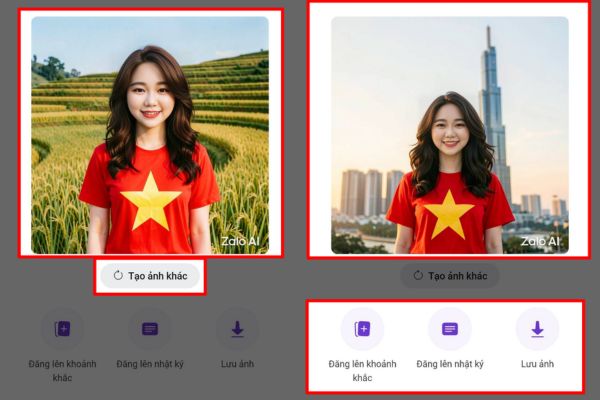
Step 4: When the processing is complete, the results of creating an avatar to welcome April 30 will be displayed immediately on the screen. If you feel like the photo is not really satisfactory or the AI doesn’t match it, you can press the “Recreate” button to have the system provide another version.
On the contrary, when you are completely satisfied with your proud new appearance, you can press “Save photos to your device“. Besides, Zalo also supports keyboard shortcuts for you to “Post a profile picture” or post to “Diary” immediately to show off to friends and relatives.
Conclusion
So, with just a few basic steps, you’re done Create an avatar to welcome April 30 extremely impressive. The photo is not only beautiful but also has the meaning of honoring the nation’s history. Wishing you success and a meaningful holiday.
Frequently Asked Questions (Q&A)
1. Is there a fee for creating photos of the National flag on Zalo?
Completely free. Zalo provides this AI feature for all users to spread the patriotic spirit during major holidays.
2. Can I use old photos available in my phone to merge?
Have. In the data upload step, you can absolutely choose to upload photos from your phone library instead of having to take a new photo.
3. What should I do if the AI that matched my face is not beautiful?
You don’t need to worry. If the result is not satisfactory, just click the “Recreate” button, the AI system will automatically process and produce another image version until you are satisfied.