What is WebBrowserPassView
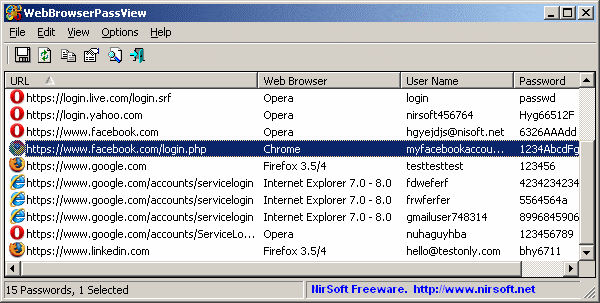
WebBrowserPassView is a tool to view passwords that you have logged in and allowed to be stored by the following Web browsers: Internet Explorer (versions 4.0-11.0), Mozilla Firefox (All versions), Google Chrome , Safari and Opera. This tool can be used to review lost/forgotten passwords of any website, including popular websites, such as Facebook, Yahoo, Google, and GMail, as long as the passwords are stored by the browser. browse your web.
| Join the channel Telegram belong to AnonyViet 👉 Link 👈 |
(In short: Carry this tool over to your computer, open the tool and get the password saved in its browser, then do whatever you want.)
After retrieving your lost passwords, you can save them as text/html/csv/xml file, using the 'Save Selected Items' option (Ctrl + S).
System requirements and limitations
- This utility works on any version of Windows, starting from Windows 2000, and up to Windows 10, including 64-bit systems. Older versions of Windows (Windows 98 / ME) are not supported, because this utility is a Unicode application.
- Currently, WebBrowserPassView cannot retrieve passwords if they are encrypted with a master password. Support for master password may be added in a future release.
- Currently, WebBrowserPassView cannot retrieve passwords from external hard drives. Support for that may be added in a future release.
- On Internet Explorer 7.0-9.0, passwords are encrypted with the website URL, so WebBrowserPassView uses Internet Explorer's history files to decrypt the password. If you clear Internet Explorer's history, WebBrowserPassView will not be able to decrypt passwords.
- On Google Chrome – the original password imported from Internet Explorer 7.0-9.0, cannot be decrypted.
Use WebBrowserPassView
WebBrowserPassView Does not require any installation process or additional DLL files. To start using it, you just need to run the executable file – WebBrowserPassView.exe
After running it, the main window of WebBrowserPassView displays a list of all Web browser passwords found in your system. You can select one or more passwords and then copy the list to clipboard (Ctrl + C) or export them to text/xml/html/csv file (Ctrl + S).
Download WebBrowserPassView
Download WebBrowserPassView (Print zip file)
False warning about Virus/Trojan
WebBrowserPassView is a tool to retrieve secret passwords stored in your system, and therefore your Antivirus may wrongly detect this tool as infected with Trojan/Virus. Click here to read more about false warnings in Antivirus programs.
Command line options
| /LoadPasswordsIE <0 | 1> | Specifies whether to download Internet Explorer web browser passwords. 0 = No, 1 = Yes. |
| /LoadPasswordsFirefox <0 | 1> | Specifies whether to download Firefox web browser passwords. 0 = No, 1 = Yes. |
| /LoadPasswordsChrome <0 | 1> | Specifies whether to download Chrome web browser passwords. 0 = No, 1 = Yes. |
| /LoadPasswordsOpera <0 | 1> | Specifies whether to download Opera web browser passwords. 0 = No, 1 = Yes. |
| /LoadPasswordsSafari <0 | 1> | Specifies whether to download Safari web browser passwords. 0 = No, 1 = Yes. |
| /UseFirefoxProfileFolder <0 | 1> /FirefoxProfileFolder |
Specify the Firefox profile directory to load, for example: WebBrowserPassView.exe /UseFirefoxProfileFolder 1 /FirefoxProfileFolder “C:\Documents and Settings\admin\Application Data\Mozilla\Firefox\Profiles\7a2ttm2u.default” |
| /UseFirefoxInstallFolder <0 | 1> /FirefoxInstallFolder |
Specify the Firefox installation directory to use, for example: WebBrowserPassView.exe /UseFirefoxInstallFolder 1 /FirefoxInstallFolder “C:\Program Files\Mozilla Firefox”” |
| /UseChromeProfileFolder <0 | 1> /ChromeProfileFolder |
Specify the Chrome Web browser profile folder to download. |
| /UseOperaPasswordFile <0 | 1> /OperaPasswordFile |
Specify the Opera master password, for example: WebBrowserPassView.exe /UseOperaPasswordFile 1 /OperaPasswordFile “Thgr55f6” |
| /Stab |
Save the password list to a normal text file. |
| /Stab |
Save the password list to a tab-delimited text file. |
| /Scomma |
Save the password list to a comma-separated text file (csv). |
| /Stabular |
Save the password list to a tabular text file. |
| /Shtml |
Save password list to HTML file (horizontal). |
| /Sverhtml |
Save list passwords to HTML file (Vertical). |
| /Sxml |
Save password list to XML file. |
| /Skeepass |
Save password list to csv file that can be imported KeePass Password Manager . |
| /Sort |
This command line option can be used with other save options for sorting by the desired column. If you do not specify this option, the list is sorted by the last type you performed from the user interface. The WebBrowserPassView.exe /shtml “f:\temp\passwords.html” /sort 2 /sort ~1 WebBrowserPassView.exe /shtml “f:\temp\passwords.html” /sort “Web Browser” /sort “URL” |
| /nosort | When you specify this command line option, the list will be saved without any sorting. |