• Home
  • News
  • Software
  • Knowledge
  • MMO
  • Tips
  • Security
  • Network
  • Office
AnonyViet - English Version
  • Home
  • News
  • Software
  • Knowledge
  • MMO
  • Tips
  • Security
  • Network
  • Office
No Result
View All Result
  • Home
  • News
  • Software
  • Knowledge
  • MMO
  • Tips
  • Security
  • Network
  • Office
No Result
View All Result
AnonyViet - English Version
No Result
View All Result

Instructions for registering .online, .site, .store domains for free at Namecheap

AnonyViet by AnonyViet
December 10, 2025
in Tips
0

Get domain name and 2 months of email Absolutely free is a great opportunity to start building your brand online without any initial costs. Namecheap is implementing a special promotion program to help users own popular domain extensions and professional email services. The article below will provide detailed step-by-step instructions to activate this attractive promotion package immediately.

Join the channel Telegram belong to AnonyViet 👉 Link 👈

Overview of Namecheap’s promotions

In the context of increasing demand for website building, finding low-cost starting resources is always a top priority. Latest program from Namecheap Not only does it give away a domain name, but it also comes with a business email service, creating a perfect duo for your online presence. This is a rare opportunity to own it at almost zero price, just apply the correct discount code and follow the steps below.

Instructions for free .online, .site, .store domains and 2 months of email at Namecheap

To ensure registration goes smoothly and there are no payment errors, users need to follow the steps below exactly.

Step 1: The first and most important step is that you need to access the correct link to Namecheap’s promotion page. HERE. Then register an account.

Step 2: Choose one of the three extensions in the promotion list: .site, .online or .store. > Press Claim domains.
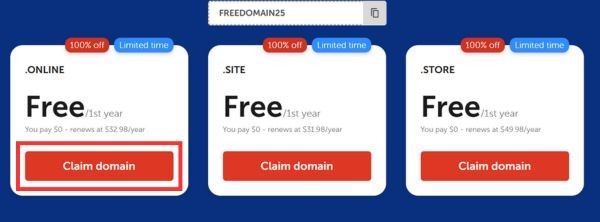
Click Claim domain
Click Claim domain

Step 3: In the search bar, enter the desired domain name. After the system confirms that the domain name is not owned, you proceed to add the product to the cart (Add to Cart).

A special point to note is that you must choose a registration period of 1 year for the discount code to work effectively.
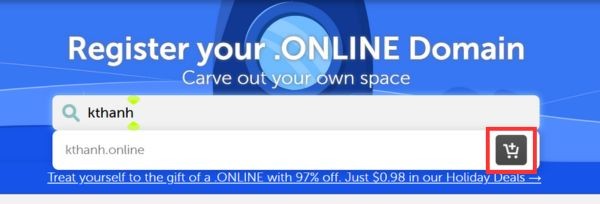
Add product to cart
Add product to cart

Step 4: To make the most of the offer, don’t forget to search for the item Business Email and add a 2-month free trial package (Free Trial 2 Months) to your order.
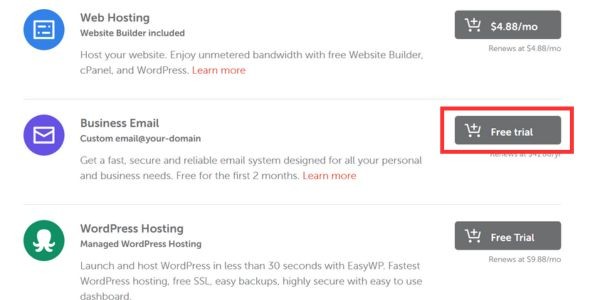
Find the Business Email section

Owning an email with your own domain name will significantly increase your credibility when dealing with partners or customers.

Business Mail package for 2 months free trial
Business Mail package with 2-month free trial

Step 5: Once you have enough domains and emails in your cart, go to the payment page and enter the promotional code FREEDOMAIN25 Go to the Promo Code box. After clicking apply, the total order value will be deducted to the free level (or only a very small ICANN fee of about $0.2).
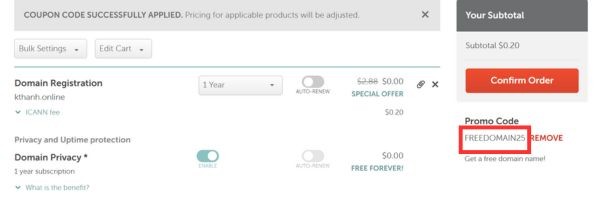
Enter promo code FREEDOMAIN25

Step 6: Finally, you check all the information and press the button Confirm Order to fill in payment information. Immediately after a successful transaction, the domain name and email service will be activated immediately for you to start setting up your website.

Important notes to know

To avoid unnecessary misunderstandings while using the service, there are a number of accompanying terms that users should clearly understand.

  • This promotion program only applies to specific domain name extensions .site, .online and .store, not .com or .net.
  • Free pricing is valid for first year used, the renewal fee from the second year will return to the normal listed price.
  • Number of discount codes limited (Limited Stock), so the program can end at any time when the gift stock runs out.

Conclusion

Taking advantage of this promotion helps save significant budget for startup projects or personal blogs. Hopefully through the above instructions, you have successfully completed the job Get domain name and 2 months email to serve business. Please act quickly before the discount code expires!
Tags: DomainsfreeInstructionsNameCheaponlineregisteringSiteStore
Previous Post

Tut unlock 092 hangs with Gmail to unlock Facebook latest 2021

Next Post

The simplest way to create KeyLogger in Python

AnonyViet

AnonyViet

Related Posts

App MonokaiToolkit 6 – Facebook utility toolkit on Android and iOS
Tips

App MonokaiToolkit 6 – Facebook utility toolkit on Android and iOS

December 12, 2025
How to Turn off “Seen” mode on Messenger 2021
Tips

How to Turn off “Seen” mode on Messenger 2021

December 11, 2025
5+ Websites to create special character names for the newest gamers in 2026
Tips

5+ Websites to create special character names for the newest gamers in 2026

December 10, 2025
The simplest way to create KeyLogger in Python
Tips

The simplest way to create KeyLogger in Python

December 10, 2025
Tut unlock 092 hangs with Gmail to unlock Facebook latest 2021
Tips

Tut unlock 092 hangs with Gmail to unlock Facebook latest 2021

December 9, 2025
Instructions on how to install multiple Windows apps at the same time
Tips

Instructions on how to install multiple Windows apps at the same time

December 9, 2025
Next Post
The simplest way to create KeyLogger in Python

The simplest way to create KeyLogger in Python

0 0 votes
Article Rating
Subscribe
Login
Notify of
guest

guest

0 Comments
Oldest
Newest Most Voted
Inline Feedbacks
View all comments

Recent News

App MonokaiToolkit 6 – Facebook utility toolkit on Android and iOS

App MonokaiToolkit 6 – Facebook utility toolkit on Android and iOS

December 12, 2025
Instructions for receiving CapCut Pro for 30 days for free

Instructions for receiving CapCut Pro for 30 days for free

December 12, 2025
How to Turn off “Seen” mode on Messenger 2021

How to Turn off “Seen” mode on Messenger 2021

December 11, 2025
Instructions for receiving Shodan Academic Membership for free

Instructions for receiving Shodan Academic Membership for free

December 11, 2025
App MonokaiToolkit 6 – Facebook utility toolkit on Android and iOS

App MonokaiToolkit 6 – Facebook utility toolkit on Android and iOS

December 12, 2025
Instructions for receiving CapCut Pro for 30 days for free

Instructions for receiving CapCut Pro for 30 days for free

December 12, 2025
How to Turn off “Seen” mode on Messenger 2021

How to Turn off “Seen” mode on Messenger 2021

December 11, 2025
AnonyViet - English Version

AnonyViet

AnonyViet is a website share knowledge that you have never learned in school!

We are ready to welcome your comments, as well as your articles sent to AnonyViet.

Follow Us

Contact:

Email: anonyviet.com[@]gmail.com

Main Website: https://anonyviet.com

Recent News

App MonokaiToolkit 6 – Facebook utility toolkit on Android and iOS

App MonokaiToolkit 6 – Facebook utility toolkit on Android and iOS

December 12, 2025
Instructions for receiving CapCut Pro for 30 days for free

Instructions for receiving CapCut Pro for 30 days for free

December 12, 2025
  • Home
  • Home 2
  • Home 3
  • Home 4
  • Home 5
  • Home 6
  • Next Dest Page
  • Sample Page

trang chủ f168 nhà cái 78win https://www.qq8827.com/ https://go99.ae.org/ https://nohu90.bid/

No Result
View All Result
  • Home
  • News
  • Software
  • Knowledge
  • MMO
  • Tips
  • Security
  • Network
  • Office

trang chủ f168 nhà cái 78win https://www.qq8827.com/ https://go99.ae.org/ https://nohu90.bid/

wpDiscuz
0
0
Would love your thoughts, please comment.x
()
x
| Reply