• Home
  • News
  • Software
  • Knowledge
  • MMO
  • Tips
  • Security
  • Network
  • Office
AnonyViet - English Version
  • Home
  • News
  • Software
  • Knowledge
  • MMO
  • Tips
  • Security
  • Network
  • Office
No Result
View All Result
  • Home
  • News
  • Software
  • Knowledge
  • MMO
  • Tips
  • Security
  • Network
  • Office
No Result
View All Result
AnonyViet - English Version
No Result
View All Result

How to create Korean-style Polaroid photo frames on Samsung

AnonyViet by AnonyViet
December 27, 2025
in Software
0

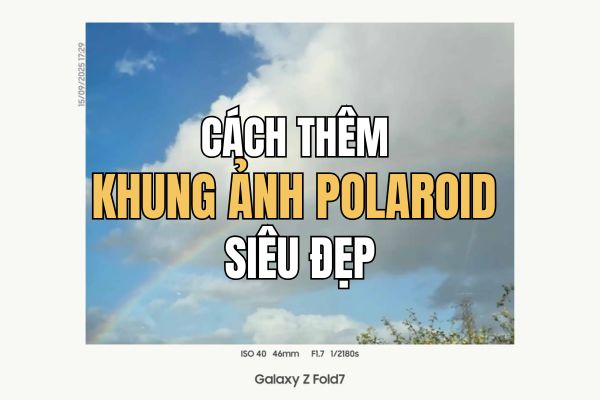
If you are looking How to create Polaroid photo frames brings a nostalgic feel right on the phone, Samsung just brought a pleasant surprise. Through the newly launched Gallery Assistant application in Korea, users can “transform” photos into artistic instant film photos.

Join the channel Telegram belong to AnonyViet 👉 Link 👈

Gallery Assistant and interesting hidden features

Samsung always knows how to please users with seemingly simple but very useful complementary applications. Gallery Assistant At first glance, it just looks like a default photo library cleaning or management tool with basic keyboard shortcuts. However, hidden deep inside is an extremely attractive feature for those who love retro photography: the ability to frame Vintage style photos.

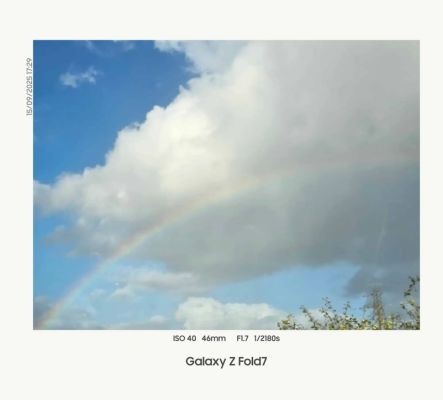
Instead of the usual borderless photos, this feature helps recreate the emotions of old instant films. For those who love nostalgia, this is definitely a tool not to be missed to create a personal touch for each moment.
Gallery Assistant and interesting hidden features

Activate Labs mode to unlock features

Since this is a “hidden” feature (similar to Good Lock), users will not see it immediately but need to perform a few manual activation operations. To create this Polaroid photo frame, the device first needs to install or update the Gallery Assistant application version 2.0.00.26 or higher.

The process to activate developer mode (Labs) is as follows:

  • Users open the application, find the three-dot icon in the upper right corner and select “Introducing Gallery Assistant“.
Select item "Introducing Gallery Assistant"
Select “Introduction to Gallery Assistant”
  • At the information screen, quickly touching the version number line is an important step for the system to display a notification that the Labs feature has been enabled.
Turn on the Labs feature
  • When returning to the main menu, one item Labs will appear, here just flip the switch to enable the option Watermark is to complete the preparation step.
Turn on Watermark Frame

Instructions on how to create Polaroid photo frames on Samsung

Once successfully activated, applying photo frames becomes extremely easy right in the photo library. Specific steps:

  • Select any photo you want to edit in the gallery and click on the option Add watermark (Add watermark).
  • Select next mode Show in frame (Display in frame) so that the frame editing interface appears.
  • Users can get creative with two available frame styles: a modern style with thin borders and horizontal text, or a classic style with thick borders and small text in the middle typical of Polaroid photos.

The color of the frame can also be flexibly changed between white and black depending on the color tone of the original photo to create the best visual effect.
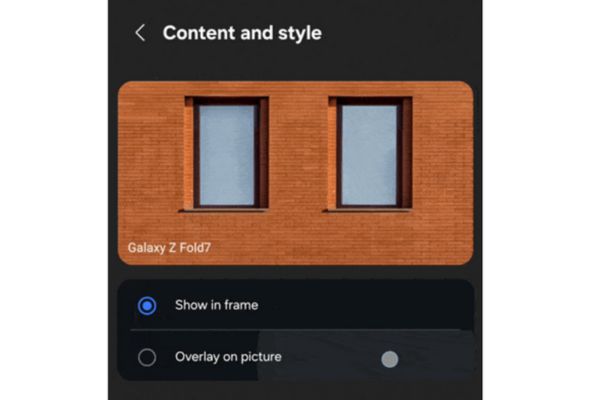
Select Show in frame mode

The future of photo frames on One UI

Samsung’s integration of experimental features into auxiliary apps like Gallery Assistant is often a stepping stone to bringing them into the official operating system. The technology community is highly hopeful that this way of creating Polaroid photo frames will soon be integrated directly into the default Camera application.

Most likely in the upcoming One UI 8.5 update, this feature will become part of the standard photography experience, helping Galaxy users easily access retro photography style without complicated activation operations.

Conclusion

The mastery How to create Polaroid photo frames Through Gallery Assistant will help your photo collection become much richer and more stylish. Hopefully in the near future, this interesting feature will be more widely available on all Galaxy devices to improve the user experience.

Tags: createframesKoreanstylephotoPolaroidSamsung
Previous Post

Get 15GB of free Viettel 5G data in just a few steps

Next Post

10 reasons why Linux is better than Windows

AnonyViet

AnonyViet

Related Posts

How to fake GPS on iPhone: “Create fake location” to every location
Software

How to fake GPS on iPhone: “Create fake location” to every location

December 25, 2025
Share AnyViewer PRO key for 1 year for free
Software

Share AnyViewer PRO key for 1 year for free

December 20, 2025
Receive Advanced SystemCare Ultimate 18 key for free for 6 months
Software

Receive Advanced SystemCare Ultimate 18 key for free for 6 months

December 15, 2025
Instructions for getting 1 month of free Discord Nitro from Epic Games
Software

Instructions for getting 1 month of free Discord Nitro from Epic Games

December 15, 2025
How to receive 10k free phone card recharge from Lavie
Software

How to receive 10k free phone card recharge from Lavie

December 14, 2025
Instructions for installing the 2026 Tet Countdown Widget for your phone
Software

Instructions for installing the 2026 Tet Countdown Widget for your phone

December 13, 2025
Next Post
10 reasons why Linux is better than Windows

10 reasons why Linux is better than Windows

0 0 votes
Article Rating
Subscribe
Login
Notify of
guest

guest

0 Comments
Oldest
Newest Most Voted
Inline Feedbacks
View all comments

Recent News

What is DuckDuckGo? The best search engine to replace Google

What is DuckDuckGo? The best search engine to replace Google

December 28, 2025
How to use Now Bar effectively on Samsung: From lock screen to AOD

How to use Now Bar effectively on Samsung: From lock screen to AOD

December 28, 2025
10 reasons why Linux is better than Windows

10 reasons why Linux is better than Windows

December 27, 2025
How to create Korean-style Polaroid photo frames on Samsung

How to create Korean-style Polaroid photo frames on Samsung

December 27, 2025
What is DuckDuckGo? The best search engine to replace Google

What is DuckDuckGo? The best search engine to replace Google

December 28, 2025
How to use Now Bar effectively on Samsung: From lock screen to AOD

How to use Now Bar effectively on Samsung: From lock screen to AOD

December 28, 2025
10 reasons why Linux is better than Windows

10 reasons why Linux is better than Windows

December 27, 2025
AnonyViet - English Version

AnonyViet

AnonyViet is a website share knowledge that you have never learned in school!

We are ready to welcome your comments, as well as your articles sent to AnonyViet.

Follow Us

Contact:

Email: anonyviet.com[@]gmail.com

Main Website: https://anonyviet.com

Recent News

What is DuckDuckGo? The best search engine to replace Google

What is DuckDuckGo? The best search engine to replace Google

December 28, 2025
How to use Now Bar effectively on Samsung: From lock screen to AOD

How to use Now Bar effectively on Samsung: From lock screen to AOD

December 28, 2025
  • Home
  • Home 2
  • Home 3
  • Home 4
  • Home 5
  • Home 6
  • Next Dest Page
  • Sample Page

https://go99.ae.org/ https://nohu90.bid/

No Result
View All Result
  • Home
  • News
  • Software
  • Knowledge
  • MMO
  • Tips
  • Security
  • Network
  • Office

https://go99.ae.org/ https://nohu90.bid/

wpDiscuz
0
0
Would love your thoughts, please comment.x
()
x
| Reply