• Home
  • News
  • Software
  • Knowledge
  • MMO
  • Tips
  • Security
  • Network
  • Office
AnonyViet - English Version
  • Home
  • News
  • Software
  • Knowledge
  • MMO
  • Tips
  • Security
  • Network
  • Office
No Result
View All Result
  • Home
  • News
  • Software
  • Knowledge
  • MMO
  • Tips
  • Security
  • Network
  • Office
No Result
View All Result
AnonyViet - English Version
No Result
View All Result

How to activate Windows SandBox to create a virtual environment on Windows 10

AnonyViet by AnonyViet
February 5, 2023
in Tips
0

How many times have you downloaded a file but dared not run it because of the virus? You want to install a virtual machine but don’t want to install VMWare or Hyper V. Since Windows 10 build 18305, Microsoft has integrated Windows Sandbox to create a virtual test environment for users.

Join the channel Telegram belong to AnonyViet 👉 Link 👈

This feature has the basic function of virtual machine. Applications installed and running on Windows Sandbox will not affect the hard drive nor the operation of Windows. Windows Sandbox can check for active applications that interfere with and disrupt the operation of the operating system. This helps protect you, and makes the decision whether to run in the real operating system. Besides, help you enhance information protection when surfing the web.

Common examples is when you download Keygen or Path from the Internet. You just need to Copy the Keygen into the SandBox to get the Key and then turn off the SandBox. If Keygen has a virus attached, Windows will not be affected

Windows Sandbox has the following basic features:

  • As part of Windows: has all the basic features of Windows 10 Pro and Enterprise. You do not need to use additional VHD.
  • Pristine: Windows Sandbox works independently of the operating system. You have one more virtual Windows 10 in the real Windows 10.
  • Single use: when closing the app in Sanbbox everything is wiped clean.
  • Doesn’t take up a lot of resources: hardware-based virtualization for kernel isolation, Microsoft-based hypervisor to run a separate kernel, isolating Windows Sandbox from the real machine.
  • Effective: integrated kernel, intelligent memory management and virtual GPU.

Configuration required to be able to use Windows Sandbox

  • Windows 10 Pro or Enterprise Insider build 18305 or later
  • AMD64 . Architecture
  • Virtualization enabled in BIOS
  • At least 4GB RAM (8GB recommended)
  • At least 1 GB of free disk space (SSD recommended)
  • At least 2 CPU cores (4 cores recommended with hyperthreading)

How to enable the SandBox feature to create a test environment on Windows 10

To check your BIOS is eligible to use udjng Windows SandBox, you need to open Task Manager up (Ctrl+Shift+Esc). Select tab Performance. You look below if you see Virtualization: Enabled Windows has support. If disabled, please open in BIOS.

How to activate Windows SandBox to create a virtual environment on Windows 10 5

The next step, you open the Control Panel (instruct) > Programs > Turn Windows Features On or Off. Scroll down check enter Windows Sandbox. Select OK and restart Windows

How to activate Windows SandBox to create a virtual environment on Windows 10 6

After restarting Windows, click on the . button Start (or the Windows key on the keyboard) type Sandbox, and click on the Sandbox icon to launch. You may be required to enter Administrator rights to operate.
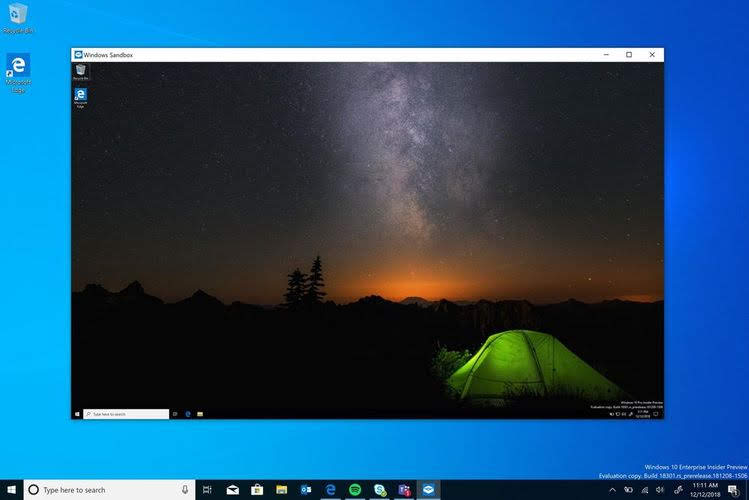
How to activate Windows SandBox to create a virtual environment on Windows 10 7

Now, you Copy the files suspected to be Viruses, or the software you want to test into SandBox’s virtual machine and run them. If there is a virus, the real Windows will not be infected. In that case you just need to restart the SandBox and everything will be restored to the way it was.

You can see more details at Microsoft. Or you can use Sandboxie to create a second SandBox environment.
The article achieved: 5/5 – (100 votes)

Tags: activatecreateEnvironmentSandboxvirtualWindows
Previous Post

Phase 2 – Get software license from WonderFox Soft

Next Post

Create a Netflix Premium account to watch royalty-free movies

AnonyViet

AnonyViet

Related Posts

App MonokaiToolkit 6 – Facebook utility toolkit on Android and iOS
Tips

App MonokaiToolkit 6 – Facebook utility toolkit on Android and iOS

December 12, 2025
How to Turn off “Seen” mode on Messenger 2021
Tips

How to Turn off “Seen” mode on Messenger 2021

December 11, 2025
5+ Websites to create special character names for the newest gamers in 2026
Tips

5+ Websites to create special character names for the newest gamers in 2026

December 10, 2025
The simplest way to create KeyLogger in Python
Tips

The simplest way to create KeyLogger in Python

December 10, 2025
Instructions for registering .online, .site, .store domains for free at Namecheap
Tips

Instructions for registering .online, .site, .store domains for free at Namecheap

December 10, 2025
Tut unlock 092 hangs with Gmail to unlock Facebook latest 2021
Tips

Tut unlock 092 hangs with Gmail to unlock Facebook latest 2021

December 9, 2025
Next Post
Create a Netflix Premium account to watch royalty-free movies

Create a Netflix Premium account to watch royalty-free movies

0 0 votes
Article Rating
Subscribe
Login
Notify of
guest

guest

0 Comments
Oldest
Newest Most Voted
Inline Feedbacks
View all comments

Recent News

App MonokaiToolkit 6 – Facebook utility toolkit on Android and iOS

App MonokaiToolkit 6 – Facebook utility toolkit on Android and iOS

December 12, 2025
Instructions for receiving CapCut Pro for 30 days for free

Instructions for receiving CapCut Pro for 30 days for free

December 12, 2025
How to Turn off “Seen” mode on Messenger 2021

How to Turn off “Seen” mode on Messenger 2021

December 11, 2025
Instructions for receiving Shodan Academic Membership for free

Instructions for receiving Shodan Academic Membership for free

December 11, 2025
App MonokaiToolkit 6 – Facebook utility toolkit on Android and iOS

App MonokaiToolkit 6 – Facebook utility toolkit on Android and iOS

December 12, 2025
Instructions for receiving CapCut Pro for 30 days for free

Instructions for receiving CapCut Pro for 30 days for free

December 12, 2025
How to Turn off “Seen” mode on Messenger 2021

How to Turn off “Seen” mode on Messenger 2021

December 11, 2025
AnonyViet - English Version

AnonyViet

AnonyViet is a website share knowledge that you have never learned in school!

We are ready to welcome your comments, as well as your articles sent to AnonyViet.

Follow Us

Contact:

Email: anonyviet.com[@]gmail.com

Main Website: https://anonyviet.com

Recent News

App MonokaiToolkit 6 – Facebook utility toolkit on Android and iOS

App MonokaiToolkit 6 – Facebook utility toolkit on Android and iOS

December 12, 2025
Instructions for receiving CapCut Pro for 30 days for free

Instructions for receiving CapCut Pro for 30 days for free

December 12, 2025
  • Home
  • Home 2
  • Home 3
  • Home 4
  • Home 5
  • Home 6
  • Next Dest Page
  • Sample Page

trang chủ f168 nhà cái 78win https://www.qq8827.com/ https://go99.ae.org/ https://nohu90.bid/

No Result
View All Result
  • Home
  • News
  • Software
  • Knowledge
  • MMO
  • Tips
  • Security
  • Network
  • Office

trang chủ f168 nhà cái 78win https://www.qq8827.com/ https://go99.ae.org/ https://nohu90.bid/

wpDiscuz
0
0
Would love your thoughts, please comment.x
()
x
| Reply