If you are looking for the best chatbot to integrate into your website to help communicate with customers easily, read this article. Up to now, about 58% of B2B businesses and 42% of B2C businesses are using chatbots for their websites to develop customer care services. In this modern era, perhaps chatbots are one of the important tools for businesses/groups/organizations to interact with their current and potential customers.
| Join the channel Telegram belong to AnonyViet 👉 Link 👈 |
Are you wondering how to integrate a chatbot into your website? Easy, all you need to find a chatbot provider that you want to integrate into your apps and websites.
And in this article, I will point out some of the best chatbots at the present time.
What are Chatbots?
A software capable of performing work automatically is called a bot. A chatbot is an automatic tool that helps websites communicate with customers through pre-programmed robots. Some chatbots use artificial intelligence to answer customer questions most accurately.
From answering questions to sending offers based on location, needs… Chatbots can be programmed to meet all your unique needs.
Why should you use chatbots?
Email marketing is traditionally the best marketing strategy. Like any other successful method, email platforms are subject to abuse and overload. A recent study conducted by Radicati Group found that a whopping 2.4 million emails are sent every second, with the average professional receiving 141 emails per day. Do you know the average click-through rate of a marketing email? 5-10%. Even with Facebook’s new algorithm selecting posts from friends and family over businesses, chatbots can help you get closer to your customers.
Chatbots help you chat with customers directly through web platforms or applications and save content on the server. Help analyze customer needs.
1. tudongchat.com
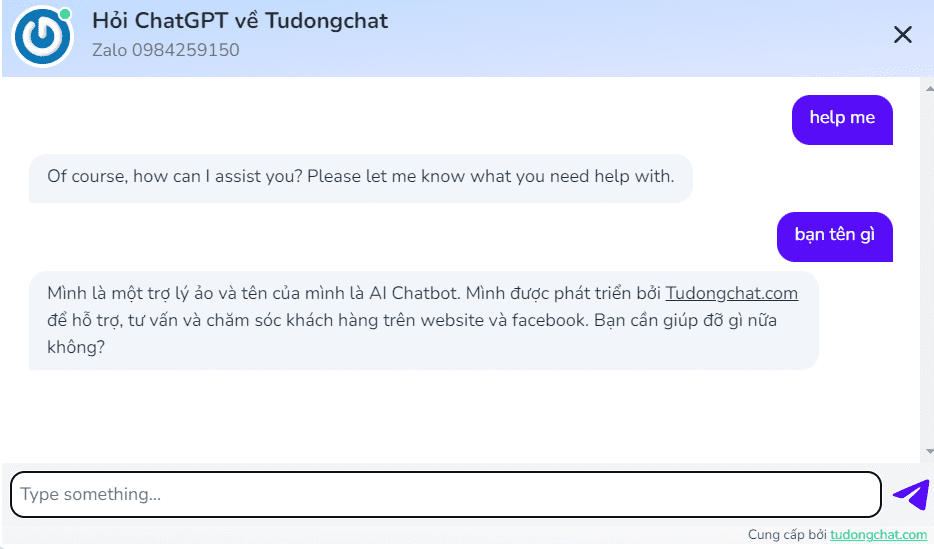
Tudongchat.com provides a groundbreaking AI Chatbot solution for web and Facebook, helping to advise, support and care for customers automatically and effectively. Thanks to the support of artificial intelligence and machine learning technology, AI Chatbot from Tudongchat.com helps quickly answer questions related to business products and services, optimizing customer experience when interacting on the website and fanpage.
Use AI Chatbot for web, Facebook from Tudongchat.com Not only does it help reduce personnel costs, but it also relieves mental pressure on employees who have to answer customer questions and complaints every day. This is the perfect solution to help businesses improve service quality and optimize costs.
Why should you choose Tudongchat.com
- 24/7 interaction
- Save time and costs: Compared to using live chat staff
- Handle multiple requests at the same time
- Supports multiple languages
- Collect customer information: AI Chatbot has the ability to collect customer information, helping businesses analyze, evaluate needs and build appropriate business strategies.
2. ArtiBot.ai

ArtiBot is a chatbot that complements websites business. business : it helps generate leads through automated chat. And it is a very powerful chatbot service because of its processing and support capabilities.
Furthermore, this chatbot operates 24/7 and contributes to improving customer experience. To have a chatbot according to your wishes, you can hire chatbot programmers and ask them to make your own chatbot.
Features: Generate leads, Accept payments, Set and Schedule appointments, Connect to LGoogle Calendar.
Why choose it?:
- Always online 24/7
- Answer questions from users
- Ask questions with multiple choices
- Appraisal
And its price: Use free for free templates. And a pro package is 437k/month.
3. MobileMonkey

MobileMonkey is a popular chatbot and is used a lot for websites. It allows you to develop a bot through OmniChat technology. You can use this chatbot in web chat, SMS messages and even in Messenger.
Its Facebook message click-through rate is 20%. Its main purpose is to save the time and money you spend creating botchat for different platforms (Mobile, Web, etc).
Features: Facebook Ads, Web Chat, Automatic Messaging, OmniChat, etc
Why choose it?
- One single inbox for all integrations
- Monitoring and feedback from different channels.
- Integrate with third-party software
Price: 327k/month for Per version. Besides, there is also a free version for you to use.
4. Acobot

Acobot is a chatbot recommended for use by experts/experienced people. This is a good and easy-to-use free chatbot. It helps customers access your online sales website and guides them to the place of sale.friendly“.
It is created to convert ordinary customers into potential customers through defined messages/gestures. Therefore, this software is very famous, popular, and used by many people/businesses. And if you want to have your own chatbot, hire good programmers/freelancers with experience in AI/ML programming in Python.
Reasons to choose it:
- It analyzes the stores and starts itself.
- Improve over time and enable more engagement
Empowered shopping experience - Loyalty Programs & Lead Generation.
Price: You will get a 15-day free trial. Its fees are 0.6% of your total revenue.
5. Tidio

Tidio is an online chat service provider. It is powered by chatbots and allows you to communicate with customers on different platforms, including web, mobile, Facebook, etc.
You can answer all user questions through one dashboard and one mobile app anytime from anywhere. And you can use the automation function to answer questions in the best way.
Features: Chat automation, AutomateTedious Process, real-time customer support, multiple channels, etc
Why choose Tidio?
- Chatbot Template to create your own template
- Work based on keywords and customer actions
- Easily integrate a chatbot into your website
Price: Free package does not have chatbot and Pro package costs 414k /month.
6. Engati

Engati is a multi-channel bot platform, best suited for CS, HR, marketing and sales. This platform has been confirmed by long-time users, experts, and experienced people as the best chatbot provider website. It only takes 10 minutes to activate this chatbot and you can use this chatbot for 12 different channels such as Skype, Twitter, Viber and Kik.
Why choose Engati?
- Online store
- Extended Legacy support
- Higher capacity
- Many templates for you to freely explore
- Instructional videos
Price: Free / 483k for premium features. And it has a free version.
Summary
So I have listed the top 5 good services for your website. Hopefully you will find for yourself the best chatbot service. See you in the next post.
Frequently asked questions
How can chatbots help businesses save costs?
Chatbots automate answering frequently asked questions and provide 24/7 customer support, reducing the need for live support staff, thereby saving staffing costs and time.
What skills do I need to integrate chatbots into my website?
You need to find a chatbot provider that fits your needs and budget. Most vendors offer easy integration instructions or technical support.
What can a chatbot do besides answering questions?
Chatbots can perform many other tasks such as collecting customer information, guiding customers to make purchases, making appointments, and even processing some simple transactions.